
SQLPro for SQLite 2026.248
SQLPro for SQLite — advanced SQLite editor for faster database workflows
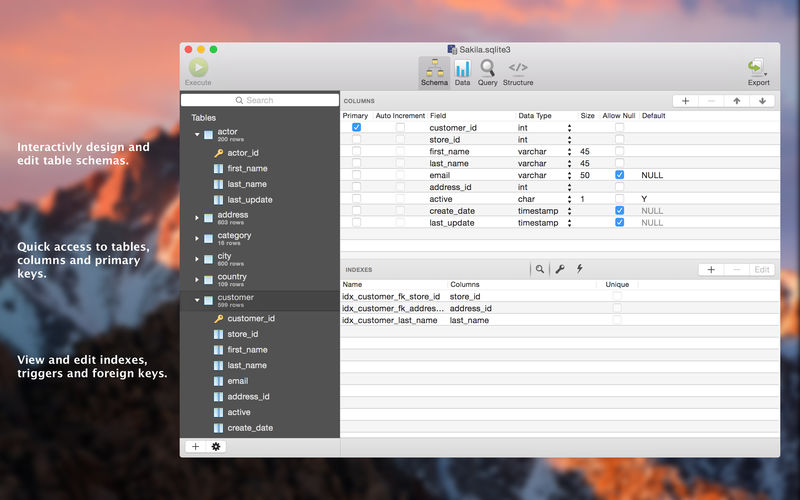

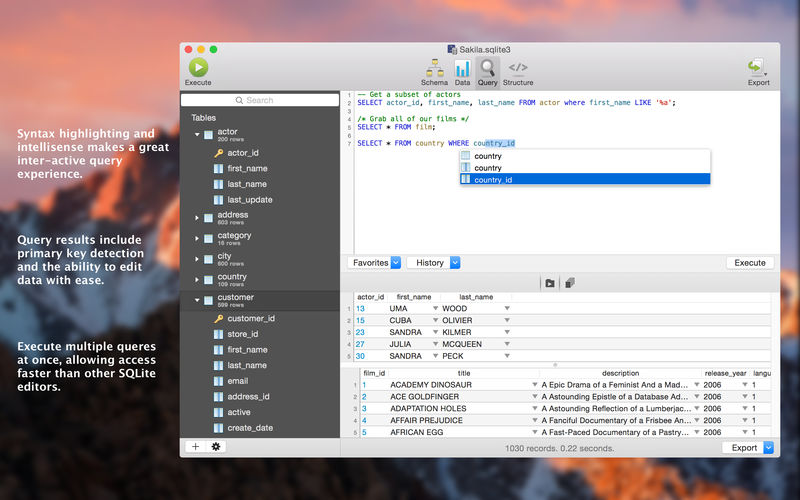
SQLPro for SQLite is an advanced sqlite editor. It has an easy to navigate interface, with the ability to perform the most basic to advanced tasks.
Features include:
- Syntax highlighting and query intellisense/auto-complete.
- Advanced multi-query execution.
- Pick from multiple included themes, or design your own.
- Automatic external change detection reloads a database when modified outside of SQLPro.
- Version integration. Mucked your database? Rollback to a previous version.
- Runtime loadable extension support.
- Semiautomatic dependency resolution.
- Export your data to csv, mysql, xml or json.
- Backwards compatibility with SQLite 2.
- Fullscreen support.
- Column reordering.
- Inline filters allowing you to customize the way your data is displayed.
If you would like to try before you buy, you can also give our free Read-Only version a look!
Version 2026.248:
- Added support for field and table CHECK constraints (#480)
- Fixed table designer changes (columns, indexes, foreign keys, triggers) not being applied.
Frequently asked questions
How do I install the app?
Mount the image, drag the app into the "Applications" folder and launch it. If the system blocks the launch, allow it in "System Settings → Privacy & Security".
The app is damaged or won't launch
Reinstalling from a fresh image usually helps. Make sure your macOS version matches the one listed in the compatibility specs.
How do I update?
Download the new version from the site and install it over the current one — your settings will be preserved.
The download link doesn't work
Try a mirror or a download manager. For large files the browser often drops the connection.
How do I completely remove the app?
Use an uninstaller utility — it cleans up the service files that remain after moving the app to the trash.





Choose a download source
SQLPro for SQLite 2026.248 · 26.67 MB
Previous versions
SQLPro for SQLite 2026.248
Previous versions are available to registered users.