
Up - Uploader for Instagram 3.7
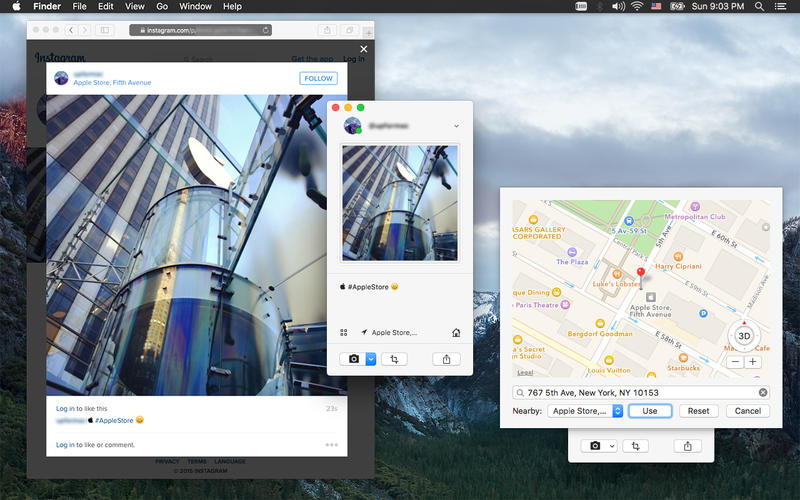
Up, a feature-rich Instagram client and uploader for OS X. Drag, drop, upload and have fun.
Features:
- Upload images of any shape or videos with captions directly from your Mac, by simply drag and drop them to the window.
- Make photos into a 3 by 3 matrix formed large photo on your timeline.
- Upload video with alternative preview image of your choice.
- Add any location of your choice from the map to your photos and videos.
- Change your profile picture.
- Use your iSight camera to take selfies.
- Toggle between private account setting.
- Switch between multiple Instagram accounts.
- Integrate with OS X's "Share" extension, you can share any image from other applications using the OS X share button/menu.
WHAT’S NEW
Version 3.7
- Please make a backup of your current working version before upgrade.
- Fix a bug that could cause crash on some machines during login.
- Upgraded Instagram API.
Screenshots
Frequently asked questions
How do I install the app?
Mount the image, drag the app into the "Applications" folder and launch it. If the system blocks the launch, allow it in "System Settings → Privacy & Security".
The app is damaged or won't launch
Reinstalling from a fresh image usually helps. Make sure your macOS version matches the one listed in the compatibility specs.
How do I update?
Download the new version from the site and install it over the current one — your settings will be preserved.
The download link doesn't work
Try a mirror or a download manager. For large files the browser often drops the connection.
How do I completely remove the app?
Use an uninstaller utility — it cleans up the service files that remain after moving the app to the trash.
VersionUp - Uploader for Instagram
Developer© Zhi-Wei Cai
CompatibilityOS X 10.10 or later, 64-bit processor
LanguageEnglish
IncludesPre-K'ed





Information
Visitors in the group Guests cannot leave comments on this publication.
Choose a download source
Up - Uploader for Instagram 3.7 · 1.57 MB