
QR Factory 2.9.17
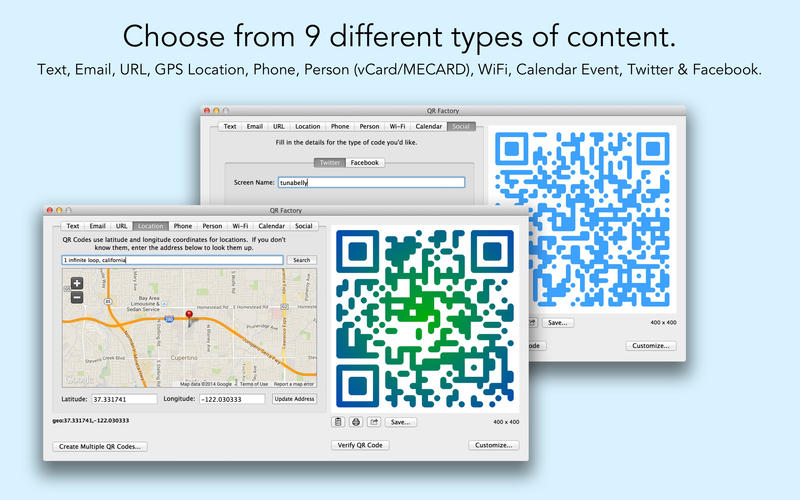

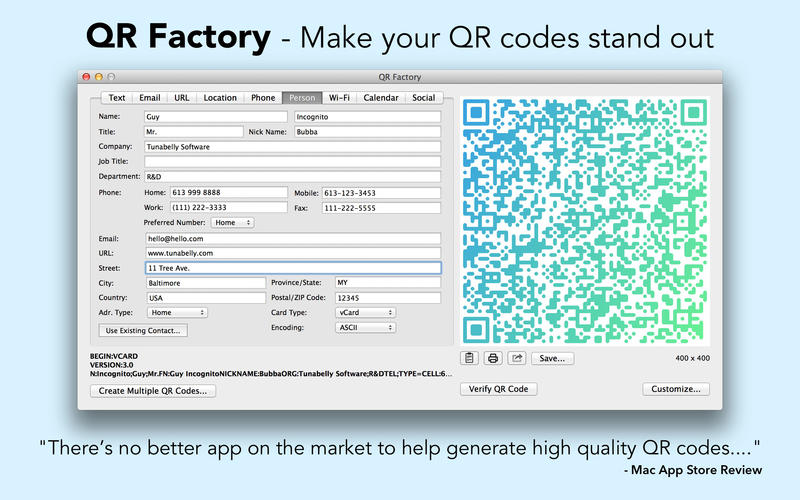
QR Factory is the end of boring black-and-white QR codes! Create QR codes from 9 different types of content and make them stand out from your competition.
Features
- Create unlimited batch codes from a CSV file with no in-app purchase required.
- Customize your code with smooth rounded corners, beautiful gradients, background colours, and enhanced reliability.
- Save as bitmap (PNG) or vector (PDF).
- Export the code information and then import it back later for less typing.
- Use the full featured map search for making location codes or use an existing contact to make a MECARD/VCARD code.
- Print your codes directly from the app.
- Verify that your code will be readable with the built-in checker.
- No Internet connection required (except for Location). Securely create your codes knowing that your data never leaves your Mac.
- Plain Text
- URL
- Location (by address or latitude/longitude)
- Phone/SMS
- Person (new or existing contact)
- Wi-Fi Setup
- Calendar Events
- Twitter and Facebook
Version 2.9.17:
- Release notes were unavailable when this listing was updated.
Frequently asked questions
How do I install the app?
Mount the image, drag the app into the "Applications" folder and launch it. If the system blocks the launch, allow it in "System Settings → Privacy & Security".
The app is damaged or won't launch
Reinstalling from a fresh image usually helps. Make sure your macOS version matches the one listed in the compatibility specs.
How do I update?
Download the new version from the site and install it over the current one — your settings will be preserved.
The download link doesn't work
Try a mirror or a download manager. For large files the browser often drops the connection.
How do I completely remove the app?
Use an uninstaller utility — it cleans up the service files that remain after moving the app to the trash.
VersionQR Factory 2.9.17
DeveloperTunabelly Software
CompatibilityOS X 10.7 or later, 64-bit processor
LanguageEnglish
IncludesK'ed by TNT





Information
Visitors in the group Guests cannot leave comments on this publication.
Choose a download source
QR Factory 2.9.17 · 13.53 MB