Barcode Maker 2.24
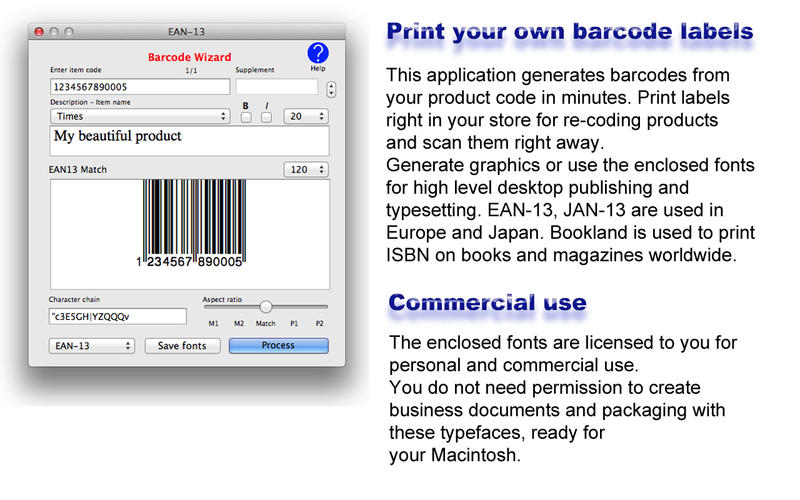
Barcode Wizard is the easiest and fastest way to perfect EAN-13, EAN-8, Jan-13, Bookland (ISBN) Bar Codes, necessary to sell packaged products in Europe, Japan, and books or magazines all over the planet. Bookland offers to enter the ISBN code as well as the price. All you need to do is to enter your product code, the title of your stickers eventually, and click ‘Process’. Your barcode is created.
Extremely convenient to bar code, or recode for sale, products you just received in a store. Aspect ratio can be changed, to have shorter or larger barcodes to perfectly fit your needs. Printing is easy with common Avery™ sizes already set. You can also generate graphics to use in any standard application. Finally, for typesetting and desktop publishing use, fonts can be saved, so printing with a particular ink becomes possible. This program is both easy to use, and absolutely precise.
Version 2.24
- Now the file name suggested when saving a picture of the bar code as file is the content of the title. If the title is empty, it remains "MyBarcode".
Frequently asked questions
How do I install the app?
Mount the image, drag the app into the "Applications" folder and launch it. If the system blocks the launch, allow it in "System Settings → Privacy & Security".
The app is damaged or won't launch
Reinstalling from a fresh image usually helps. Make sure your macOS version matches the one listed in the compatibility specs.
How do I update?
Download the new version from the site and install it over the current one — your settings will be preserved.
The download link doesn't work
Try a mirror or a download manager. For large files the browser often drops the connection.
How do I completely remove the app?
Use an uninstaller utility — it cleans up the service files that remain after moving the app to the trash.



Choose a download source
Barcode Maker 2.24 · 7.45 MB