
WhyFi 1.4.4
WhyFi Mac Wi-Fi diagnostic app with live signal, latency, DNS checks
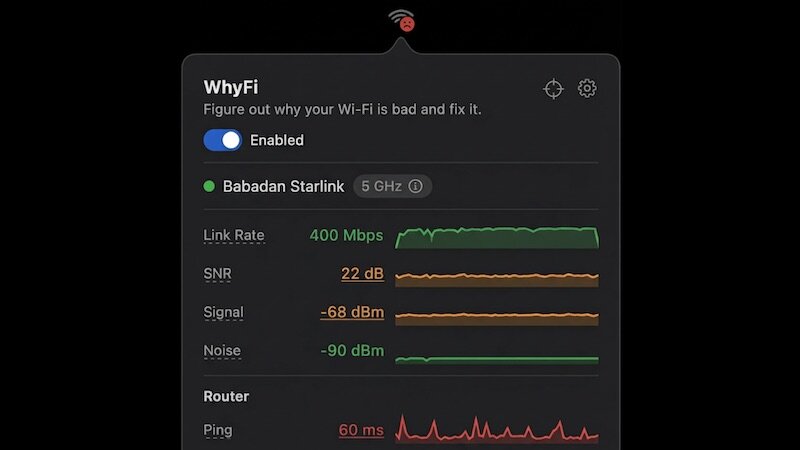

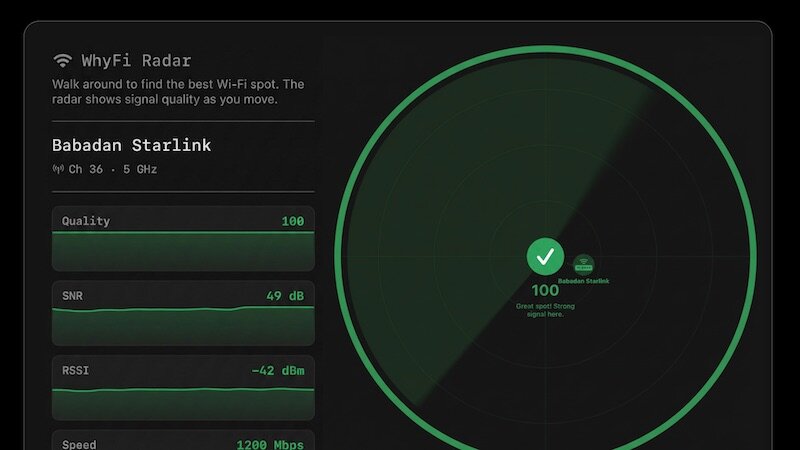
WhyFi — Your menu-bar Wi‑Fi detective.
Keep your Mac’s Wi‑Fi fast and reliable without the guesswork. WhyFi lives in your menu bar and continuously monitors signal, router latency, internet quality, and DNS so you can see exactly what’s slowing you down — and how to fix it.
Key features
- Radar: real‑time signal map that updates 4×/second. Walk around with your laptop to find the strongest spot—scored 0–100—with live prompts like “keep going” or “go back.”
- Nearby networks: see other SSIDs and their signal strengths to spot crowded channels and interference.
- Speed tests with bufferbloat detection: quick download/upload tests (via Cloudflare) plus latency-under-load checks to show whether video calls or gaming will hold up.
- Layered diagnostics: separates problems into Wi‑Fi signal (Mac → router), router/LAN latency, and internet/WAN latency so you know whether to move, reboot hardware, or call your ISP.
- Exportable diagnostics: generate a detailed report you can paste into ChatGPT, Claude, or share with support for faster troubleshooting.
Find what’s actually wrong — and fix it fast.
- official site does not provide any info about changes in this version.
Frequently asked questions
How do I install the app?
Mount the image, drag the app into the "Applications" folder and launch it. If the system blocks the launch, allow it in "System Settings → Privacy & Security".
The app is damaged or won't launch
Reinstalling from a fresh image usually helps. Make sure your macOS version matches the one listed in the compatibility specs.
How do I update?
Download the new version from the site and install it over the current one — your settings will be preserved.
The download link doesn't work
Try a mirror or a download manager. For large files the browser often drops the connection.
How do I completely remove the app?
Use an uninstaller utility — it cleans up the service files that remain after moving the app to the trash.




Choose a download source
WhyFi 1.4.4 · 5.73 MB