
Wireless Signal 2.1
Get fast and precise info about your system Wi-Fi connection.
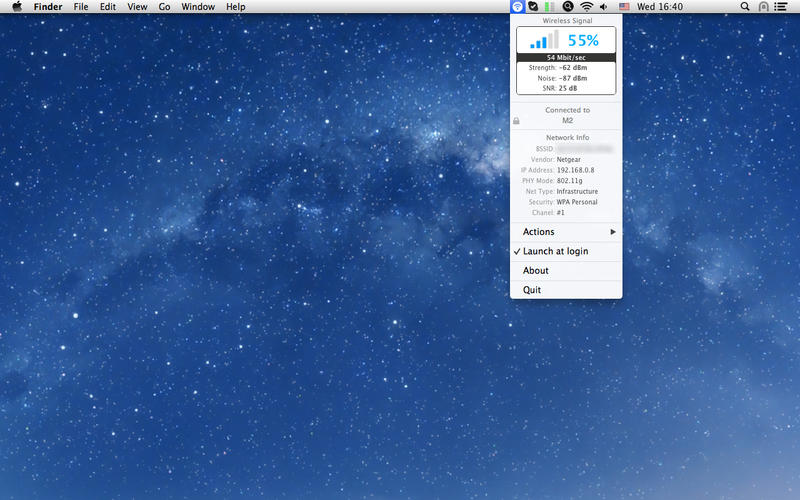
Wireless Signal is a system status bar application that allows easily identify all wifi related connectivity and poor performance issues.
Provides easy access to all Wi-Fi connection details as:
- wi-fi network name (SSID)
- wi-fi router mac address (BSSID)
- occupied channel
- transmit rase (RSSI)
- noise level
- signal-to-noise ratio (SNR)
- network security level
- user ip address
WHAT’S NEW
Version 2.1
- improved overall stability and accuracy,
- macOS dark theme support added.
SCREENSHOTS
Frequently asked questions
How do I install the app?
Mount the image, drag the app into the "Applications" folder and launch it. If the system blocks the launch, allow it in "System Settings → Privacy & Security".
The app is damaged or won't launch
Reinstalling from a fresh image usually helps. Make sure your macOS version matches the one listed in the compatibility specs.
How do I update?
Download the new version from the site and install it over the current one — your settings will be preserved.
The download link doesn't work
Try a mirror or a download manager. For large files the browser often drops the connection.
How do I completely remove the app?
Use an uninstaller utility — it cleans up the service files that remain after moving the app to the trash.
VersionWireless Signal 2.1
DeveloperBigWhitePlanet s.r.o.
CompatibilityOS X 10.7 or later, 64-bit processor
LanguageEnglish
IncludesPre-K'ed





Information
Visitors in the group Guests cannot leave comments on this publication.
Choose a download source
Wireless Signal 2.1 · 2.72 MB