
ForkLift 4.7.5
Forklift — Dual-Pane File Manager and Remote Server Client
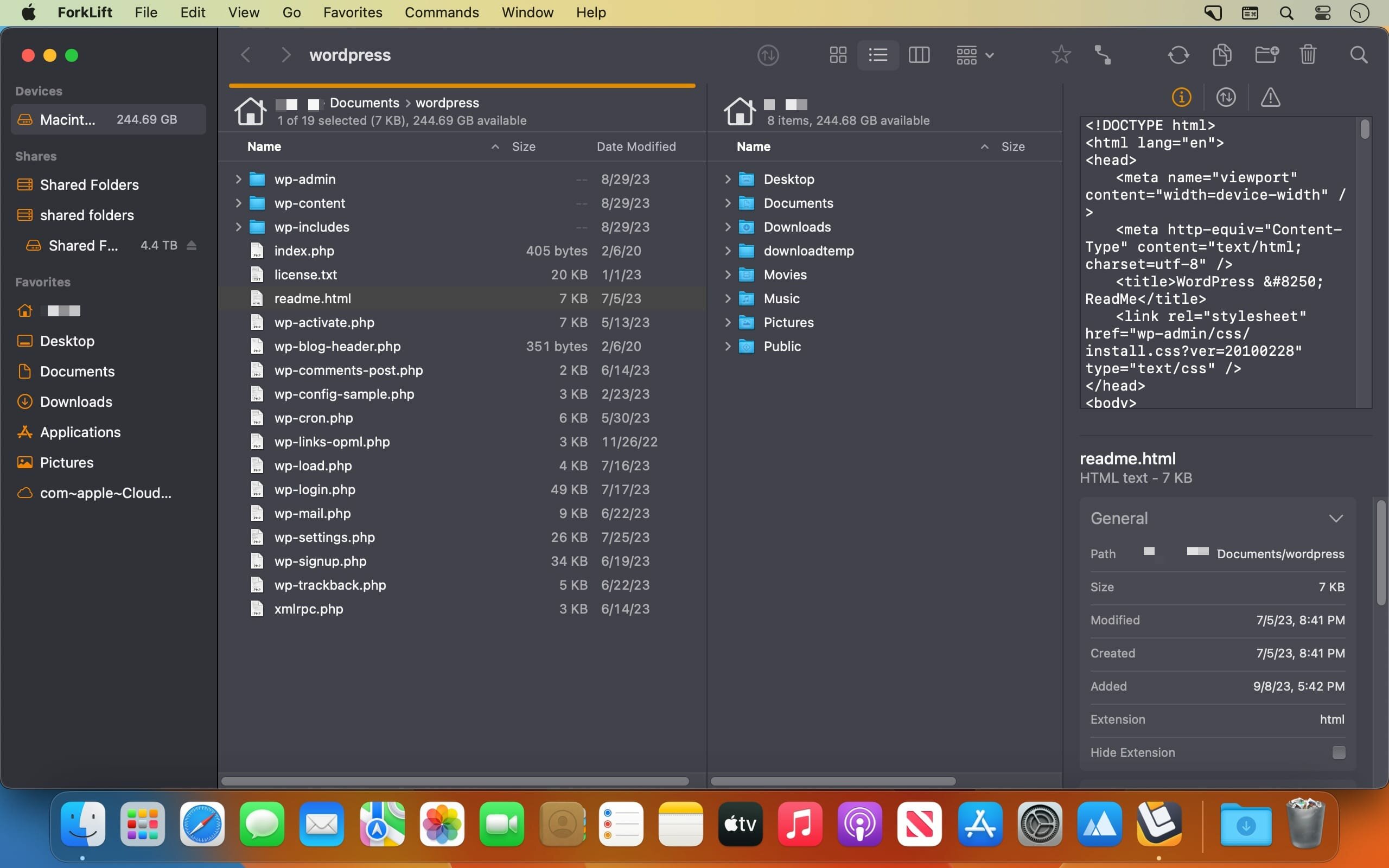


Forklift is a lightweight and clean styled macOS app built to be a speedy and very powerful dual pane file manager for all Mac users that need to work with their files on their local machine or by connecting to remote servers.
Support for managing files on remote servers
- Thus, with the help of Forklift, you can manipulate the files and documents on your Mac’s hard drive or the ones stored on FTP, SFTP, SMB, WebDAV, Amazon S3, iDisk, AFP and NIS servers.
- Moreover, all the features and tools that Forklift provides you with in order to effortlessly and rapidly manage your local and remote files are made available via an elegant looking and Cocoa based user interface.
Slick styled and macOS integrated interface
- The Forklift file manager and remote client is designed to perfectly integrate within the look and feel of macOS, as well as closely follow Apple’s Human Interface Guidelines for a streamlined user experience.
- The fact that Forklift is a dual-pane based application helps it to greatly increase one's productivity by providing direct and quick access to two different local or remote file views at a time.
- Also, because each panel can be configured to display a different view of your files, you can use any of them as a built-in panel for previewing the currently selected file’s contents.
- Forklift also includes other cutting-edge features like a live preview tool, spring loaded folders, and synchronized browsing for further speeding up your file managing workflow.
Tab powered powerful and streamlined file managing application
- As an added bonus, Forklift enables you to manage your files using multiple tabs at a time, this allowing you to keep your workspace nice and clean while still being able to handle numerous file storage locations and folder structure simultaneously.
- Furthermore, you can employ Forklift for effortlessly and swiftly synchronizing your folders between two local or remote target folders, thus eliminating the need of an extra application dedicated to keeping your files and documents in sync.
- What’s more, Forklift also features a built-in application deleter designed to help you keep your hard drive clean of left over files after uninstalling applications, a remote editing feature that will automatically upload any changes you’ve made locally to the remote server where the edited file is stored.
User-oriented and full featured file manager and remote server client
- Forklift has you covered ever if you are an macOS power user with its Terminal integration that makes it simple to open a new command line interface within any folder and the extensive keyboard shortcuts which make it a cinch to control it without using a mouse.
- To sum it all up, if Apple’s Finder just doesn’t cut it for you because of its limited set of features, you might want to give Forklift a quick spin.
- Forklift is the right choice if you need a dual pane file manager on steroids, capable of helping you manage local and remote files and folders via a user-friendly and efficient user interface.
Vesion 4.7.5:
New:
- Brazilian Portuguese localization
Improvements:
- The buttons at the bottom of the Sync Window are now clickable and filter the view by All, Added, Updated, and Deleted files
- When Resize columns to fit is enabled, column widths now take the Bold Folder Names setting into account
- Adds the option to use the Command-+ keyboard shortcut to increase the font size in Column View
- Adds the option to use the Command-- keyboard shortcut to decrease the font size in Column View
- Changes the behavior of file transfers when the source contains items with conflicting names. The transfer now does not start to prevent files from being unintentionally overwritten
Fixes:
- Fixes an issue with column widths in Column View when the Resize columns to fit setting is enabled and the scroll bar is visible
- Fixes an issue where, after deselecting all items from synchronization, it was possible to click the Synchronize button
- Fixes an issue in the Logs where the number of synchronized items was displayed as the total number of analyzed items during synchronization instead of the number of synchronized items
- Fixes an issue introduced in version 4.7.4 where transfers from search results to remote connections remained in the queue after the maximum number of simultaneous transfers configured in the settings had been completed
- Fixes a possible hang when the remote server is not responding
- Fixes an issue where the file view did not update when an external drive was disconnected without ejecting the disk first
- Fixes small localization issues
Frequently asked questions
How do I install the app?
Mount the image, drag the app into the "Applications" folder and launch it. If the system blocks the launch, allow it in "System Settings → Privacy & Security".
The app is damaged or won't launch
Reinstalling from a fresh image usually helps. Make sure your macOS version matches the one listed in the compatibility specs.
How do I update?
Download the new version from the site and install it over the current one — your settings will be preserved.
The download link doesn't work
Try a mirror or a download manager. For large files the browser often drops the connection.
How do I completely remove the app?
Use an uninstaller utility — it cleans up the service files that remain after moving the app to the trash.




Choose a download source
ForkLift 4.7.5 · 20.83 MB
Previous versions
ForkLift 4.7.5
Previous versions are available to registered users.