
rcmd • App Switcher 2.3.7
Re-imagined Command-Tab. We reimagined Command-Tab to switch apps with no fuss.
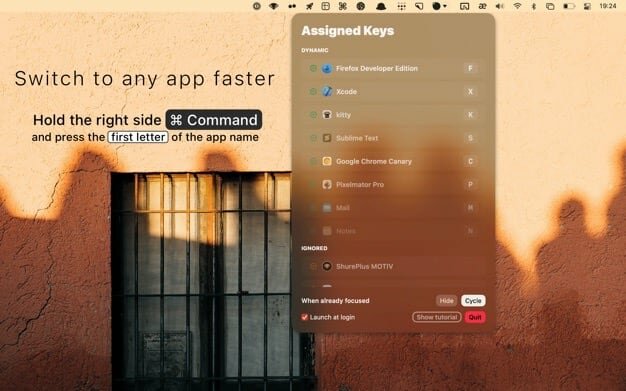
Switch apps instantly just by their first letter!
- Hold down the right side |⌘ command| and press the first letter of the app name to focus apps instantly
- The Dynamic algorithm will choose the most useful app for each letter
- The algorithm will adapt in real time to your workflow
- If apps live on separate spaces, rcmd will switch to the relevant space
- Switching spaces needs the following setting enabled
- System Preferences --> Mission Control --> "When switching to an application, switch to a Space with open windows for the application"
- When pressing the key while the app is already focused, you can use one of 2 useful functions
- HIDE: Show/Hide the app instantly
- CYCLE: Focus other apps with the same first letter
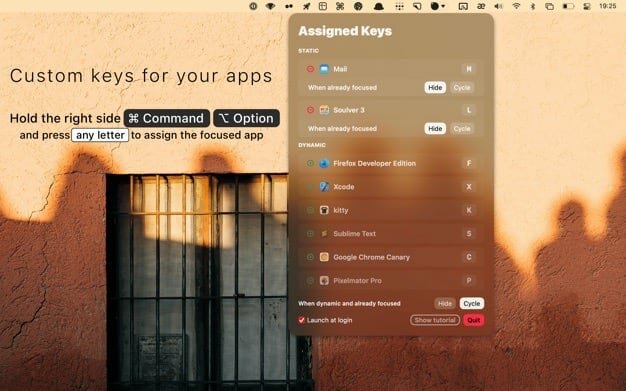
Assign custom keys for your favorite apps
- Hold down |⌘ command| + |⌥ option| and press any letter to assign that letter permanently to the currently focused app
- When an app is in the STATIC list
- the assigned key can launch the app when it isn't running
- the HIDE/CYCLE setting can be adjusted on a per-app basis
Customize the app to your liking
- the Trigger setting allows you to change the Right Command trigger to any combination of modifiers
- this will come in handy if you have a keyboard without a Right Command key
- disable specific letters from being registered by rcmd
- click on the Settings button to find the Enabled Keys setting
Version 2.3.7
- Fallback to checking for Hammerspoon installation by path if Spotlight indexing is disabled
- Ensure rcmd-equals is bound after onboarding
- Hide tutorials for functions that are disabled
- Speed up app and window switching by removing redundant code on the hot code paths
Frequently asked questions
How do I install the app?
Mount the image, drag the app into the "Applications" folder and launch it. If the system blocks the launch, allow it in "System Settings → Privacy & Security".
The app is damaged or won't launch
Reinstalling from a fresh image usually helps. Make sure your macOS version matches the one listed in the compatibility specs.
How do I update?
Download the new version from the site and install it over the current one — your settings will be preserved.
The download link doesn't work
Try a mirror or a download manager. For large files the browser often drops the connection.
How do I completely remove the app?
Use an uninstaller utility — it cleans up the service files that remain after moving the app to the trash.



Choose a download source
rcmd • App Switcher 2.3.7 · 9.85 MB
Previous versions
rcmd • App Switcher 2.3.7
Previous versions are available to registered users.