MACSpoof 1.4
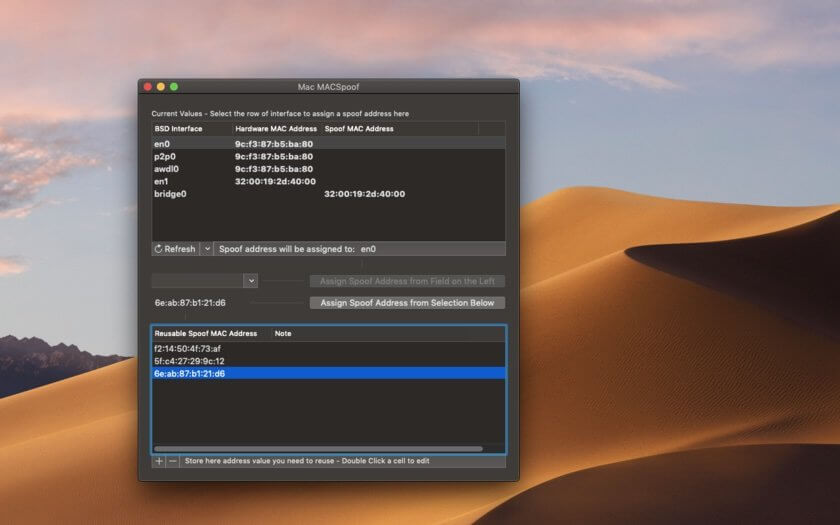

Mac MACSpoof is a Mac utility that allows the user to change the MAC address of the network interfaces of your Mac (Ethernet, Wi-Fi and so on) with any custom value.
The utility display a list of all the network interfaces of the Mac and selecting one the user is able to assign the value from one created at the moment or using a list of pre-defined values reusable over time.
The application display always, near the spoofed value also the original hardware written MAC address. At any time the application is able in a single command to revert all network values to the original one.
The application uses XPC Apple technology for a safe escalation privilege to change the requested Mac address and is Apple Developer signed and Gatekeeper enabled. Mac MACSpoof includes a PDF User guide
Version 1.4:
- Optimized for macOS 11 Big Sur
- Universal format for Apple silicon and Intel-based Mac
- Various layout improvements
- Bug fix
Frequently asked questions
How do I install the app?
Mount the image, drag the app into the "Applications" folder and launch it. If the system blocks the launch, allow it in "System Settings → Privacy & Security".
The app is damaged or won't launch
Reinstalling from a fresh image usually helps. Make sure your macOS version matches the one listed in the compatibility specs.
How do I update?
Download the new version from the site and install it over the current one — your settings will be preserved.
The download link doesn't work
Try a mirror or a download manager. For large files the browser often drops the connection.
How do I completely remove the app?
Use an uninstaller utility — it cleans up the service files that remain after moving the app to the trash.




Choose a download source
MACSpoof 1.4 · 5.39 MB