Internet Speed Test 4.4
Internet Speed Test — see your connection in everyday use
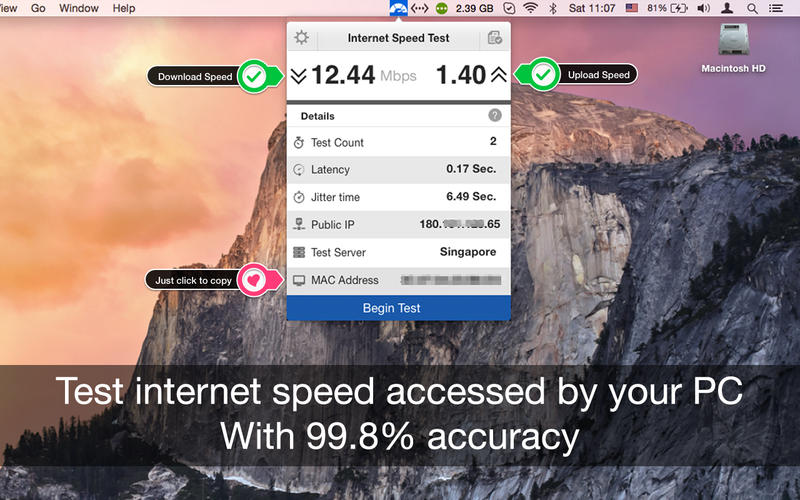
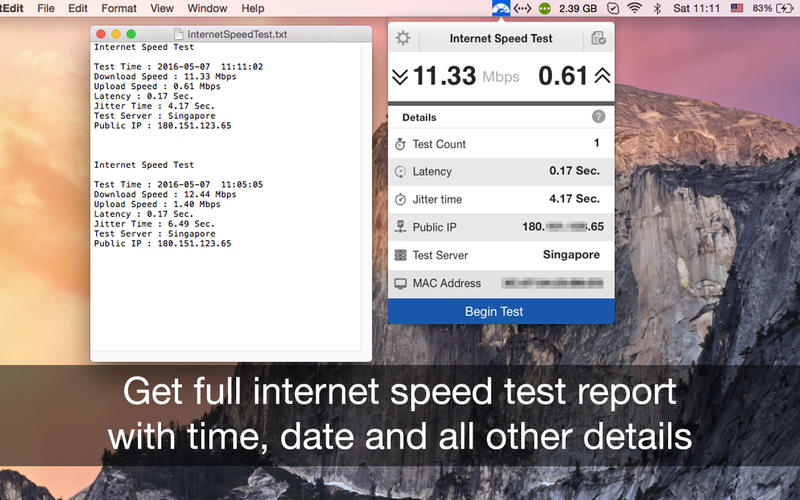

Internet Speed test is a single threaded test while most others (like speed test dot net) are multi-threaded. It uses a single connection to download the sample files which is closer to what you actually do in your everyday browsing and downloading.
Features:
- One click internet speed test right from the menu bar.
- Upload and Download speed of your network connection.
- Export .txt format report for internet speed tests with date and time.
- Get the public IP address of your computer.
- Just click to copy MAC address of your PC.
- PC network connectivity is shown with a dark and grey icon.
- Retina Display enabled icons.
- Easy to use interface.
- Best in the market.
Basics:
- Test Count: Number of tests done to get accurate results
- Latency Time: A time delay between the cause and the effect of some physical change in the system being observed.
- Jitter Time: The amount of time it takes for a block of information, called a packet, to travel across a network
- Public IP: Your public IP address is the IP address that is logged by various servers/devices when you connect to them through your internet connection.
- Test Server: Location of Server user to determine your internet speed.
- Mac Address: A unique identifier assigned to network interfaces for communications on the physical network segment.
Version 4.4
- We fixed crash, bugs and made some improvements to enhance your experience with the application.
Frequently asked questions
How do I install the app?
Mount the image, drag the app into the "Applications" folder and launch it. If the system blocks the launch, allow it in "System Settings → Privacy & Security".
The app is damaged or won't launch
Reinstalling from a fresh image usually helps. Make sure your macOS version matches the one listed in the compatibility specs.
How do I update?
Download the new version from the site and install it over the current one — your settings will be preserved.
The download link doesn't work
Try a mirror or a download manager. For large files the browser often drops the connection.
How do I completely remove the app?
Use an uninstaller utility — it cleans up the service files that remain after moving the app to the trash.




Choose a download source
Internet Speed Test 4.4 · 9.35 MB
Previous versions
Internet Speed Test 4.4
Previous versions are available to registered users.