SnapNDrag Pro Screenshot 4.5.5
SnapNDrag Pro: screenshot tool for easy capture, annotation, sharing
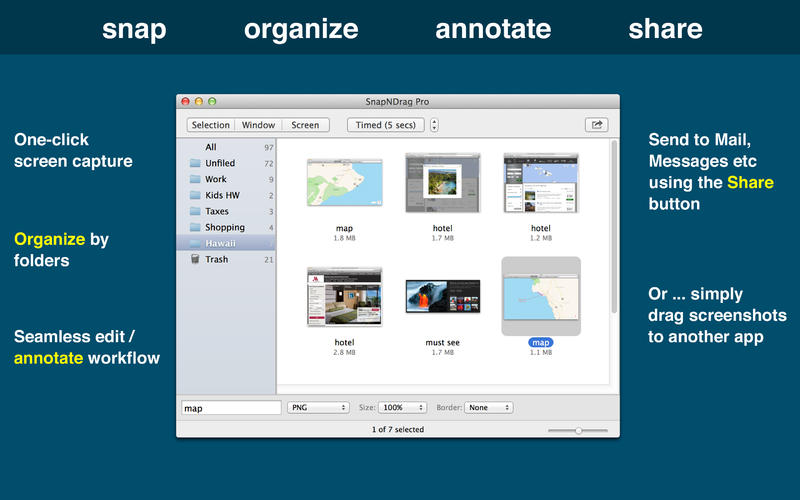

SnapNDrag Pro is screen capture made ridiculously easy.
SnapNDrag started off as a simple app that lets you snap a screenshot with one click and then drag the result off to Mail, Finder, or any other app that accepts an image. It has since matured into a powerful screenshot tool that helps you annotate, organize, and share your screenshots.
As we added features over time, we have made it a top priority to keep the app easy to use. And we think the extra thought we put into this speaks for itself. This powerful app is still as easy to use as the day it was born as a simple one-trick pony.
Features
- One-click capture (by window, selection or timed)
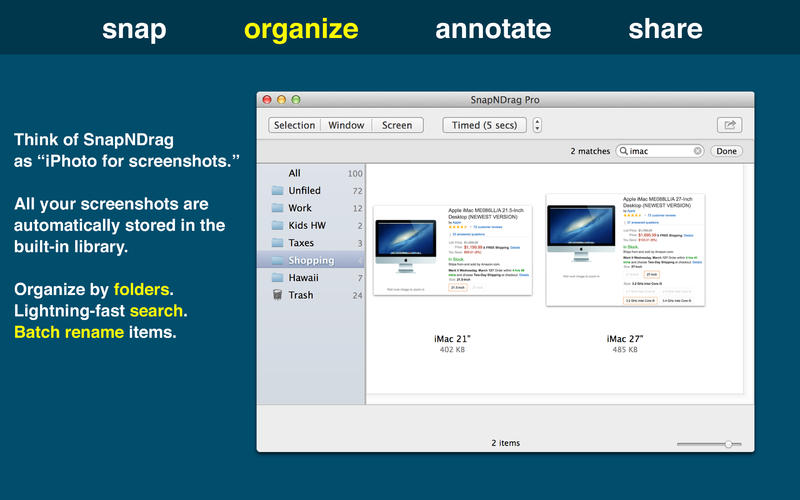
- Organize with Folders
- Annotate without losing the original screenshot
- Share to Mail, Messages, Twitter, Facebook, etc.
- Output in PNG, JPEG, or TIFF
And for advanced users:
- Batch rename
- Run as a background app (no Dock icon)
- Customizable Hot Keys
Version 4.5.4
- Added a marquee tool for selecting multiple annotations by dragging a selection box.
- Fixed cropping sometimes causing the screenshot to disappear when reopened.
- Restored the ability to choose different emoji in the annotation window.
- Fixed automatic importing of system screenshots saved to the Desktop.
- Fixed the selected line width indicator and improved the Arrow tool icon.
- Updated compatibility with recent versions of macOS and fixed several minor issues.
Frequently asked questions
How do I install the app?
Mount the image, drag the app into the "Applications" folder and launch it. If the system blocks the launch, allow it in "System Settings → Privacy & Security".
The app is damaged or won't launch
Reinstalling from a fresh image usually helps. Make sure your macOS version matches the one listed in the compatibility specs.
How do I update?
Download the new version from the site and install it over the current one — your settings will be preserved.
The download link doesn't work
Try a mirror or a download manager. For large files the browser often drops the connection.
How do I completely remove the app?
Use an uninstaller utility — it cleans up the service files that remain after moving the app to the trash.


Choose a download source
SnapNDrag Pro Screenshot 4.5.5 · 6.56 MB
Previous versions
SnapNDrag Pro Screenshot 4.5.5
Previous versions are available to registered users.