
Paragon Camptune X 10.13.433
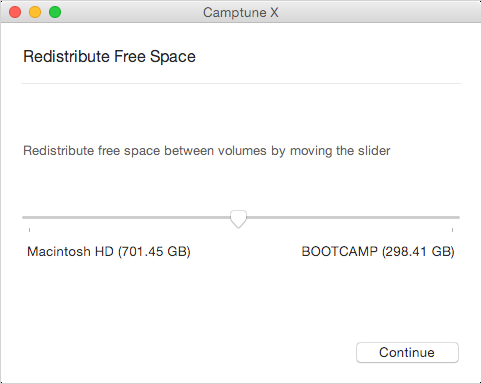
CampTune makes your Boot Camp Windows partition freely resizable. You may need to adjust the size of your Windows partition when, for example, you run out of disk space or want to install an application with particularly high storage requirements. CampTune provides a simple slider to redistribute storage space between Macintosh HD and Boot Camp Windows partitions. The resize operation is safe, fast and easy.
Manage disk space on Macs with Boot Camp
- Redistribute storage space between Mac and Windows anytime
- Safe, easy and compatible with the latest macOS versions, including 10.13 High Sierra
- Support technologies such as Fusion Drive, System Integrity Protection and the new Apple File System
How it Works
To redistribute storage space between macOS and Windows with Paragon CampTune, simply move the partition size slider and click Resize. Alternatively, type in the exact size in gigabytes for either partition.
Note that any changes to system disk partitions can only be made in a special boot environment called macOS Recovery mode. This is because the system disk configuration is a critical area of macOS guarded by the System Integrity Protection technology. CampTune guides you through the creation of a special bootable drive which is then used to start your Mac and safely resize the partitions. It will take a few minutes to create the required bootable media files; you will need a 1 GB or larger removable storage device like a USB stick or an SD card.
Fusion Drive
Logical volumes on the hybrid Fusion Drives can be resized
FileVault
FileVault encrypted volumes are supported.
System Integrity Protection
(NEW!) Paragon CampTune can perform resize operations with a system disk in macOS even with System Integrity Protection turned on.
Apple File System (APFS) support
(NEW!) Apple File System is fully supported.
Release Notes:
- (NEW!) macOS High Sierra (10.13) Support
- (NEW!) Paragon CampTune can perform resize operations with a system disk in macOS even with System Integrity Protection turned on.
- (NEW!) Apple File System is fully supported.
Frequently asked questions
How do I install the app?
Mount the image, drag the app into the "Applications" folder and launch it. If the system blocks the launch, allow it in "System Settings → Privacy & Security".
The app is damaged or won't launch
Reinstalling from a fresh image usually helps. Make sure your macOS version matches the one listed in the compatibility specs.
How do I update?
Download the new version from the site and install it over the current one — your settings will be preserved.
The download link doesn't work
Try a mirror or a download manager. For large files the browser often drops the connection.
How do I completely remove the app?
Use an uninstaller utility — it cleans up the service files that remain after moving the app to the trash.
Choose a download source
Paragon Camptune X 10.13.433 · 13.61 MB