
dDNS Broker 2.7

dDNS Broker is the ultimate dynamic DNS update client for Mac.
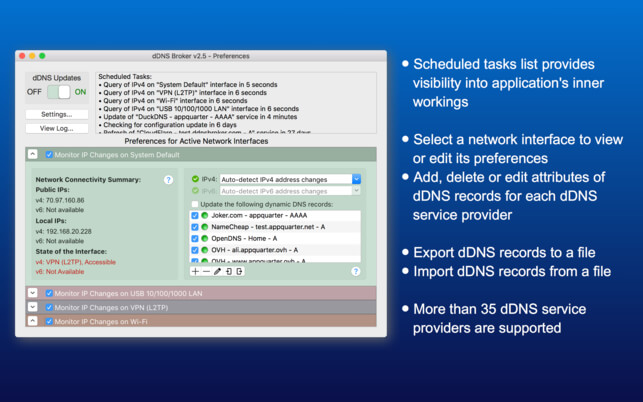
dDNS Broker (formally known as IP Monitor) works with about 50 popular DDNS service providers, and can monitor public IPv4 and IPv6 address changes across multiple network interfaces. Since dDNS Broker can distinguish between separate networks, it works without interruption should your server ever be on the move, either physically or virtually. Also, dDNS Broker always detects your IPv4 address accurately - even when your system is behind a transparent proxy.
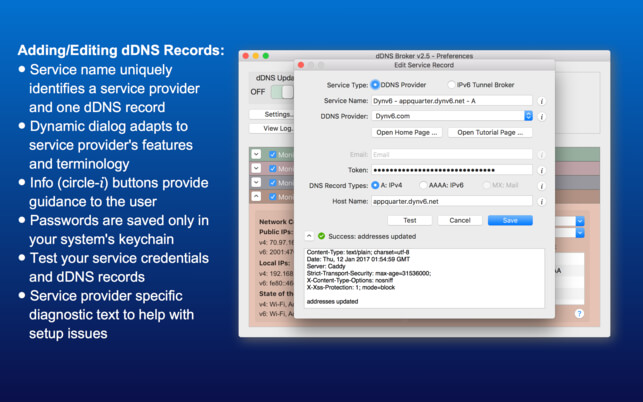
From the straightforward slider switch to the color-coded tables listing active networks and their preferences, dDNS Broker’s user interface was built for intuitive usage. The user interface’s dialog dynamically adapts to each service provider’s features and terminology, while info buttons provide guidance at each step. And, if something doesn’t go as expected, simply consult the service provider-specific diagnostic report offered with each query and update attempt. Meanwhile, sensitive information, like passwords, are saved only in your system’s keychain.
Upon each login, dDNS Broker will start running in the background, only alerting you, should you choose, to IP address changes, dynamic DNS record updates, and changes in active network interfaces—out of sight, but always keeping you up to date.
Supported dynamic DNS providers: All-inkl, ChangeIP, CityNetwork, CloudFlare, ClouDNS, DNS-O-Matic, DNS2Go, DNSEver, DNSExit, DNShome, DNSMadeEasy, DNSPark, DNSZi, DreamHost, DtDNS, DuckDNS, duiaDNS, DynDNS, DynDNS.it, DYNU, Dynv6, EasyDNS, EntryDNS, FreeDNS.Afraid.org, GoDaddy, Google Domains, Hurricane Electric, INWX, Joker, Loopia, MyDNS, MyOnlinePortal, NameCheap, No-IP, Now-DNS, Now-IP, OpenDNS, OVH, Pair Domains, RimuHosting, selfHOST, Sitelutions, Strato, TwoDNS, XpertDNS, ZoneEdit, and Zonomi.
Supported IPv6 Tunnel Brokers: NetAssist, and TunnelBroker
We regularly add support for other dynamic DNS providers and IPv6 Tunnel Brokers. Please refer to our support site for an up to date list.
Version 2.7
- Improved support for third party IPSec VPN clients
- Fixed "flipped service records table" artifact when running on High Sierra
- Added support for MyOnlinePortal, Pair Domains, INWX, and other dDNS providers
Frequently asked questions
How do I install the app?
Mount the image, drag the app into the "Applications" folder and launch it. If the system blocks the launch, allow it in "System Settings → Privacy & Security".
The app is damaged or won't launch
Reinstalling from a fresh image usually helps. Make sure your macOS version matches the one listed in the compatibility specs.
How do I update?
Download the new version from the site and install it over the current one — your settings will be preserved.
The download link doesn't work
Try a mirror or a download manager. For large files the browser often drops the connection.
How do I completely remove the app?
Use an uninstaller utility — it cleans up the service files that remain after moving the app to the trash.
VersiondDNS Broker 2.7
DeveloperAppQuarter, LLC
CompatibilityOS X 10.10 or later, 64-bit processor
LanguageEnglish
IncludesK'ed by TNT




Information
Visitors in the group Guests cannot leave comments on this publication.
Choose a download source
dDNS Broker 2.7 · 9.63 MB