
Surge 2.1.3
Working quietly on the Menubar, Surge is a high-performance HTTP/SOCKS5 proxy server. It is capable of intercepting and logging the summary of HTTP traffic, and meanwhile transmitting the traffic to other proxy servers according to the flexible rule system. Multiple proxy protocols are supported including HTTP, HTTPS, SOCKS5, SOCK5 over TLS.
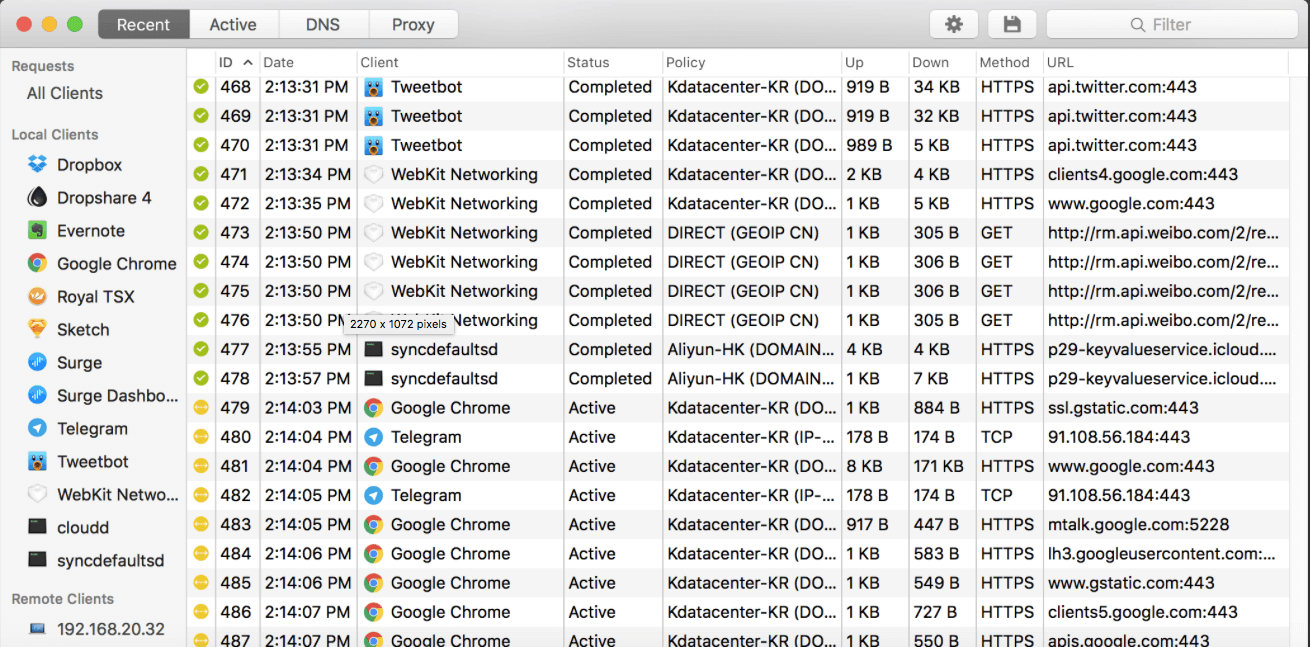
Launching the Dashboard, Surge then becomes a sophisticated HTTP debugging tool. You will be able to monitor all recent network requests, adjust proxy rules, and manipulate Local DNS Mapping.
High Performance & Stability
With industrial-grade stability, Surge is capable of constantly running with high performance, yet it only occupies minimum system resources. It will perfectly handle all the traffic and leave you worry-free.
Flexible Rule System
You may setup proxy forwarding rules based on domain, IP CIDR, GEOIP, etc. Surge will automatically send the requests to another proxy server.
Integration with iOS Version
Dashboard is able to connect to Surge iOS through WiFi or USB, monitor and analyze network requests on the iOS devices. You can even examine Cellular network requests when Dashboard is connected through USB.
HTTPS Decryption
HTTPS traffic can be decrypted by MitM. Certificate generator will help you generate CA certificate for debugging and make the certificate trusted by system.
Local DNS Mapping
Surge supports local-customized DNS mapping. Its multiple functional modules, including wildcard, alias and custom DNS server, will be able to fulfill varied needs.
Proxy Group
You may categorize several proxies as a group and a policy will be employed in accordance with the grouping. Proxy group can be configured as Auto Speed Test (select policy based on benchmarking URL access speed), SSID (select policy based on WiFi SSID), and manual-select.
Screenshots
Frequently asked questions
How do I install the app?
Mount the image, drag the app into the "Applications" folder and launch it. If the system blocks the launch, allow it in "System Settings → Privacy & Security".
The app is damaged or won't launch
Reinstalling from a fresh image usually helps. Make sure your macOS version matches the one listed in the compatibility specs.
How do I update?
Download the new version from the site and install it over the current one — your settings will be preserved.
The download link doesn't work
Try a mirror or a download manager. For large files the browser often drops the connection.
How do I completely remove the app?
Use an uninstaller utility — it cleans up the service files that remain after moving the app to the trash.
VersionSurge 2.1.3
DeveloperSurge Team
CompatibilityOS X 10.10 or later, 64-bit processor
LanguageEnglish
IncludesPre-K'ed





Choose a download source
Surge 2.1.3 · 7.69 MB
Comments 1