iconXprit 3.7
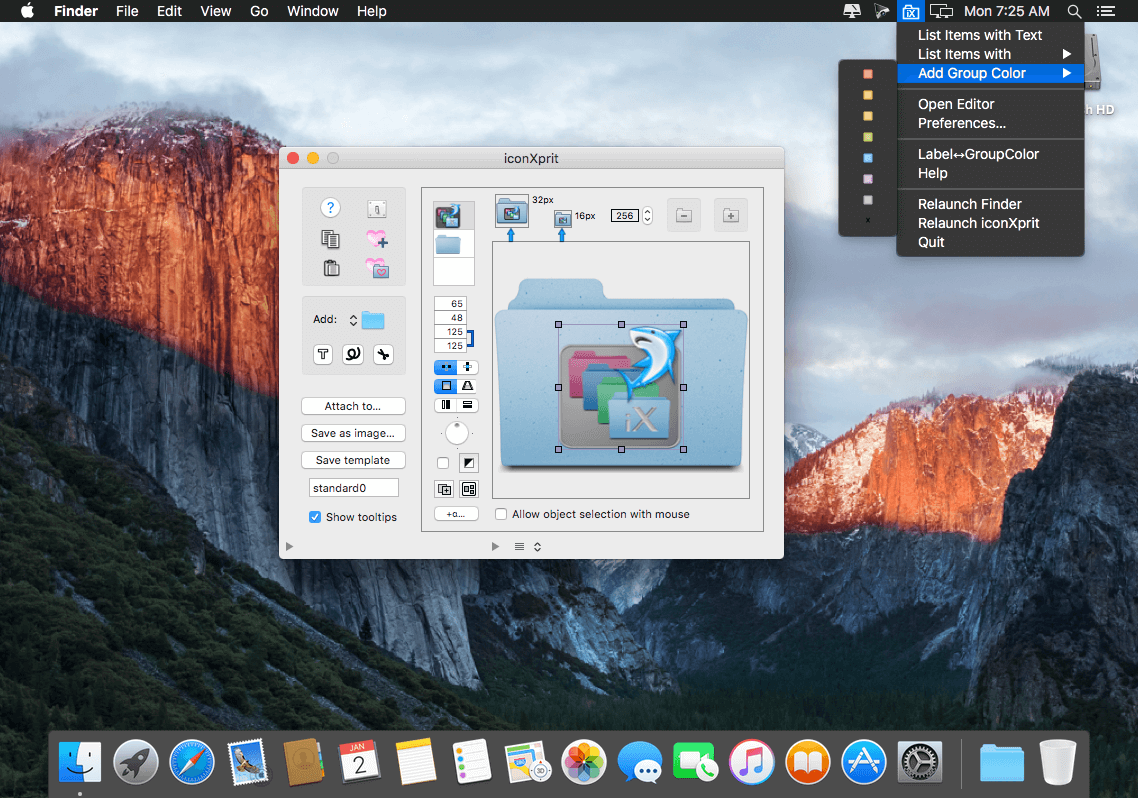
iconXprit is basically a background icon tool to provide a Finder service. It makes it easy to attach custom icons to desktop items such as folder. Three sorts of add-ons - image, color and text - can be added as layers and removed separately.
Main features
- Define group colors or use any color freely.
- Strings added via the text panel are editable and searchable.
- The editor panel contains various tools to modify combined images: resize, relocate, transform, apply several effects, add text and clip.
- Edit-settings can be saved as templates accessible from the service menu.
- Collect favorites.
- Keep items whose icons are frequently modified.
- iconXprit menu items are selectable and their order is customizable.
WHAT’S NEW
Version 3.7:
- The iconXprit service menu is now displayed in a panel, which resolves the issue of menu instability on macOS 10.12
- Text editing in the editor uses a separate panel on macOS 10.12
SCREENSHOTS
Frequently asked questions
How do I install the app?
Mount the image, drag the app into the "Applications" folder and launch it. If the system blocks the launch, allow it in "System Settings → Privacy & Security".
The app is damaged or won't launch
Reinstalling from a fresh image usually helps. Make sure your macOS version matches the one listed in the compatibility specs.
How do I update?
Download the new version from the site and install it over the current one — your settings will be preserved.
The download link doesn't work
Try a mirror or a download manager. For large files the browser often drops the connection.
How do I completely remove the app?
Use an uninstaller utility — it cleans up the service files that remain after moving the app to the trash.
VersioniconXprit 3.7
DeveloperT. Loosli
CompatibilityOS X 10.11 or later, 64-bit processor
LanguageEnglish
IncludesPre-K'ed



Information
Visitors in the group Guests cannot leave comments on this publication.
Choose a download source
iconXprit 3.7 · 17.85 MB