hr - Task timer as simple as it's name 1.1.7
hr -- short for hour -- tracks your hours. It's minimalistic, clean and easy to use, yet it's a powerful time-tracking app for your menu bar.
Features
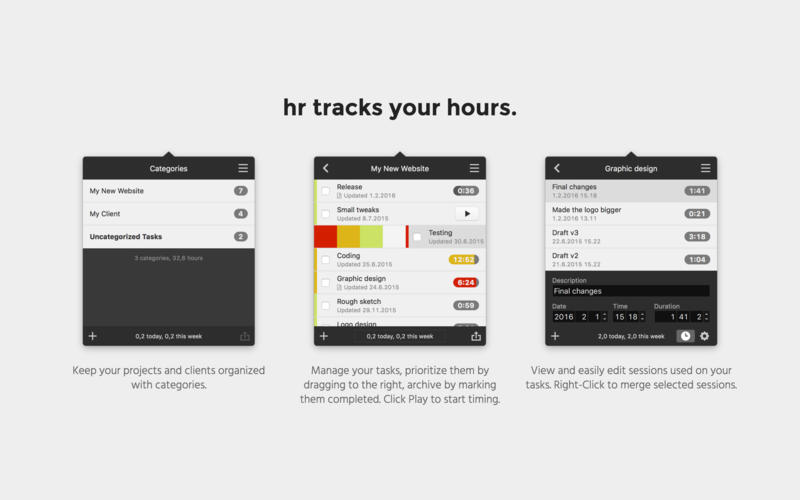
- Keep your projects and clients organized with categories.
- Manage your tasks, prioritize them by dragging to the right, archive by marking them finished. Press Play to start timing.
- View and easily edit each session used on your tasks. Right-Click to merge selected sessions.
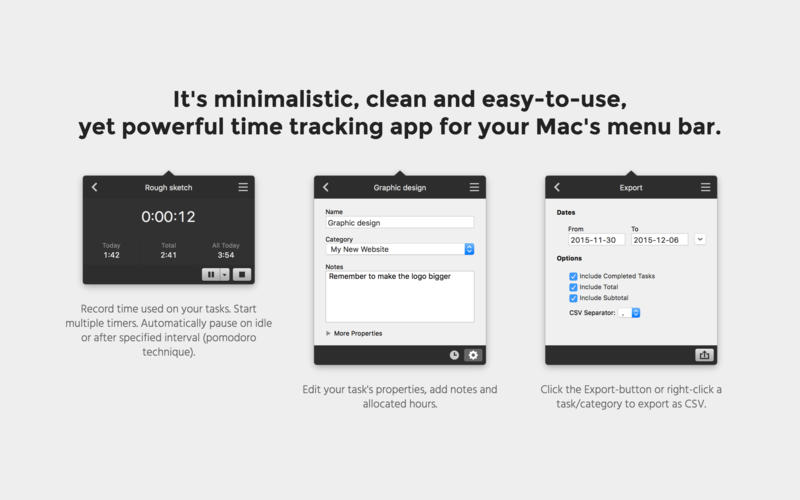
- Record time used on your tasks. Automatically pause on idle or after specified interval (pomodoro technique).
- Edit your task's properties, add notes and allocated hours.
- Press the Export-button or right-click a task/category to export as CSV.
WHAT’S NEW
Version 1.1.7:
- Minor bug fixes and enhancements
Screenshots

Frequently asked questions
How do I install the app?
Mount the image, drag the app into the "Applications" folder and launch it. If the system blocks the launch, allow it in "System Settings → Privacy & Security".
The app is damaged or won't launch
Reinstalling from a fresh image usually helps. Make sure your macOS version matches the one listed in the compatibility specs.
How do I update?
Download the new version from the site and install it over the current one — your settings will be preserved.
The download link doesn't work
Try a mirror or a download manager. For large files the browser often drops the connection.
How do I completely remove the app?
Use an uninstaller utility — it cleans up the service files that remain after moving the app to the trash.
Versionhr - Task timer as simple as it's name 1.1.7
DeveloperZero White Designs
CompatibilityOS X 10.9 or later, 64-bit processor
LanguageEnglish
IncludesPre-K'ed
Information
Visitors in the group Guests cannot leave comments on this publication.
Choose a download source
hr - Task timer as simple as it's name 1.1.7 · 6.09 MB