
Vinoteka 3.5.1
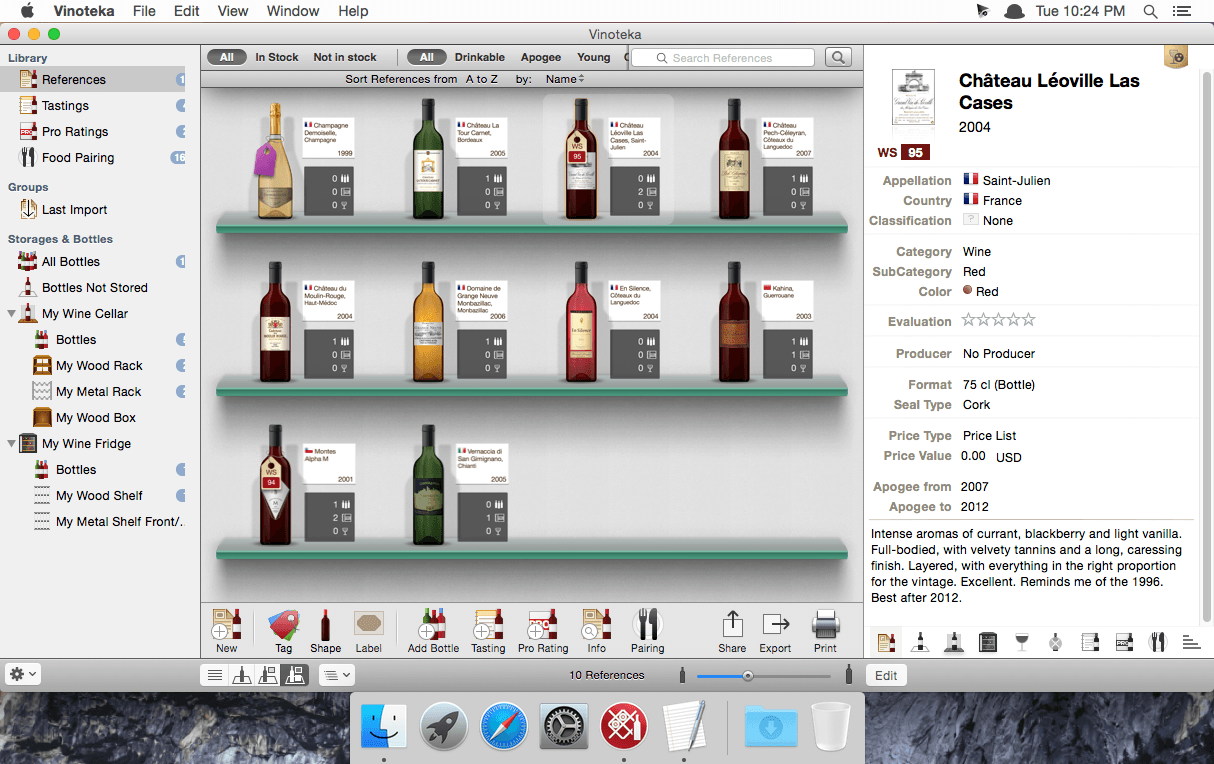
Vinotekasoft is the ultimate wine cellar management software for Mac. In a unique and gorgeous interface showing bottles, cellars, wine fridges and tasting notes, Vinoteka brings the best wine cellar management experience to Mac users.
Now featuring the complete synchronization with the iPhone/iPod Touch application Vinoteka Touch, Vinoteka has become the most advanced wine and cellar management software for the Mac platform. From now on, synchronize both applications and transfer data to your iPhone/iPod touch in few clicks. Its very easy, it's secure, you can now carry your cellar in your pocket, have a look at it and modify it everywhere, any time.
Extremely easy and fun to use, Vinoteka offers a fantastic and realistic environment to manage your references, your bottles (wine, liquors or spirits), recreate your cellar or wine fridge, save your tasting notes and add your own food and wine pairings. The many different powerful features of Vinoteka (large database of appellations, countries, varietals, types of wines, shapes of bottles, racks and shelves, etc.) provide users with the most advanced technology in terms of wine management. Customizable and user-friendly, straight-to-the point and nevertheless very professional, Vinoteka is the ultimate companion every wine lover needs.
Vinoteka, other than being as intuitive as possible, is based on the lastest Mac technologies and brings a wealth of high-performing and innovative features. Vinoteka is now the most professional tool to manage your cellar and is the the typical and most thought Mac-friendly application for wine management.
WHAT’S NEW
Version 3.5.1:
- [Crash] Fixed migration issues
- [Bug] Various improvements
Screenshots
Frequently asked questions
How do I install the app?
Mount the image, drag the app into the "Applications" folder and launch it. If the system blocks the launch, allow it in "System Settings → Privacy & Security".
The app is damaged or won't launch
Reinstalling from a fresh image usually helps. Make sure your macOS version matches the one listed in the compatibility specs.
How do I update?
Download the new version from the site and install it over the current one — your settings will be preserved.
The download link doesn't work
Try a mirror or a download manager. For large files the browser often drops the connection.
How do I completely remove the app?
Use an uninstaller utility — it cleans up the service files that remain after moving the app to the trash.
VersionVinoteka 3.5.1
DeveloperVinotekaSoft
CompatibilityOS X 10.6 or later, 64-bit processor
LanguageEnglish
IncludesSerial




Information
Visitors in the group Guests cannot leave comments on this publication.
Choose a download source
Vinoteka 3.5.1 · 79.66 MB