
BookMacster 3.0.12

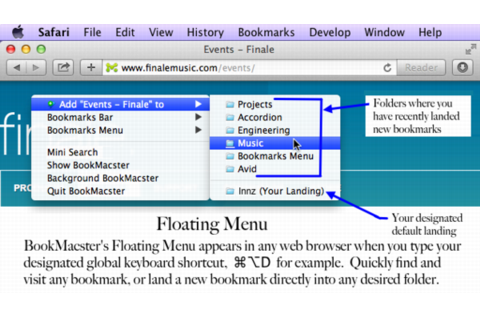
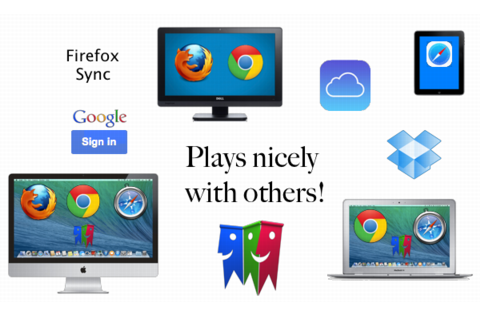
BookMacster is a bookmarks manager for your Mac, which plays nicely with iCloud, Sign In to Chrome, and Firefox Sync. It can be used in three ways, or all three:
- Manage Browser Bookmarks. Add alphabetizing and tagging. Verify, fix dupes, consolidate.
- Cross-Browser Syncing. Sync bookmarks of Safari Firefox, Chrome, and more among all your devices.
- Directly. Keep your bookmarks in one central store, accessible within web browsers.
Features
- Compatible with iCloud's Safari syncing, Google Chrome's Sign In, and Firefox Sync. Bookmarks added to Safari from BookMacster on your Mac will sync via iCloud to Safari on iOS devices.
- Import/export with Safari, Firefox, Chrome, iCab, Opera 11-12, Roccat, Pinboard, Delicious, Diigo, and OmniWeb.
- Easily organize with Tags, Hierarchy, or both.
- Verifies bookmarks, fixes redirects and duplicates.
- Sort (alphabetize) automatically when bookmarks are changed. You control which folders you want to be sorted or not sorted, how to sort them.
- Supports multiple User Profiles in Firefox and Google Chrome.
- Scriptable to collect new bookmarks from NetNewsWire or similar apps.
Version 3.0:
- Able to import and export (and sync) )with Safari version 16, which is part of macOS 13 Ventura. (Versions 2.x of our apps do not work with Safari 16.)
- Migrates data to a more secure format (Internall, data model Bkmx018 to Bkmx019.).
- A lot of re-engineering under the hood; little bug fixes and some performance immprovements.
- No longer supports import or export with the Roccat web browser. (It appears that this capability has been broken since March 2018 or earlier, no one has noticed, and Roccat has not been updated since March 2018.)
Frequently asked questions
How do I install the app?
Mount the image, drag the app into the "Applications" folder and launch it. If the system blocks the launch, allow it in "System Settings → Privacy & Security".
The app is damaged or won't launch
Reinstalling from a fresh image usually helps. Make sure your macOS version matches the one listed in the compatibility specs.
How do I update?
Download the new version from the site and install it over the current one — your settings will be preserved.
The download link doesn't work
Try a mirror or a download manager. For large files the browser often drops the connection.
How do I completely remove the app?
Use an uninstaller utility — it cleans up the service files that remain after moving the app to the trash.


Choose a download source
BookMacster 3.0.12 · 21.01 MB
Previous versions
BookMacster 3.0.12
Previous versions are available to registered users.