
WhatCable Pro 1.4.0
WhatCable Pro: USB-C diagnostics for Mac power and device insight.
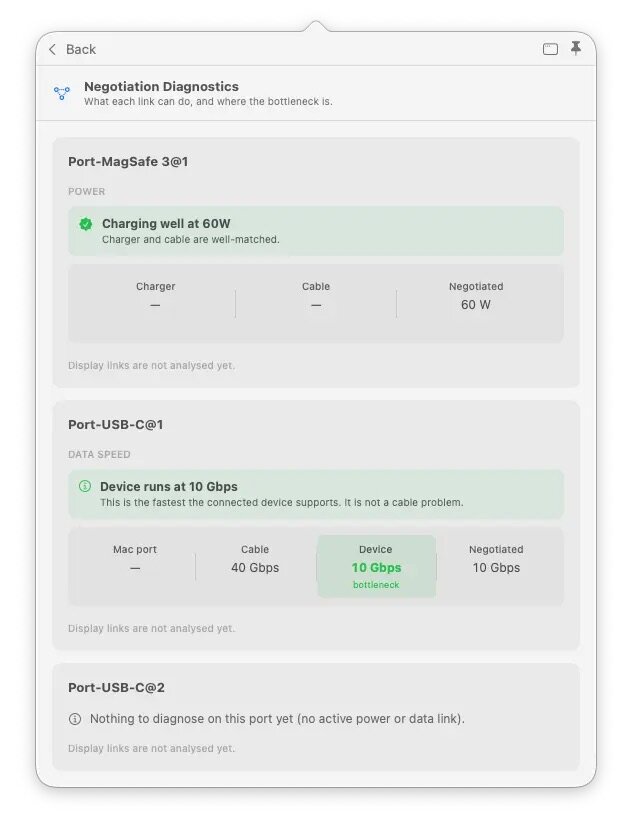
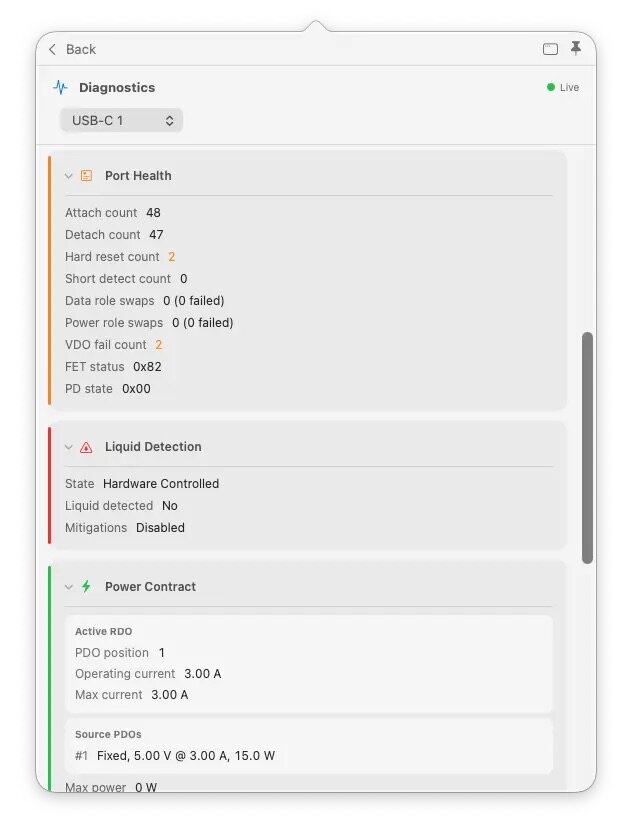
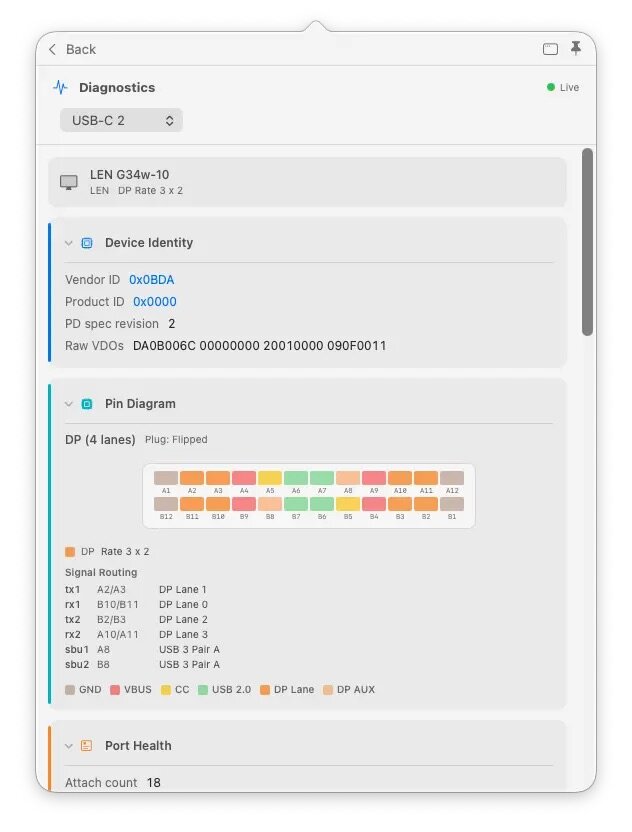
WhatCable Pro is a deep USB-C diagnostics tool designed specifically for Apple Silicon Macs running macOS 14+. While the free version identifies basic cable capabilities, the Pro tier offers advanced, real-time troubleshooting directly from IOKit data—requiring no extra software or root access.
Key Features
- Negotiation Diagnostics: Easily spot bottlenecks by comparing what your Mac port, cable, and connected device support side-by-side.
- Live Power Metering: Displays real-time wattage, voltage, and amperage per port, updating every 2 seconds.
- Hardware & Port Health: Tracks lifetime port errors, resets, and monitors liquid detection (LDCM) sensors.
- Advanced Insights: Offers Power Delivery (PD) contract inspection, cable resistance estimation, and DisplayPort Alt Mode lane mapping.
- Developer Friendly: Includes a CLI monitor mode (whatcable –monitor) and desktop widgets for quick tracking.
Version 1.4.0:
Connected devices:
- Devices behind docks are placed by the chain's actual topology, not by name matching. A drive on a dock used to be filed under whichever device happened to share a name with something in the chain, so an SSD could show up inside the wrong enclosure. The tree now follows the PCIe path the device actually hangs off. Thanks @cannotcollide (#493), whose CalDigit chain with two same-vendor enclosures caught it and whose diagnostic submissions proved the fix.
- Thunderbolt tunnels set up by the firmware at boot are no longer dropped from the tree, and a display reporting an empty name no longer counts as having one.
Speed verdicts:
- "Cable is limiting data speed" stopped blaming the cable for a slow device. On a multi-hop chain the verdict compared against the first thing in the chain (often an adapter), not the device at the end. It now walks to the end of the chain before deciding who is the limit. Thanks @cannotcollide (#507).
- Thunderbolt 1 and 2 devices no longer read as 40 Gbps. Old TB silicon reports the same link-speed code as Thunderbolt 3, and WhatCable took it at face value: a TB1 drive showed "Device 40 Gbps" and its adapter got flagged as the bottleneck. The device's own generation now caps the figure, the port badge matches the diagnostic, and the verdict correctly points at the device. Thanks @cannotcollide again (#515), who caught this in the beta the day it shipped.
Charging:
- "Charging at 30W" no longer shows when the Mac isn't charging. With a full battery, or charging paused by a charge limit or Optimized Battery Charging, the banner now says so instead of implying an active charge. Contributed by @YuriNachos (#514).
- Cables:
- A cable fingerprint is no longer treated as one retail product. Many brands ship the same electronics inside different jackets, so a fingerprint shared across brands now lists all of them instead of naming whichever was reported first.
- The cable database has been rebuilt and now holds 116 entries.
Fixed:
- The app was rewriting its widget data every second or two whenever power readings wobbled. It now writes only when something meaningful changes, at most once a minute, and not at all if you have no widgets installed. Reported by email, thank you.
- The CLI's test-kit consent text no longer contradicts itself about how many probes run.
Also:
- The diagnostic test kit now reads each hub's own hardware descriptor (which ports are soldered to internal devices versus real plug-in ports), runs three cheap probes a second time at the end of a run to catch state changes, and fixes capture blind spots on M1, M2 and Intel machines.
- Traditional Chinese wording refined across the link-speed and e-marker sharing strings, by @jimmyorz.
- The in-app Pro page now leads with what Pro is actually for: finding the weak link in a chain and keeping the evidence.
Frequently asked questions
How do I install the app?
Mount the image, drag the app into the "Applications" folder and launch it. If the system blocks the launch, allow it in "System Settings → Privacy & Security".
The app is damaged or won't launch
Reinstalling from a fresh image usually helps. Make sure your macOS version matches the one listed in the compatibility specs.
How do I update?
Download the new version from the site and install it over the current one — your settings will be preserved.
The download link doesn't work
Try a mirror or a download manager. For large files the browser often drops the connection.
How do I completely remove the app?
Use an uninstaller utility — it cleans up the service files that remain after moving the app to the trash.



Choose a download source
WhatCable Pro 1.4.0 · 13.84 MB
Previous versions
WhatCable Pro 1.4.0
Previous versions are available to registered users.