
timeLAPSE 2.66
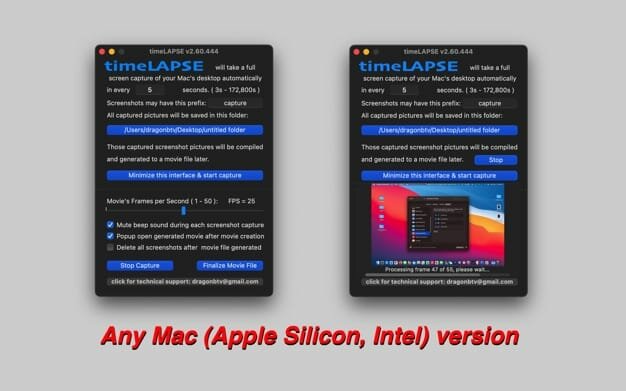

timeLAPSE will take a silent screenshot of your Mac's desktop automatically and periodically at an interval according to your setup, from between 1 second to 24 hours. All captured screenshots will be saved in a folder of your choosing. Then, these captured screenshots can be linked and compiled into a continuously played time-lapse video at any time.
timeLAPSE is ideal for computer security and educational usage as a child computer behavior monitor, it's also very useful for medical care professionals, law enforcement personnel, journalist, and researchers, to act as a computer event tracking and analyzing app.
Features
- Silent and user-unnoticeable automatic screen captures;
- Screenshot capture's interval can choose from between 1 second to 24 hours, accurate to the second;
- User may choose any folder as a destination, anywhere ( yes, ANYWHERE! ) that Finder can handle could be used;
- With full-screen capture, a high-resolution full-motion movie captures anything and everything;
- Time-lapse videos were compiled with a single click in incredible speed;
- You may choose to delete the screenshots after the video has been compiled.
Version v2.66
- bug fixed: the smallest time interval is down to one second now
- status menu icon dark mode supported
- status menu bar icon not only matches macOS dark mode but also the wallpaper light/dark setting
- fixed bug that does NOT fire capture when the app's status menu is open
- More by dragonBTV menu updated
Frequently asked questions
How do I install the app?
Mount the image, drag the app into the "Applications" folder and launch it. If the system blocks the launch, allow it in "System Settings → Privacy & Security".
The app is damaged or won't launch
Reinstalling from a fresh image usually helps. Make sure your macOS version matches the one listed in the compatibility specs.
How do I update?
Download the new version from the site and install it over the current one — your settings will be preserved.
The download link doesn't work
Try a mirror or a download manager. For large files the browser often drops the connection.
How do I completely remove the app?
Use an uninstaller utility — it cleans up the service files that remain after moving the app to the trash.




Choose a download source
timeLAPSE 2.66 · 4.33 MB