PhotoDirector Ultra 7.0.7405
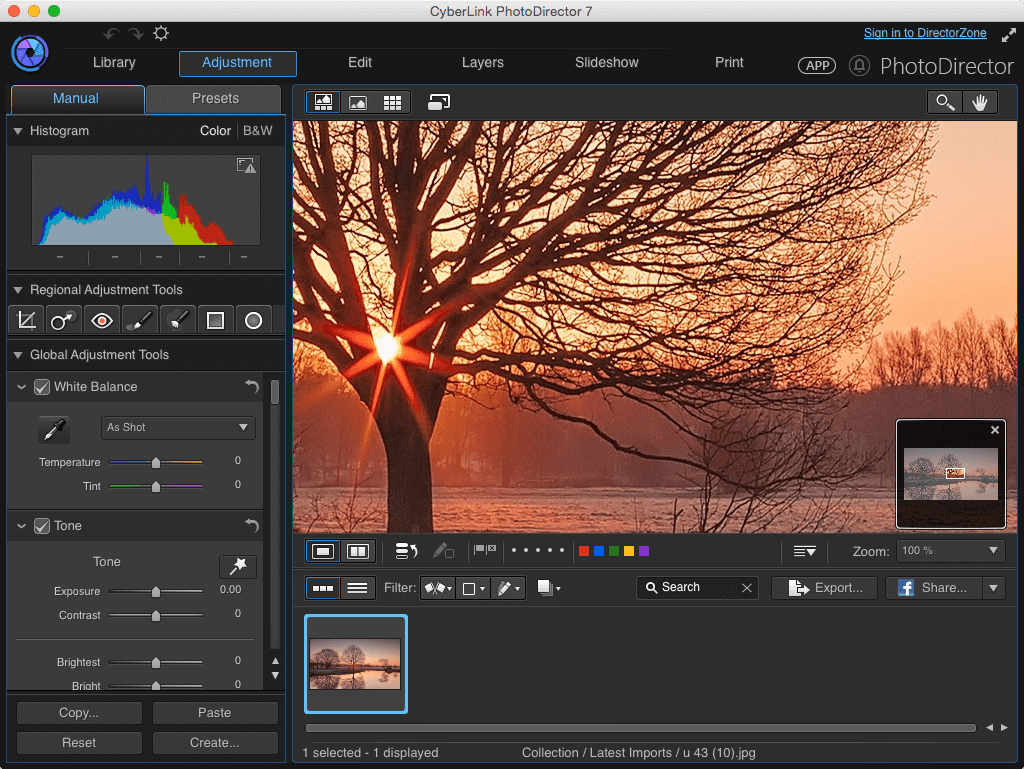
PhotoDirector 7 offers an extreme blend of features that goes far beyond what you would normally expect to find in photography software. Simplified photo management tools combine with powerfully easy-to-use yet sophisticated adjustment and editing options that offer a complete, end-to-end photo editing and management solution.
- Layer Editing. – PhotoDirector 7 demystifies layer editing, making this advanced tool simple and intuitive, even for beginners.
- Easy Adjustment with Filters, Effects and Blurs – Tools you need to edit, adjust, and enhance your shots to turn them into spectacular photos.
- Face and Body Beautifying Tools – Expanded collection of easy-to-use touch-up tools make it easy to professionally remove imperfections from your portraits, and group shots.
- Easy Object Removal and Photo Merging – Work faster with an efficient interface and intuitive photo management tools.
- CyberLink Cloud – PhotoDirector integrates CyberLink Cloud which allows you to easily back up and retrieve your important creations safely and securely.
WHAT’S NEW
Version 7.0.7405:
New
- Layer editing - achieve artistic effects wth 7 easy-to-use tool sets & 14 blending modes
- Beautifying tools - one-click to alter skin tone, smooth flaws, reshape curves & more
- Easily define blur regions with pro blur tools, add dynamism & focus to images
Enhanced
- Support for 100+ lens profiles for accurate auto correction of lens distortion
- Support for more RAW image formats to ensure original quality is maintained
Screenshots
Frequently asked questions
How do I install the app?
Mount the image, drag the app into the "Applications" folder and launch it. If the system blocks the launch, allow it in "System Settings → Privacy & Security".
The app is damaged or won't launch
Reinstalling from a fresh image usually helps. Make sure your macOS version matches the one listed in the compatibility specs.
How do I update?
Download the new version from the site and install it over the current one — your settings will be preserved.
The download link doesn't work
Try a mirror or a download manager. For large files the browser often drops the connection.
How do I completely remove the app?
Use an uninstaller utility — it cleans up the service files that remain after moving the app to the trash.
VersionPhotoDirector Ultra 7.0.7405
DeveloperCyberLink Corp
CompatibilityOS X 10.7 or later, 64-bit processor
LanguageEnglish
IncludesSerial

Information
Visitors in the group Guests cannot leave comments on this publication.
Choose a download source
PhotoDirector Ultra 7.0.7405 · 243.47 MB