Ringer - Ringtone Maker 2.0.5
Ringer allows you to create iPhone ringtones.
Choose any non-protected file from your iTunes library or any media file on your system and turn it into a custom ringtone for your iPhone. Make as many as you want, there is no limit to the number of ringtones you can make with Ringer.
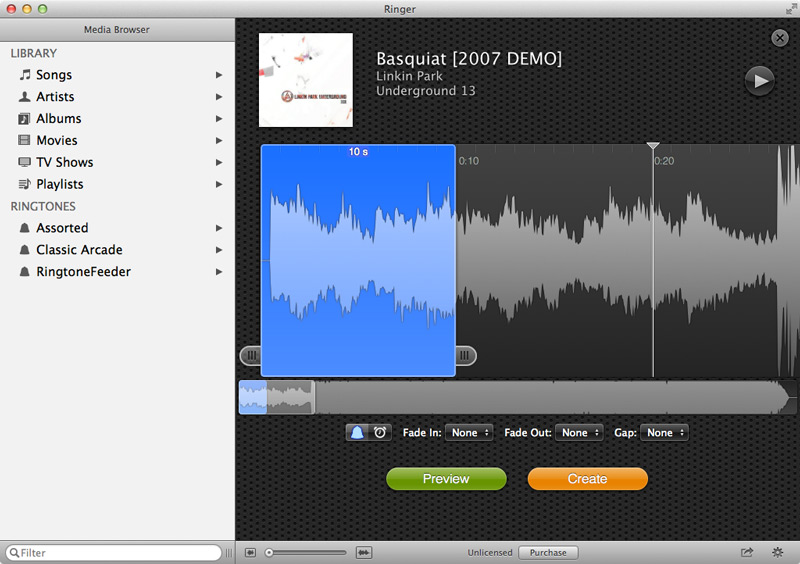
Easily select just the right part of your song to turn into your ringtone. Preview it exactly as it will sound on your phone. When you are ready press the create button and Ringer will make your ringtone and import it into iTunes where it will be ready to sync to your iPhone.
Features
- Open any media file that can be opened by QuickTime. MP3, AAC, MOV, MP4, M4V. All the three letter extensions that you care about. This includes videos.
- See the waveform for your media so you can quickly find the spot you are looking for or find the exact point where the sound stops.
- Turn on fading on your ringtone. Fade in and fade out. Helps you avoid those unseemly cuts.
- Control the gap between rings.
- Auto volume balance. Keeps ringtones from being too loud or too quiet. Have a selection that is kinda quiet? Ringer will automatically make it louder.
WHAT’S NEW
Version 2.0.5:
- Fix a pop noise at the start of some ringtones
- Improve accessibility
- Fix some visual appearance issues
- Fix a bug where double-clicking in the selection would not preview from the point clicked
Screenshots
Frequently asked questions
How do I install the app?
Mount the image, drag the app into the "Applications" folder and launch it. If the system blocks the launch, allow it in "System Settings → Privacy & Security".
The app is damaged or won't launch
Reinstalling from a fresh image usually helps. Make sure your macOS version matches the one listed in the compatibility specs.
How do I update?
Download the new version from the site and install it over the current one — your settings will be preserved.
The download link doesn't work
Try a mirror or a download manager. For large files the browser often drops the connection.
How do I completely remove the app?
Use an uninstaller utility — it cleans up the service files that remain after moving the app to the trash.
VersionRinger - Ringtone Maker 2.0.5
DeveloperPixel Research
CompatibilityOS X 10.8.5 or later, 64-bit processor
LanguageEnglish
IncludesPre-K'ed




Information
Visitors in the group Guests cannot leave comments on this publication.
Choose a download source
Ringer - Ringtone Maker 2.0.5 · 13.51 MB