Rectangle Pro 3.92
Rectangle Pro: window management software with custom snapping shortcuts


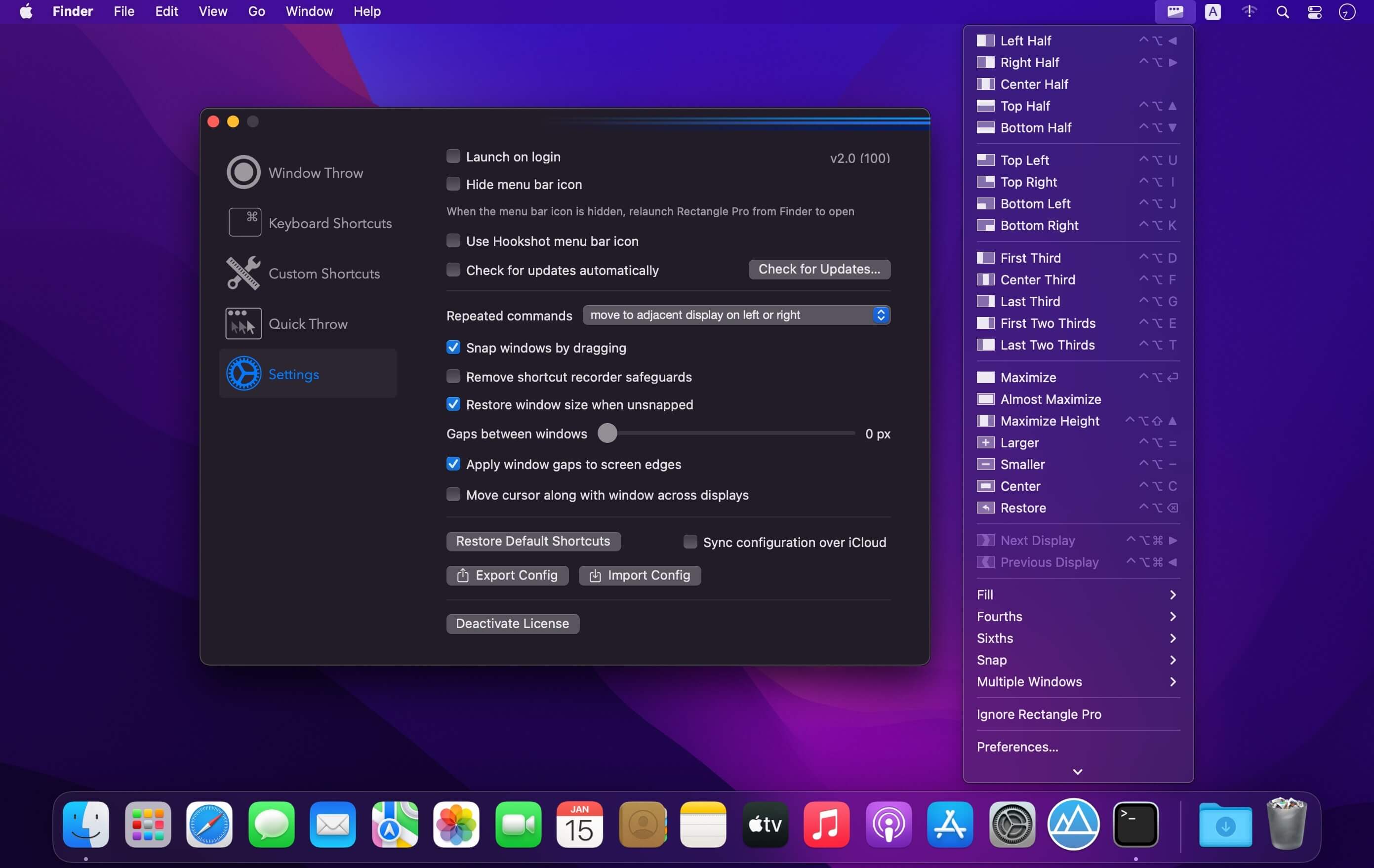
Rectangle Pro is a complete window manager for your Mac. Move, resize, and arrange windows with a single key combo, snap them anywhere on screen, and set up entire workspaces with one shortcut. If you already use Rectangle, you can bring your shortcuts right over.
One key combo, 16 positions
- Throw any window to 16 sizes and positions with one simple key combo.
- Works anywhere on a window, even when it's not in focus.
- No long list of shortcuts to memorize, though a full set is there if you want it.
Keyboard shortcuts your way
- A large set of built-in shortcut options, including Windows-style arrow shortcuts, multi-window commands, and fill left/right.
- Create custom sizes and positions, and choose what happens each time you repeat a shortcut.
Snap with precision
- Place snap targets anywhere on your screen.
- Use the configurable snap panel for quick, one-motion snaps.
- Quick throw moves windows fast without adding visual clutter.
Arrange your whole workspace
- Position all your apps at once with a single shortcut.
- Trigger layouts automatically when you connect or disconnect a display.
Keep windows close at hand
- Hide windows at the edge of your screen. They slide back out when your cursor reaches the edge.
- Pin one app to a side of the screen with Todo mode, now with more options.
Make it yours
- Fully customize the commands in the menu bar menu.
- Open it with a shortcut or as a right-click context menu.
- Import your existing Rectangle shortcuts.
- Sync your configuration across Macs with iCloud.
Light on resources
- Minimal resource usage helps preserve battery life.
- Keyboard and cursor gestures use fewer resources than touch gesture apps.
Version 3.92:
Bug fixes
- Win Arrow keys will now respect if an app is ignored by Rectangle Pro.
- Layouts will now ignore Stage Manager.
- Snap Targets configured for specific displays will now load properly when Rectangle Pro opens.
- Duplicate window information inaccessible menu items will no longer be added to the menu.
Frequently asked questions
How do I install the app?
Mount the image, drag the app into the "Applications" folder and launch it. If the system blocks the launch, allow it in "System Settings → Privacy & Security".
The app is damaged or won't launch
Reinstalling from a fresh image usually helps. Make sure your macOS version matches the one listed in the compatibility specs.
How do I update?
Download the new version from the site and install it over the current one — your settings will be preserved.
The download link doesn't work
Try a mirror or a download manager. For large files the browser often drops the connection.
How do I completely remove the app?
Use an uninstaller utility — it cleans up the service files that remain after moving the app to the trash.




Choose a download source
Rectangle Pro 3.92 · 11.38 MB
Previous versions
Rectangle Pro 3.92
Previous versions are available to registered users.