
FotoJet Photo Editor 1.0.7

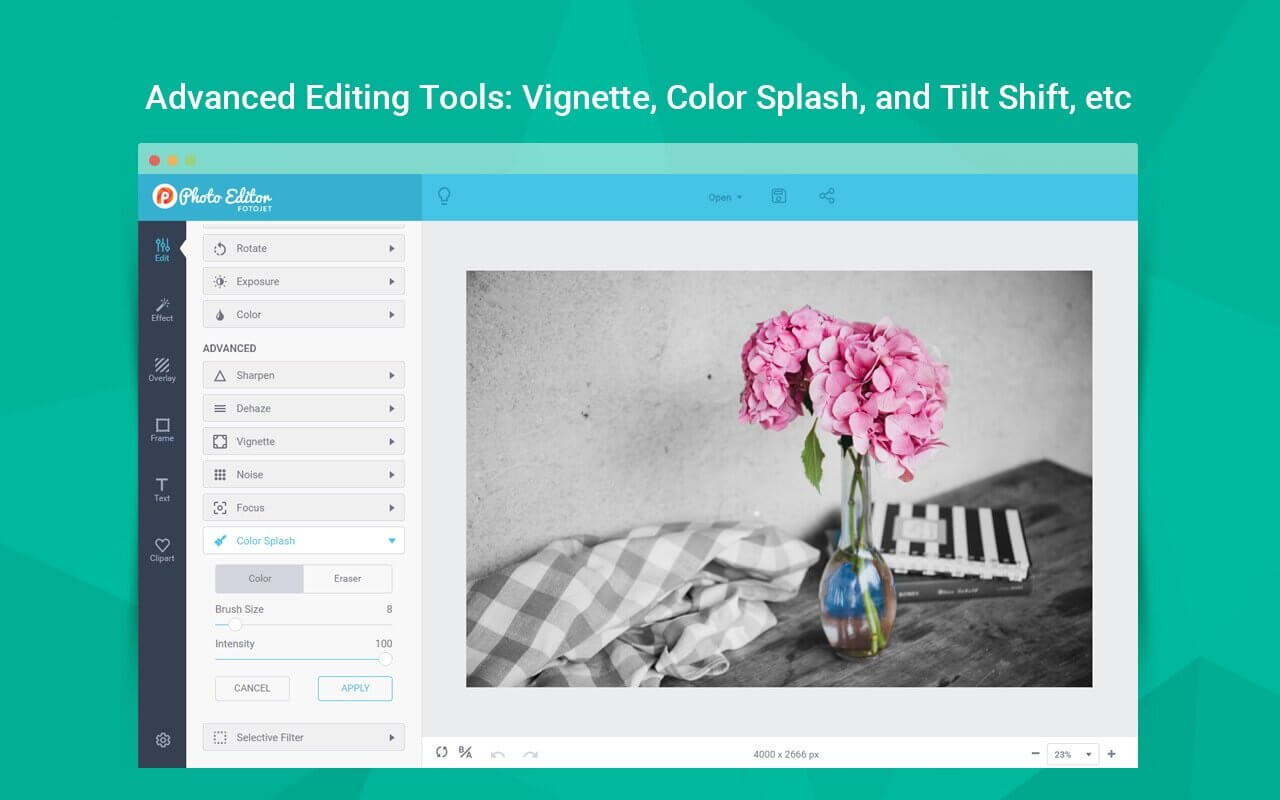

FotoJet Photo Editor enables everyone to be a photo editing expert in no time at all. It allows you not only to edit photos and apply amazing filters easily, but also add overlays, frames, text, cliparts, etc. to touch-up your images in a simple way.
Whether you are a novice or a professional, FotoJet Photo Editor meets all your photo editing needs. Simply use these handy editing tools and your photos are a few clicks away from the next level.
HIGHLIGHTED FEATURES
Edit a Photo Freely
- Auto-enhance your photo with one simple tap.
- Crop, resize and rotate your photo flexibly.
- Adjust photo Exposure, Brightness, Contrast, Highlights and Shadows.
- Make color adjustments such as Saturation, Temperature and Tint.
- Apply Sharpness and Clarity adjustments to your photo.
- Add Dehaze effect to reduce or remove haze from your photo.
- Add Vignette effect to your photo.
- Add Noise effect to your photo.
- Add Radial Focus and Tilt Shift effect to your photo.
- Apply Color Splash effect to give your photo a dramatic look.
- Manage Selective Filter effect to enhance the selected part of your photo.
Apply Photo Effects to Beautify Your Photo
- Freely choose from50+ photo effects/filters in 7 categories to apply including B&W, Sepia, Vintage, Lomo, Old Photo, Scene, etc.
- Simply click to apply any effect that you desire and flexibly adjust the intensity.
Add Other Elements to Enhance Your Photo
- Add new text to your photo or apply 30+ preset text styles quickly.
- Adjust text opacity, font, color, size, alignment, and effect at will.
- Choose from800+ preset clipart images to use or search through 93,000+ images online.
- Freely customize clipart images to your satisfaction.
- Choose from 70+ delicate overlays and customize by adjusting intensity, blend mode, rotating and flipping.
- Apply 40+ various types of frames including Border, Shadow, Polaroid, Edge, Film, etc.
- Freely move, resize, rotate and duplicate elements.
More Helpful Tools for Easy Photo Editing
- Undo/Redo.
- Auto-snap.
- Restore the original photo with one click.
- Show a before/after photo comparison with one click.
- Freely zoom in/out to view your photo.
Save and Share
- Save your photo as a JPG or PNG image.
- Share it to Facebook, Twitter, Pinterest, or Tumblr.
Version 1.0.7
- Fully compatible with Monterey and Apple M1.
Frequently asked questions
How do I install the app?
Mount the image, drag the app into the "Applications" folder and launch it. If the system blocks the launch, allow it in "System Settings → Privacy & Security".
The app is damaged or won't launch
Reinstalling from a fresh image usually helps. Make sure your macOS version matches the one listed in the compatibility specs.
How do I update?
Download the new version from the site and install it over the current one — your settings will be preserved.
The download link doesn't work
Try a mirror or a download manager. For large files the browser often drops the connection.
How do I completely remove the app?
Use an uninstaller utility — it cleans up the service files that remain after moving the app to the trash.
Choose a download source
FotoJet Photo Editor 1.0.7 · 148.91 MB