
Currencier 2.5.3
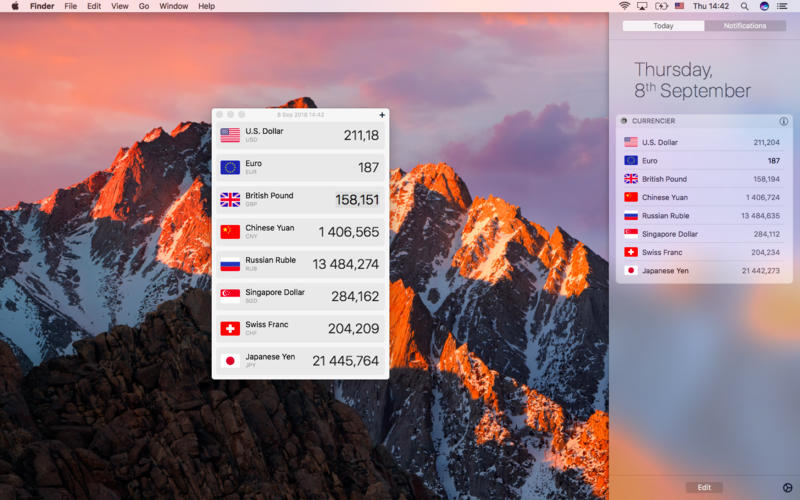


Currencier is a currency-converter with widget for notification center.
Tutorial:
Main window contains only widget settings and Tutorial. You can convert currencies in the notification center widget. Currency data automatically update from Yahoo Finance.
In order to install the widget in the notification center, enter it by clicking on the upper right corner. Then find the button “Edit” and click on it. In the list of widgets find “Currencer” and click on “+” opposite the widget’s name.
In order to change the widget click on “(i)” opposite the widget. You can add, delete or sort currencies.
Your Mac should to be connected to the Internet to show accurate information.
Version 2.5.3
- Optimised for macOS Ventura
Frequently asked questions
How do I install the app?
Mount the image, drag the app into the "Applications" folder and launch it. If the system blocks the launch, allow it in "System Settings → Privacy & Security".
The app is damaged or won't launch
Reinstalling from a fresh image usually helps. Make sure your macOS version matches the one listed in the compatibility specs.
How do I update?
Download the new version from the site and install it over the current one — your settings will be preserved.
The download link doesn't work
Try a mirror or a download manager. For large files the browser often drops the connection.
How do I completely remove the app?
Use an uninstaller utility — it cleans up the service files that remain after moving the app to the trash.




Choose a download source
Currencier 2.5.3 · 15.02 MB
Previous versions
Currencier 2.5.3
Previous versions are available to registered users.