Flyingbee PDF to Word 10.3.7
DF to Word: a professional offline PDF to Word converter for secure documents


Offline conversion, No Internet Required, No need to Upload, Confidential Document Security. Compatible with Microsoft Office Word 2022. Converting PDF into MS Office formats is recognized as notoriously challenging, it offers unparalleled accuracy in terms of formatting and content preservation!
Offline conversion, No Internet Required, No need to Upload, No Boring Waiting, Privacy-safe, Process 100% on your Mac.
PDF to Word exports PDF files to fully-formatted and editable office word documents with exactly preserved original texts, images, layouts, hyperlinks, tables, and bezier graphics.
Main Features
- Incredibly easy-to-use.
- Professional PDF Converter.
- Add unlimited PDFs at one time.
- Convert PDF files to fully-formatted and editable Word (.docx) documents directly.
- Conversion 100% process locally.
- Export PDF to Word (.docx), Text (.txt), RTF (.rtf) and HTML (.html) files.
- Superior accuracy and layout, formatting retention.
Incredibly easy to use
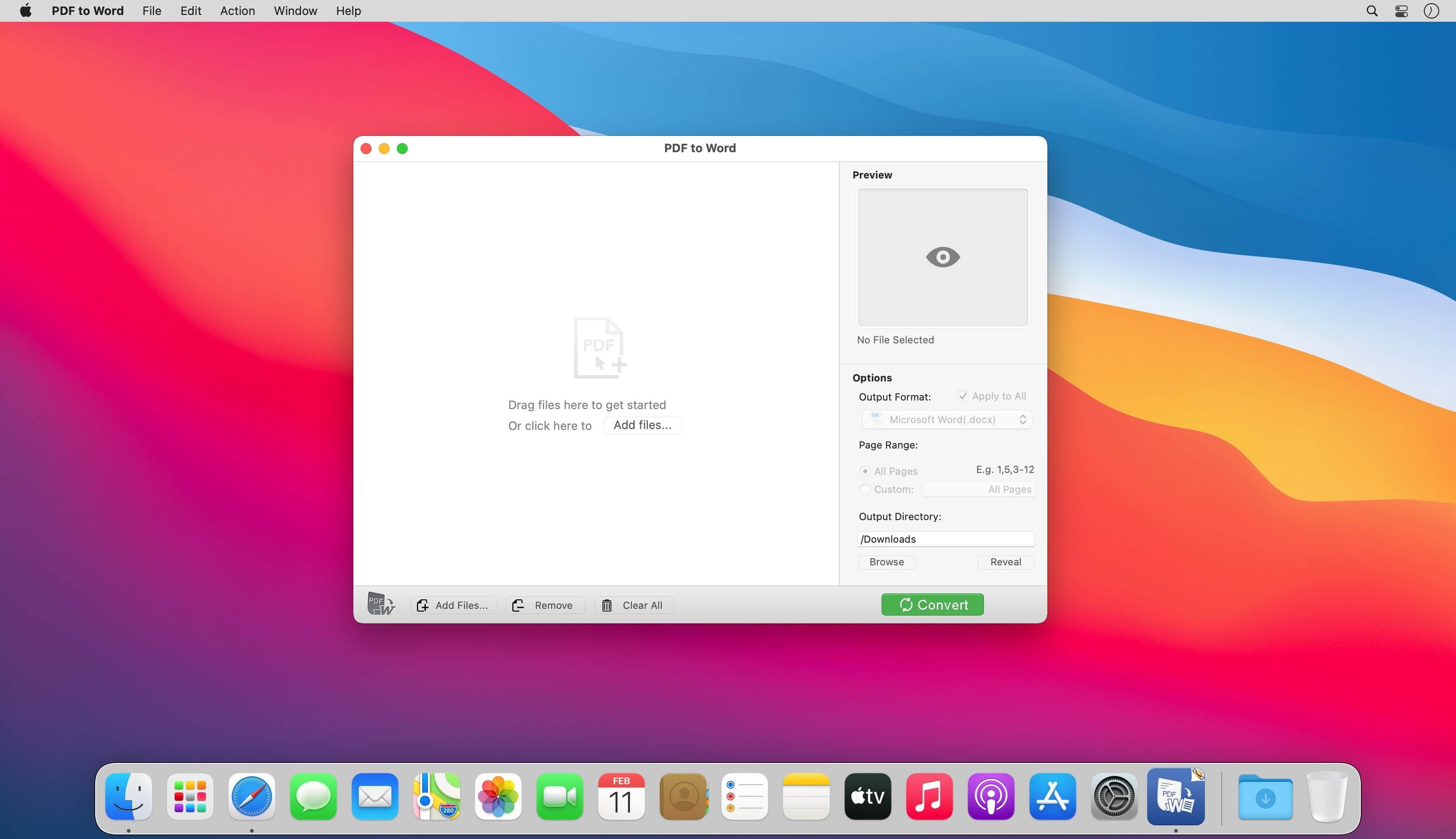
Simple workflow with an extremely neat and clear interface.
- User-friendly & convenient interface.
- Convenient import PDFs With drag & drop operation.
- Preview a batch of PDF files within the app.
- Batch convert PDFs by one button.
- Easily edit or reuse the PDF content.
High efficiency and productivity
Import as many PDFs as you like for converting any particular pages flexibly.
- 3 Ways to add PDFs by browse, drag & drop, and open in.
- Easily manage PDFs by build-in insert, rearrange, delete and open feature.
- Configure any particular pages (e.g. 1,2-16,35 or all pages) to meet your needs.
- 100% fast speed to process PDF file locally.
Perfect accuracy and layout, formatting retention
All the elements including text, image, format and more will be preserved in Word documents.
- Preserve original texts, images, layouts, hyperlinks, tables, and graphics exactly.
- Preserve stroking or filing vector graphics, including lines, arrows, rectangles, and pen bezier paths.
- Convert encrypted PDFs with copying and printing restrictions.
- Convert Adobe PDF in Multi-languages and Version from 1.0-1.7
- Output PDF files to Office 2007 Version (.docx), which can be opened by 2007 and the latest Office apps.
Version 10.3.7:
- Improve PDF to word conversion quality, speed.
- General performance and stability improvements.
Frequently asked questions
How do I install the app?
Mount the image, drag the app into the "Applications" folder and launch it. If the system blocks the launch, allow it in "System Settings → Privacy & Security".
The app is damaged or won't launch
Reinstalling from a fresh image usually helps. Make sure your macOS version matches the one listed in the compatibility specs.
How do I update?
Download the new version from the site and install it over the current one — your settings will be preserved.
The download link doesn't work
Try a mirror or a download manager. For large files the browser often drops the connection.
How do I completely remove the app?
Use an uninstaller utility — it cleans up the service files that remain after moving the app to the trash.
Related posts
Choose a download source
Flyingbee PDF to Word 10.3.7 · 53.3 MB
Previous versions
Flyingbee PDF to Word 10.3.7
Previous versions are available to registered users.