
CudaText 1.127.0
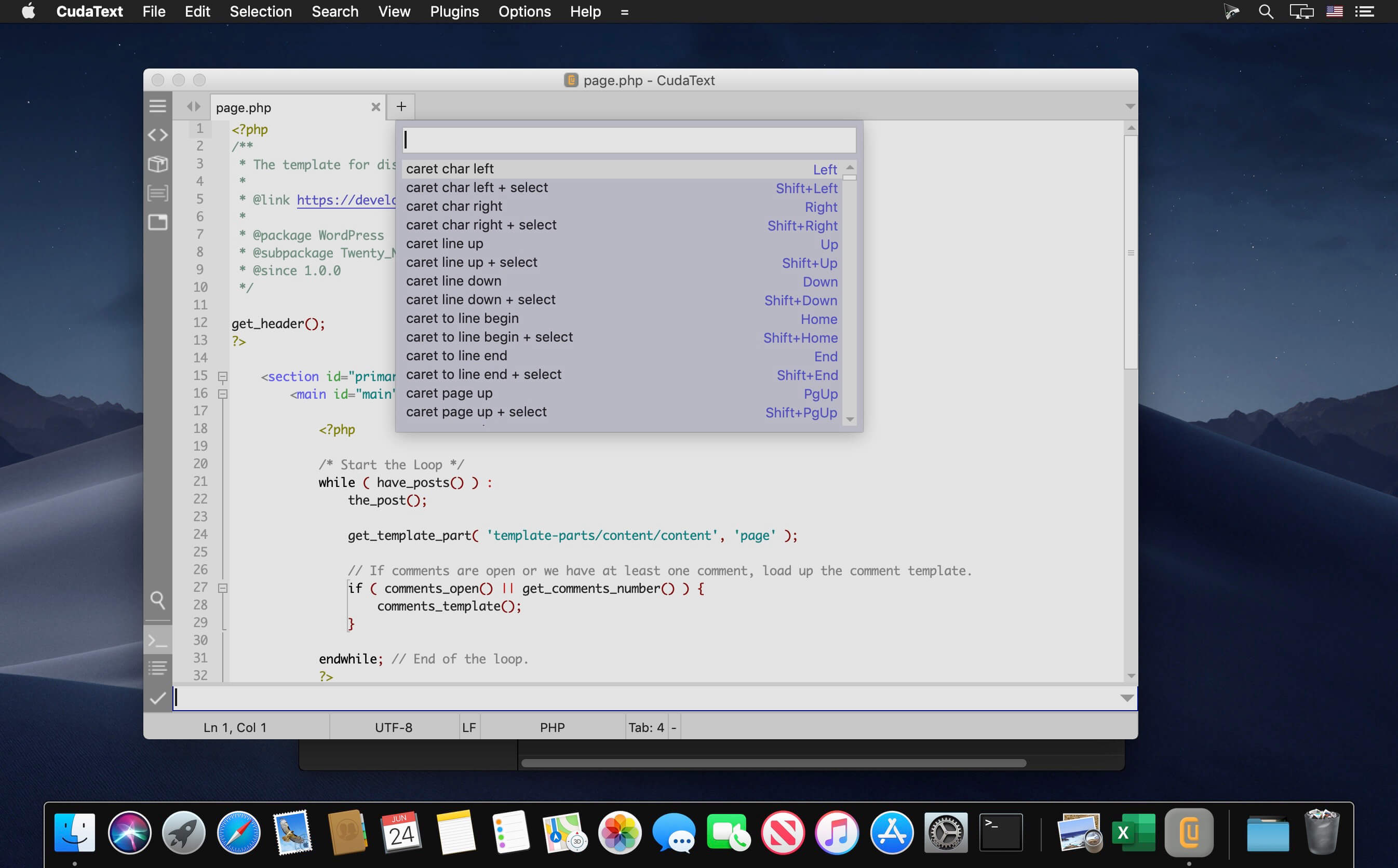


CudaText is a cross-platform code editor.
Features include:
- Syntax highlight for many languages: C, C++, jаvascript, HTML, CSS, PHP, Python, XML etc. 200+ syntax lexers exist.
- Code tree (tree structure of functions/classes/etc in source).
- Code folding.
- Multi-carets and multi-selections.
- Find/Replace with reg. ex.
- Configs in JSON format. Including lexer-specific configs.
- Tabbed UI.
- Split each tab.
- Split view for 2/3/4/6 files.
- Simple auto-completion (fixed list) for some lexers.
- Command palette (ST3 style).
- Minimap.
- Micromap.
- Show unprinted whitespace.
- Support for many encodings.
- Customizable hotkeys.
- Binary/Hex viewer for files of unlimited size.
- Smart auto-completion for HTML, CSS.
- HTML tags completion with Tab-key (Snippets plugin).
- HTML color codes (#rgb, #rrggbb) underline.
- Show pictures inside editor area (jpeg/png/gif/bmp/ico).
- Show tooltip when mouse moves over picture tag, entity, color value.
Version 1.127.0:
- Add: multi-threading is now used to paint the minimap, painting with minimap is now 2x faster
- Add: when UI-tabs are not 'angled', they have rounded corners (no option yet)
- Change: UI-tabs are now not 'angled' by default
- Change: 'angled' UI-tabs were not painted ok on some OS/desktops, so disabled them yet: on Linux Qt5, on macOS
- Change: partially revert changes for tab-group splitters from 1.126.0 (thanks @Shovel)
- Change: remove lexer VBScript to add-ons
- Fix: work with minimap after click on minimap-current-view-area (thanks @xcme)
- Fix: some pixel artifacts on 'flat' UI-tabs (thanks @JairoMartinezA)
- Fix: error when PHP auto-completion is called after e.g. "0~" (thanks @Shovel)
- Fix: regression, option "renderer_offsets" was ignored
- Fix: coloring of code-blocks in e.g. reST lexer
Frequently asked questions
How do I install the app?
Mount the image, drag the app into the "Applications" folder and launch it. If the system blocks the launch, allow it in "System Settings → Privacy & Security".
The app is damaged or won't launch
Reinstalling from a fresh image usually helps. Make sure your macOS version matches the one listed in the compatibility specs.
How do I update?
Download the new version from the site and install it over the current one — your settings will be preserved.
The download link doesn't work
Try a mirror or a download manager. For large files the browser often drops the connection.
How do I completely remove the app?
Use an uninstaller utility — it cleans up the service files that remain after moving the app to the trash.
VersionCudaText 1.127.0
DeveloperUVViewSoft
CompatibilityOS X 10.8 or later, 64-bit processor
LanguageMultilangual


Information
Visitors in the group Guests cannot leave comments on this publication.
Choose a download source
CudaText 1.127.0 · 24 MB