
FindFocus Pro 1.0.24
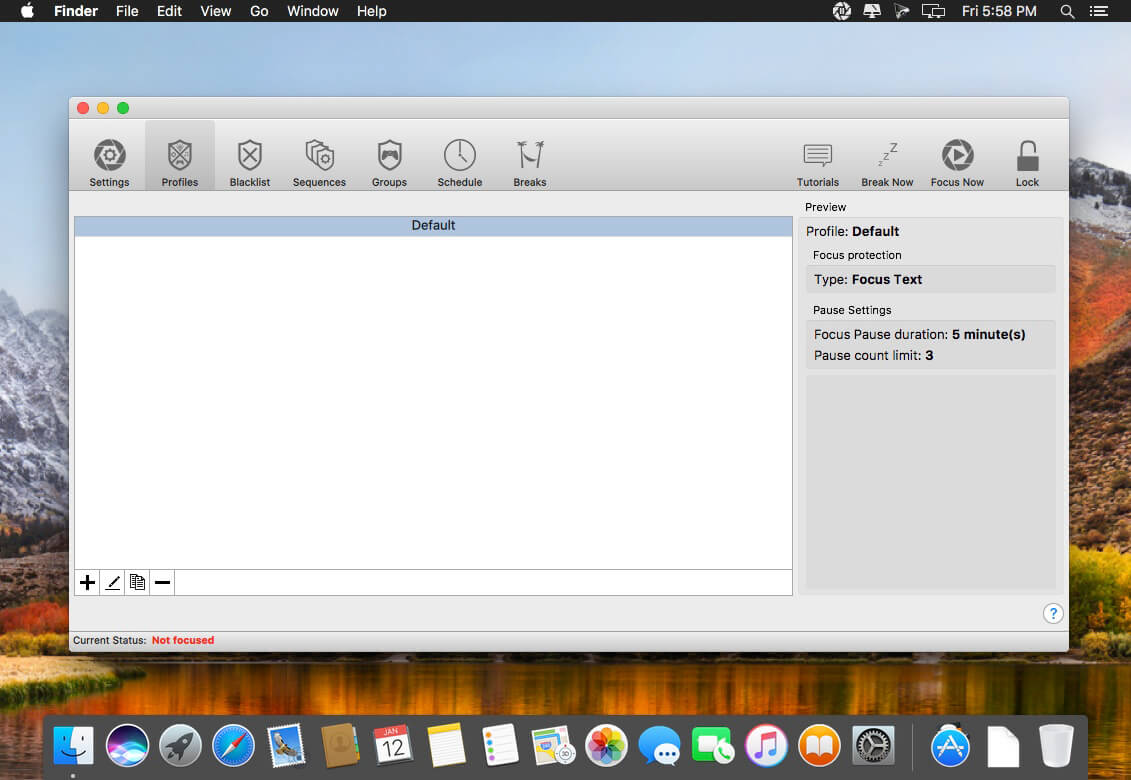


FindFocus helps you avoid distractions and break bad online habits without limiting your flexibility.
FindFocus Profiles
- Groups: Group your websites into categories to create a new sequence or block specific URLs in seconds. Create lists for Social Media Sites, Email and Work related websites or games
- Profile Descriptions: Keep the overview. Create powerful descriptions for every profile you create
- White List Mode For Websites: Block only the websites that distract you while still being able to use any other site
- Black List Mode For Websites: Block the entire internet except the few sites that you need. Much better that disconnecting the entire internet with more and more tools moving to the cloud
- Wildcard Syntax For Websites: Only want to use a certain part of a website or forum? We got you covered. Just block (or a allow the part of the website you need)
- White List Mode For Apps: Want to block your local email client or prevent yourself from playing games with Steam? No problem. Just chose the apps that waste your time
- Black List Mode For Apps: Are you a workaholic? Use the black list mode for apps at the end of the day to force yourself to shut it down. That’s literally the only thing you can do if you block all apps on your mac
Version 1.0.24:
- Remove Dock icon and force application activation from tray
- Fix ability to set empty names for some entries
- Add a feature to schedule a manual break period while using Flexible Breaks
Frequently asked questions
How do I install the app?
Mount the image, drag the app into the "Applications" folder and launch it. If the system blocks the launch, allow it in "System Settings → Privacy & Security".
The app is damaged or won't launch
Reinstalling from a fresh image usually helps. Make sure your macOS version matches the one listed in the compatibility specs.
How do I update?
Download the new version from the site and install it over the current one — your settings will be preserved.
The download link doesn't work
Try a mirror or a download manager. For large files the browser often drops the connection.
How do I completely remove the app?
Use an uninstaller utility — it cleans up the service files that remain after moving the app to the trash.
VersionFindFocus Pro 1.0.24
DeveloperFindFocus
CompatibilityOS X 10.8 or later, 64-bit processor
LanguageEnglish
IncludesK'ed by TNT





Information
Visitors in the group Guests cannot leave comments on this publication.
Choose a download source
FindFocus Pro 1.0.24 · 40.34 MB