Artboard 2.3
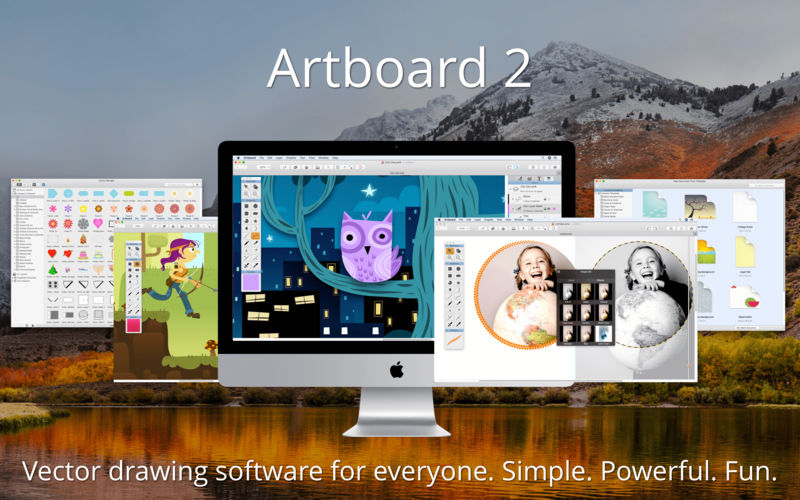


Artboard is a full-featured vector drawing application for new and experienced creatives to draw crisp vector graphics, scalable logos, sharp icons, and stunning layered illustrations. Templates help small businesses, students, hobbyist and 2D game designers get started on their projects quickly, such as making business cards, posters, pixel perfect icons, and right-sized social media graphics.
With its uncomplicated interface and familiar Mac feel, users spend more time creating and less time searching for elusive commands. Overflowing with new features and a tidy user interface, its speed and responsiveness are complemented by smart techniques for interacting with drawing objects.
Notable Features
- At Your Fingertips Control - New tabbed interface puts what you need at your fingertips, no more digging through menus to find edit commands
- More Powerful Styles Editor - Go way beyond simple stroke and fill styles of basic illustration software. Artboard's Styles Tab is used to create and edit expert "stacked" styles (including arrowed strokes, rough strokes, pattern brushes, gradients, image tile, patterned and hatched fills, and more)
- Smart Shapes - The most advanced smart objects give complete control of shapes and paths
- Single, Direct Select Tool - Add and remove points, simplify paths, rotate and resize shapes, edit objects through direct and numeric input, move center points, combine objects with Boolean operators, crop and clip photos, reset object's bounding box, and... much, much more
- Time-Saving Workflows - Export your drawing, selected objects, individual layers, and/or "slices" of your drawing, at multiple resolutions and scales, supporting multiple Color Spaces. Print shrink-to-fit to a single page, and "poster-tiled" printing over multiple sheets of paper
- Editable Clip Art and Styles - Includes over 1900 royalty-free fully editable clip art and graphic styles to customize, plus a Library to store your own
- Import SVG - Open directly or import scalable vector graphics
Version 2.2:
- Release notes were unavailable when this listing was updated.
Frequently asked questions
How do I install the app?
Mount the image, drag the app into the "Applications" folder and launch it. If the system blocks the launch, allow it in "System Settings → Privacy & Security".
The app is damaged or won't launch
Reinstalling from a fresh image usually helps. Make sure your macOS version matches the one listed in the compatibility specs.
How do I update?
Download the new version from the site and install it over the current one — your settings will be preserved.
The download link doesn't work
Try a mirror or a download manager. For large files the browser often drops the connection.
How do I completely remove the app?
Use an uninstaller utility — it cleans up the service files that remain after moving the app to the trash.
VersionArtboard 2.3
DeveloperMapdiva, LLC
CompatibilityOS X 10.9 or later, 64-bit processor
LanguageEnglish
IncludesK'ed by TNT


Information
Visitors in the group Guests cannot leave comments on this publication.
Choose a download source
Artboard 2.3 · 68.9 MB
Previous versions
Artboard 2.3
Previous versions are available to registered users.