
Hands Off! 2.3.5
This functional and easy to use tool for OS X platforms can be used to monitor the activity of applications that can establish a connection to the Internet. Thanks to Hands Off! user will be able to timely detect signs of malicious or potentially dangerous activities, to eliminate the possibility of leakage of confidential data and prevent malicious programs to a personal computer.
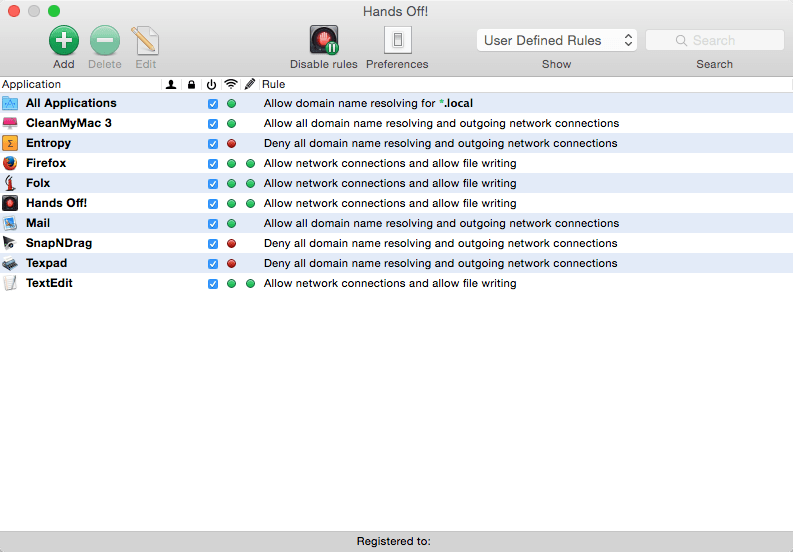
List the key features of the application includes the ability to block incoming and outgoing connections at the level of individual applications, the prohibition elements cookies, as well as the management of operations for reading and writing files. The last of these features is one of the most requested features Hands Off !. For example, in order to avoid damage or loss of critical information, the user can disable a specific program to make changes to the data on the hard drive. Hands Off! keeps users up to date and report any violations detected by a detailed notification and allows the creation of global rules, applicable to all system users.
Screenshots

Frequently asked questions
How do I install the app?
Mount the image, drag the app into the "Applications" folder and launch it. If the system blocks the launch, allow it in "System Settings → Privacy & Security".
The app is damaged or won't launch
Reinstalling from a fresh image usually helps. Make sure your macOS version matches the one listed in the compatibility specs.
How do I update?
Download the new version from the site and install it over the current one — your settings will be preserved.
The download link doesn't work
Try a mirror or a download manager. For large files the browser often drops the connection.
How do I completely remove the app?
Use an uninstaller utility — it cleans up the service files that remain after moving the app to the trash.
VersionHands Off! 2.3.5
DeveloperOne Periodic Inc.
CompatibilityOS X 10.6.88 or later
LanguageEnglish
IncludesPre-K'ed





Information
Visitors in the group Guests cannot leave comments on this publication.
Choose a download source
Hands Off! 2.3.5