
Lumen 1.0.3
Lumen is a Mac App that makes it easy for you to create engaging visuals in real time. Use the same process with Lumen as you would with a hardware video synth, but with modern features only software can provide. With a semi-modular design that is both playable and deep, Lumen is the perfect way to get into video synthesis.
Made for synthesists
Lumen expands on the techniques of the past to bring you an entirely new process for manipulating video. You won't be in the dark, though - our comprehensive Lumen Guides and a preset library of 150+ patches will get you up-to-speed in no time.
Patchable back panel
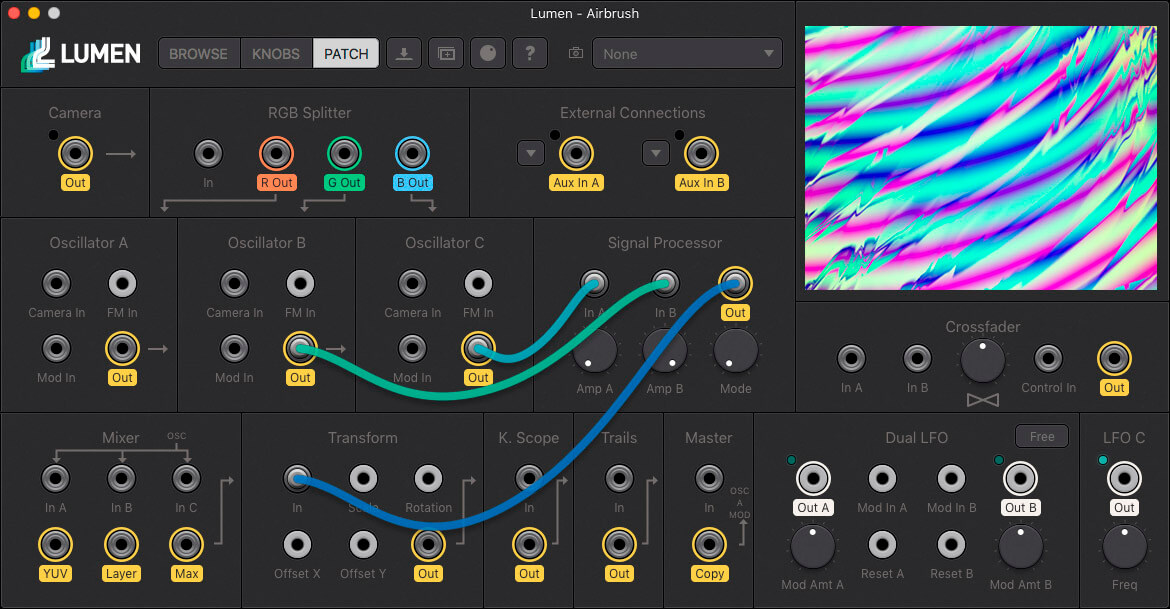
Lumen is semi-modular, which gives you the power to reroute the synth’s signal flow. Every component is broken out, so you can create custom video effects and mind-bending feedback patches.
Plays well with others
Lumen features Syphon input & output, for interacting with other video apps. Webcam input and full-screen output let you create external feedback loops. All synthesizer knobs and buttons can be mapped to your MIDI controller, and we have plans to add audio-reactivity via a free update.
SCREENSHOTS
Frequently asked questions
How do I install the app?
Mount the image, drag the app into the "Applications" folder and launch it. If the system blocks the launch, allow it in "System Settings → Privacy & Security".
The app is damaged or won't launch
Reinstalling from a fresh image usually helps. Make sure your macOS version matches the one listed in the compatibility specs.
How do I update?
Download the new version from the site and install it over the current one — your settings will be preserved.
The download link doesn't work
Try a mirror or a download manager. For large files the browser often drops the connection.
How do I completely remove the app?
Use an uninstaller utility — it cleans up the service files that remain after moving the app to the trash.
VersionLumen 1.0.3
DeveloperParacosm
CompatibilitymacOS 10.10 or later, 64-bit processor
LanguageEnglish
IncludesK'ed by TNT





Choose a download source
Lumen 1.0.3 · 23.02 MB
Comments 1