apQualizr v2.1.0
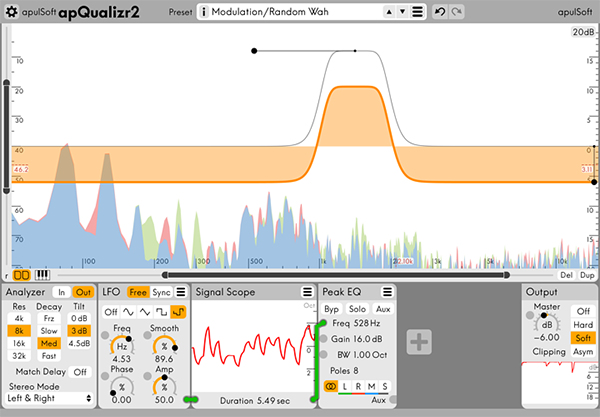
apulSoft apQualizr2 is an audio plugin based on a multiband equalizer layered on top of a fre- quency analyzer with elements of a modular effects system. It features graphical editing of top quality low latency filters and modular modulation of various filter parameters. It can be used for all standard EQ applications and can produce many modulation and dynamics effects thanks to the dynamics and lfo modules included.
apQualizr2’s filters are based on a unique method to match ideal frequency response curves over the entire frequency spectrum while maintaining minimal latency. Applicable filter types have adjustable steepness (adjustable number of poles) and can be individually switched to Mid-Side processing.
MAIN FEATURES
- High quality minimal latency vari-slope filters modelled perfectly over the full frequency spectrum.
- Graphical editing of filter parameters.
- Unlimited number of filter bands.
- Zoomable FFT-based frequency analyzer displayed beneath the filter curves.
- Frequency band solo feature: hold Alt to solo frequencies in mouse proximity at any time.
- Filter parameters can be modulated by a configurable network of modules.
- Current module selection: LFO, Dynamics Detector, Signal Scope, Mix, Split.
- Mid-Side / Left-Right processing per filter band.
- Comb filter.
- Output clipper with gain reduction graph.
- Interactive piano ruler
Frequently asked questions
How do I install the app?
Mount the image, drag the app into the "Applications" folder and launch it. If the system blocks the launch, allow it in "System Settings → Privacy & Security".
The app is damaged or won't launch
Reinstalling from a fresh image usually helps. Make sure your macOS version matches the one listed in the compatibility specs.
How do I update?
Download the new version from the site and install it over the current one — your settings will be preserved.
The download link doesn't work
Try a mirror or a download manager. For large files the browser often drops the connection.
How do I completely remove the app?
Use an uninstaller utility — it cleans up the service files that remain after moving the app to the trash.
VersionapQualizr v2.1.0
DeveloperapulSoft
CompatibilityOS X 10.6.8 or newer
LanguageEnglish
IncludesPre-K'ed


Information
Visitors in the group Guests cannot leave comments on this publication.
Choose a download source
apQualizr v2.1.0 · 12.15 MB