
Parallels Toolbox 1.5.2
Parallels Toolbox offers a set of tools, with no complicated settings, to simplify everyday tasks.
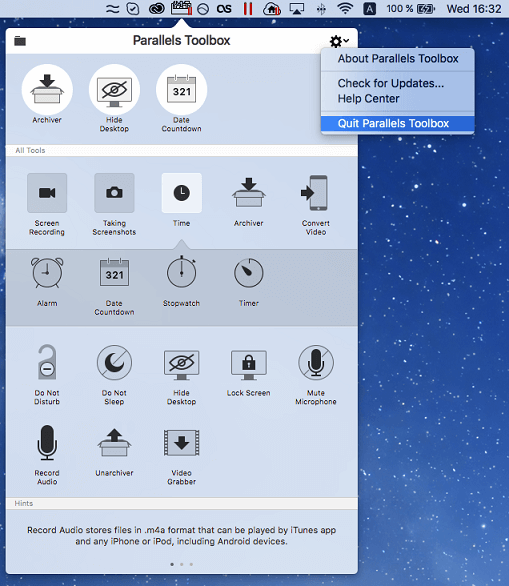
- Archive Your Files - Compress files with one click to use less storage space. Unarchive any archived files, RAR, zip, and more
- Record Your Screen - Record a video of a screen, active window, or area
- Take Screenshots - Screenshot a screen, active window, or area
- Time Management - A set of handy, easy-to-use time management tools to keep you productive and on task
- Convert A Video - Optimize your home movie or television shows for iPad or iPhone
- Do Not Disturb - Avoid distractions so you can focus on the task at hand. When activated, all notifications and the Dock app animations are disabled
- Do Not Sleep - Prevent your computer from going to sleep and your display from dimming. Ensure a task won’t be interrupted by disabling settings that would allow the computer to go to sleep
- Download A Video - Download your favorite videos from the Internet: YouTube, Vimeo, and many more
- Hide Desktop - Use this tool to hide all the files, folders, and other icons on your desktop when you’re doing a presentation, sharing or recording your screen, or taking screenshots
- Lock Screen - Immediately lock your screen to prevent unauthorized access to your computer. No need to wait until the password-protected screen saver kicks in
- Mute Your Microphone - Mute your computer’s microphone to prevent unauthorized or unwanted listening by other apps
- Record Audio - Use this tool to record audio from your computer’s built-in microphone with a single click. You can record from an external microphone if it is selected as the input source in System Preferences > Sound
- Note: price is for a yearly subscription. It includes new and updated tools.
WHAT’S NEW
Version 1.5.2:
- Resolves the issue where some videos from Facebook could not be downloaded
SCREENSHOTS
Frequently asked questions
How do I install the app?
Mount the image, drag the app into the "Applications" folder and launch it. If the system blocks the launch, allow it in "System Settings → Privacy & Security".
The app is damaged or won't launch
Reinstalling from a fresh image usually helps. Make sure your macOS version matches the one listed in the compatibility specs.
How do I update?
Download the new version from the site and install it over the current one — your settings will be preserved.
The download link doesn't work
Try a mirror or a download manager. For large files the browser often drops the connection.
How do I completely remove the app?
Use an uninstaller utility — it cleans up the service files that remain after moving the app to the trash.
VersionParallels Toolbox 1.5.2
DeveloperParallels Holdings Ltd
CompatibilitymacOS Sierra 10.12, OS X El Capitan 10.11.6 or later, OS X Yosemite 10.10.5
LanguageEnglish, Russian
IncludesPre-K'ed





Information
Visitors in the group Guests cannot leave comments on this publication.
Choose a download source
Parallels Toolbox 1.5.2 · 26.43 MB