
Vidmore Screen Recorder 1.1.50
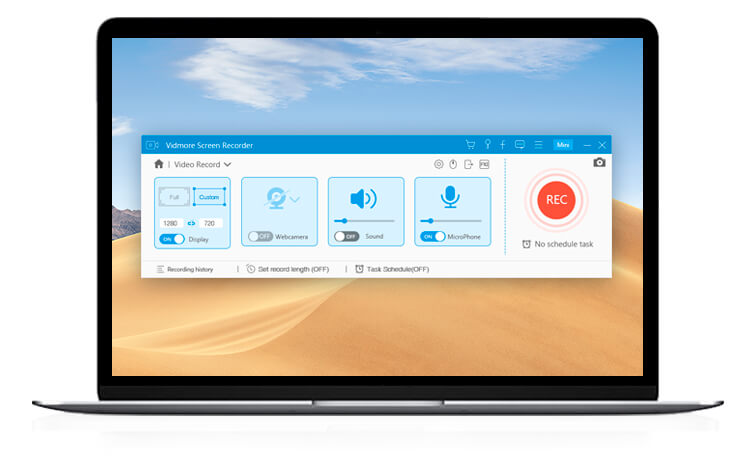
Vidmore Screen Recorder can capture any screen any time you want. No matter you want to record computer screen, exciting gameplay, webcam videos, online lectures, favorite music, or just save a screenshot.
Record Desktop Record Desktop
Easily capture your desktop screen activity of any area.
Record Gameplay Record Gameplay
Record 2D/3D games, flash games and online games on PC.
Record Live Streaming Video Capture Streaming Video
Capture online videos from YouTube, Dailymotion, Facebook, TED and more.
Record Webcam Record Webcam
Record and save high-quality video content from your webcam.
Record Audio Record Audio
Record any audio on your computer, and your voice from microphone.
Take Screenshots Take Screenshots
Take a screenshot of the whole screen or of a single window.
Frequently asked questions
How do I install the app?
Mount the image, drag the app into the "Applications" folder and launch it. If the system blocks the launch, allow it in "System Settings → Privacy & Security".
The app is damaged or won't launch
Reinstalling from a fresh image usually helps. Make sure your macOS version matches the one listed in the compatibility specs.
How do I update?
Download the new version from the site and install it over the current one — your settings will be preserved.
The download link doesn't work
Try a mirror or a download manager. For large files the browser often drops the connection.
How do I completely remove the app?
Use an uninstaller utility — it cleans up the service files that remain after moving the app to the trash.



Choose a download source
Vidmore Screen Recorder 1.1.50 · 35.58 MB