
BookmarkApp 1.7.6
BookmarkApp is an unique and useful tool for organizing bookmarks in your Safari browser.
Everyone who use Safari as a main browser has many duplicated bookmarks.
Even after cleaning, during importing or adding of the new bookmarks may appear a lot of new duplicates. The aim of this tool to make your Safari clean and organized, and save your time.
Remove duplicate bookmarks and organize your Safari. Fast and easy!
FEATURES
Duplicates
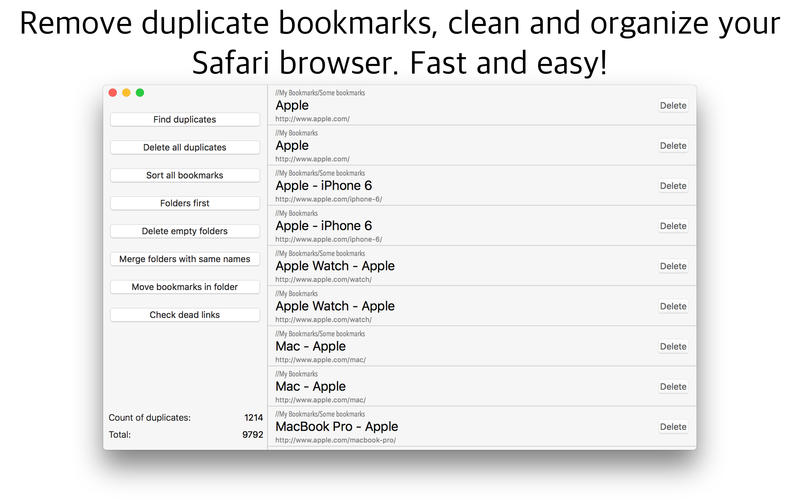
- Finds duplicates very fast
- Deletes all duplicates with one click
- Selective deletion in list
Sorting
- Sorts all bookmarks with one click
- Puts folders first
Organizing
- Deletes unnecessary empty folders
- Merges folders with same names
- Moves bookmarks depending on search criteria in folder
- Checks dead links
UI
- Professional translation and from native speakers
HOW TO USE
- Just click on "Find duplicates" and the app will show you all duplicated bookmarks of Safari. Then you can delete them.
Version 1.7.6
- Fixed crash of "Check dead links" (which was introduced with macOS High Sierra update)
- Performance improvements
Frequently asked questions
How do I install the app?
Mount the image, drag the app into the "Applications" folder and launch it. If the system blocks the launch, allow it in "System Settings → Privacy & Security".
The app is damaged or won't launch
Reinstalling from a fresh image usually helps. Make sure your macOS version matches the one listed in the compatibility specs.
How do I update?
Download the new version from the site and install it over the current one — your settings will be preserved.
The download link doesn't work
Try a mirror or a download manager. For large files the browser often drops the connection.
How do I completely remove the app?
Use an uninstaller utility — it cleans up the service files that remain after moving the app to the trash.





Choose a download source
BookmarkApp 1.7.6 · 6.82 MB