
Pins 2.1.4
Whether you're OCD or just really keen on your bookmarks Pins is the app for you.
Keep all your bookmarks safely stored, neatly categorized and always at your fingertips. A lifetime of visited web site information in one single app.
Easy but powerful
Pins is easy to use but also offers flexibility when working with your bookmarks.
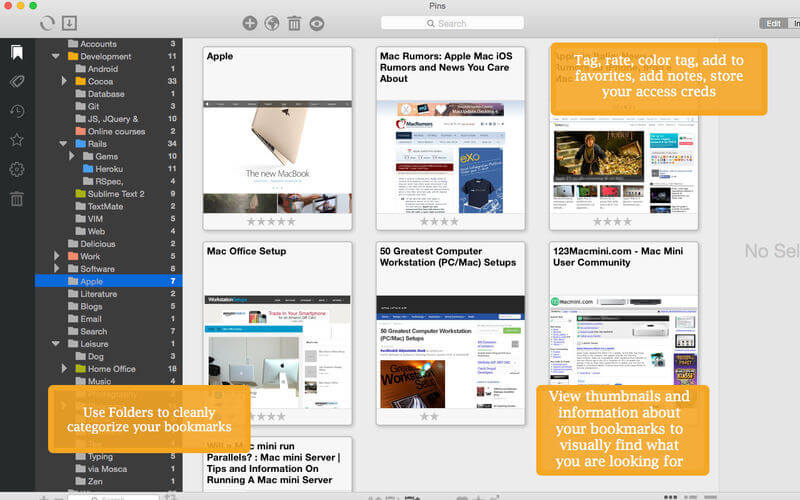
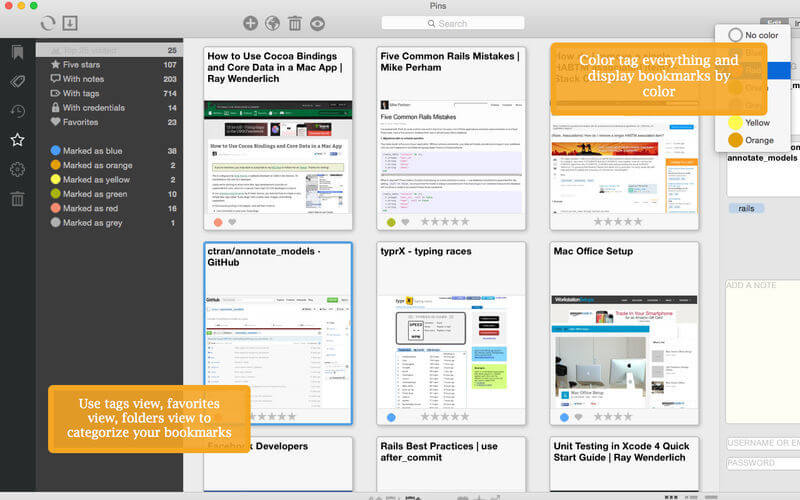
You can use tags, folders, color labels, rating and favorite some some of your bookmarks to catalog and easily retrieve what you are looking for.
Many ways to view your bookmarks
Different views can suit different needs. Are you more of a folder person or more of a tag person? Do you prefer to find the bookmarks you changed or viewed or added lately? Pins offers you many different options to suit your workflow whether you are a professional web developer, a researcher or just keen on keeping the collection of bookmarks you have been working on for years.
Graphical thumbnails and live preview
Pins offers you graphical previews to visually browse your favorite sites, live preview, you can add notes to single bookmarks, store your username and password if needed, and more importantly sync this information across different macs.
Delicious and Pinboard on board
Pins is also a complete Delicious and Pinboard client and will allow you to use your online bookmarks from within the app and sync back the modifications in real time.
Sort and Search however you like
You'll also be able to sort bookmarks within your Library or folders by date, title, URL, rating or favorite. Search within the app is extremely powerful and can be fine tuned to search title, URL, notes, folder, tags and so on.
Import from browsers and with Extensions to save bookmarks with one click!
You can Import bookmarks from Safari, Chrome, Firefox easily (you'll need to export an html file from these first). Pins comes equipped with powerful browser extensions that will allow you to store bookmarks in Pins without ever leaving your favorite web browser.
Version 2.1.4:
- Release notes were unavailable when this listing was updated.
Frequently asked questions
How do I install the app?
Mount the image, drag the app into the "Applications" folder and launch it. If the system blocks the launch, allow it in "System Settings → Privacy & Security".
The app is damaged or won't launch
Reinstalling from a fresh image usually helps. Make sure your macOS version matches the one listed in the compatibility specs.
How do I update?
Download the new version from the site and install it over the current one — your settings will be preserved.
The download link doesn't work
Try a mirror or a download manager. For large files the browser often drops the connection.
How do I completely remove the app?
Use an uninstaller utility — it cleans up the service files that remain after moving the app to the trash.





Choose a download source
Pins 2.1.4 · 11.89 MB