
WMF Converter Pro 3.4.2
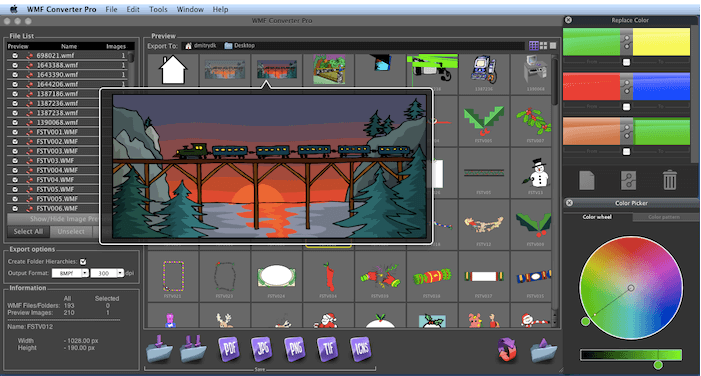
WMF Converter Pro allows users to work with WMF images on Macs easily. It lets you render and convert single or multiple WMF files, preview them, change colors in vector based WMF files, and save either all of them, or selected ones as Mac native images in one of 10 file formats, including vector formats (PDF, EPS) and the raster ones, such as TIFF, JPEG, PNG, 8BPS (Photoshop), BMP, SGI, Mac ICNS, and more. The image resolution setting can also be used when saving in raster image formats.
On Windows, many graphics and forms are stored and exchanged as Windows Metafiles (WMF*). On Mac, you can not preview WMF files unless you open them in a Microsoft applications such as Word or PowerPoint, or use WMF Converter Pro from Cristallight So, if you wish to use WMF images on Mac - this is the right choice for you.
The product interface is easy and intuitive. It allows you to accomplish WMF files conversion in just a couple of steps. Its main features are:
- Navigate through WMF images using navigation keys and keyboard shortcuts
- View WMFs at different zoom amounts
- Convert Mac WMF files to vector formats
- Convert WMF files to most common raster formats with different resolution amounts
- Batch convert images, or folders with WMF files
- Multiple WMF files processing
- WMF image information display
- Replace colors feature in vector based WMFs
- Export images to PDF, EPS, SGI, 8BPS (Photoshop), BMP, JPEG, PNG, TIFF and other image formats
- Export WMFs as Mac 'ICNS' files
- Multiple export buttons
- Customizable image Preview size
- Export folder hierarchy
WHAT’S NEW
Version 3.4.2:
- Functionality improvements made
SCREENSHOTS
Frequently asked questions
How do I install the app?
Mount the image, drag the app into the "Applications" folder and launch it. If the system blocks the launch, allow it in "System Settings → Privacy & Security".
The app is damaged or won't launch
Reinstalling from a fresh image usually helps. Make sure your macOS version matches the one listed in the compatibility specs.
How do I update?
Download the new version from the site and install it over the current one — your settings will be preserved.
The download link doesn't work
Try a mirror or a download manager. For large files the browser often drops the connection.
How do I completely remove the app?
Use an uninstaller utility — it cleans up the service files that remain after moving the app to the trash.
VersionWMF Converter Pro 3.4.2
DeveloperCristallight Software
CompatibilityOS X 10.6 or later, 64-bit processor
LanguageEnglish
IncludesPre-K'ed




Information
Visitors in the group Guests cannot leave comments on this publication.
Choose a download source
WMF Converter Pro 3.4.2 · 5.45 MB