Aiseesoft PDF Converter Pro - With OCR 3.3.67
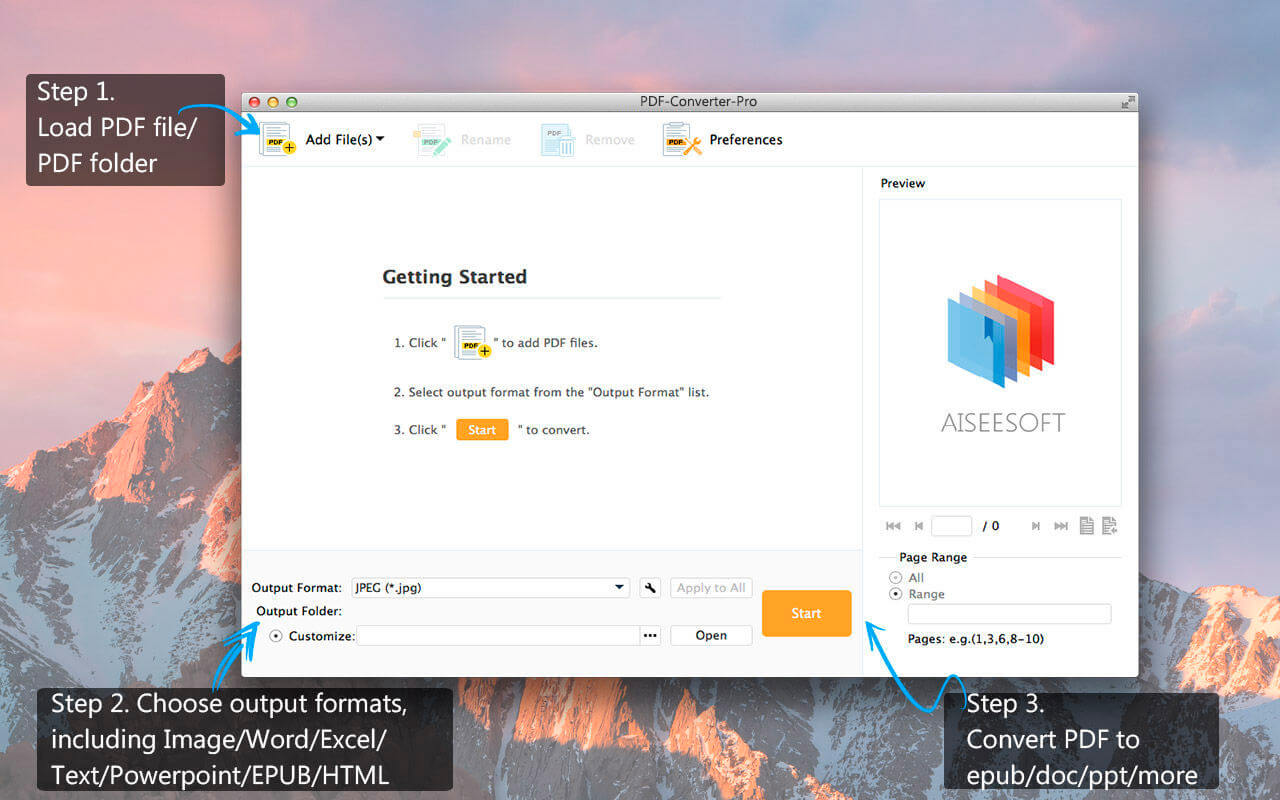
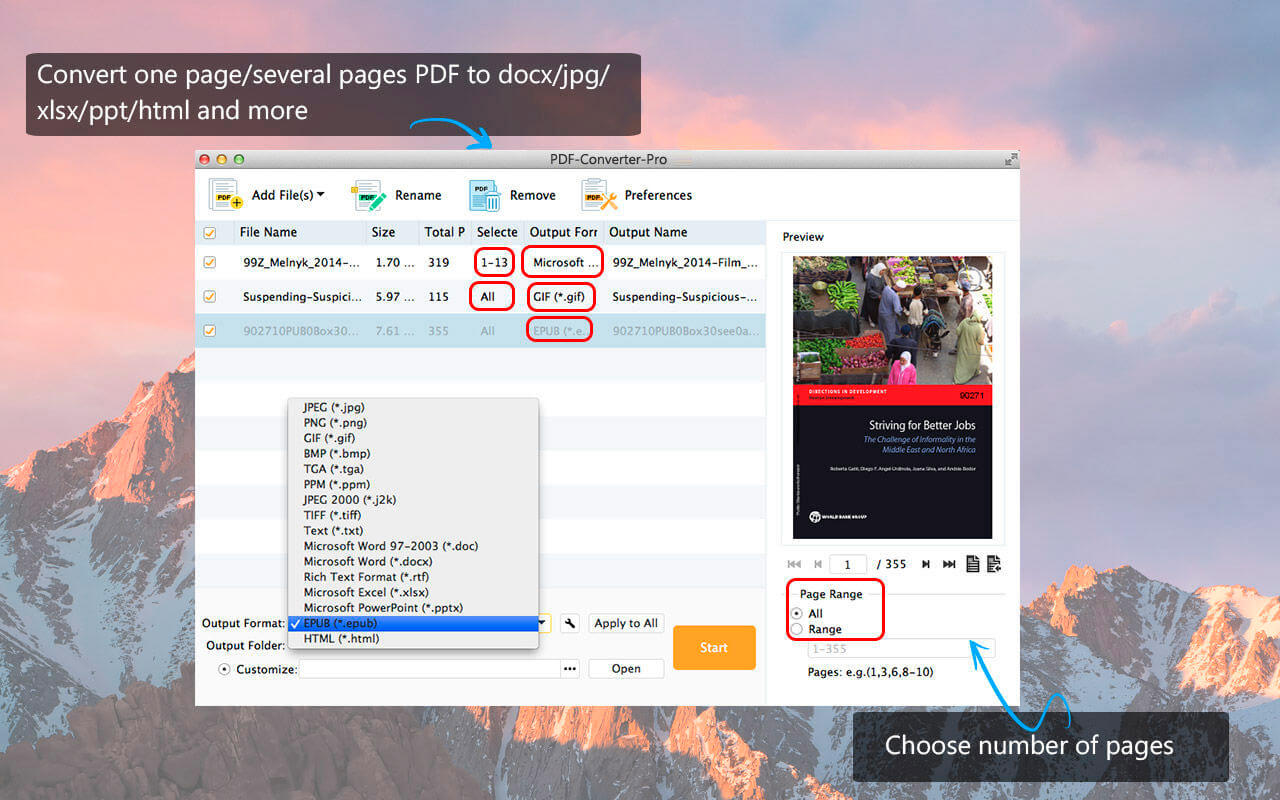

How to convert PDF to .jpg/.doc/.epub/.ppt/.png/.txt and more document or image formats? Use this all-in-one PDF converter! With it, you can convert DPF to Word/Excel/Powerpoint/Image/Text/EPUB freely. Also, you can use it as a PDF reader to preview PDF files before converting. Aiseesoft PDF Converter is powerful PDF converter software for Mac. It helps users convert any PDF file to document format (Text, Word, Excel, PPT, EPUB, RTF and HTML) and image format (JPG, PNG, GIF, BMP, TIFF, TGA, PPM, and JPEG2000) on Mac without losing quality and formatting . This Mac PDF Converter can preserve the original PDF layout – embedded hyperlinks, images, tables, columns, graphics, etc.
Key features:
1. Convert any PDF to document and image file
This PDF file Converter can be PDF to Word Converter, PDF to JPG Converter and PDF to EPUB Converter, etc, because it can convert any PDF to MS document (Word, Excel and PPT), Text, Rich Text Format, EPUB, HTML and image files (.jpg, .png, .gif, .bmp, .tiff, .tga, .ppm, .j2k).
2. Preserve the PDF style and quality
Convert PDF to other file format without losing the original quality and formatting. The output file could keep the original text, hyperlinks, images, layouts, tables, columns, graphics, etc. of the original PDF.
3. Edit and customize PDF
This PDF converter can be also a PDF editor. To get customized output files and improve the output effect, there are numerous, flexible output settings for you to choose from. For document formatting, you can set the layout, text encoding, and image format/resolution. For image formatting, you are able to set the output image size, color. In a word, this PDF editor supports editing PDF files.
4. Support OCR technology
Adopt OCR technology to digitize texts in the scanned, image-based PDF file accurately.
5. Batch conversion
Aiseesoft PDF converting app allows you to change multiple PDF files to different output formats with only one conversion.
6. Partial conversion
Do you want to convert a/one PDF to word? With this PDF converter software, you can convert part of the PDF file by selecting specific page(s) or page range from the source PDF freely and easily.
Version 3.3.67
- Fixed the problem that when you preview and export some files, there's only audio but no image.
- Improved the conversion stability and speed.
Frequently asked questions
How do I install the app?
Mount the image, drag the app into the "Applications" folder and launch it. If the system blocks the launch, allow it in "System Settings → Privacy & Security".
The app is damaged or won't launch
Reinstalling from a fresh image usually helps. Make sure your macOS version matches the one listed in the compatibility specs.
How do I update?
Download the new version from the site and install it over the current one — your settings will be preserved.
The download link doesn't work
Try a mirror or a download manager. For large files the browser often drops the connection.
How do I completely remove the app?
Use an uninstaller utility — it cleans up the service files that remain after moving the app to the trash.
Related posts
Choose a download source
Aiseesoft PDF Converter Pro - With OCR 3.3.67 · 490.26 MB