VidConvert 1.7.2
VidConvert is a video converter designed to make converting your videos simple and easy. VidConvert will convert just about any type of video into one of the many popular formats of today. Creating videos for your iPhone or iPad, for your Mac or TV, or formats such as DivX and MPEG are just a click away with VidConvert.
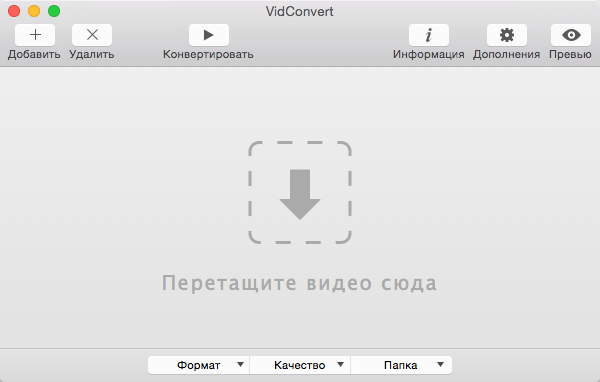
You do not need to be an expert to use VidConvert. Simply add a file, select a format and a quality, and click convert. Optionally you can change your save folder from the main window. For advanced users you can select the Advanced quality if you choose to allow such options as custom Frame Rate, Bit Rate, etc. But for most users simply choosing Normal or High quality should be sufficient. After your conversion is finished simply add more files or quit VidConvert and the job is done.
Supported formats include iPhone, iPod, iPad, QuickTime, .mp4, MPEG-1 and 2, DivX, Xvid, and audio only formats such as .mp3 and .m4a. VidConvert can add iTunes compatible videos directly to your iTunes library for convenience and for syncing with your iPhone, iPod, or other iDevice. It's also possible to turn your favorite videos in audio only tracks for playback in your favorite audio device. And VidConvert is not limited to creating videos just for Apple devices, in fact any device that can play one of the supported formats can play a video converted by VidConvert. With VidConvert converting your videos couldn't be easier.
WHAT’S NEW
Version 1.7.2:
- Added notifications
- Added badges
- Minor fixes
Screenshots
Frequently asked questions
How do I install the app?
Mount the image, drag the app into the "Applications" folder and launch it. If the system blocks the launch, allow it in "System Settings → Privacy & Security".
The app is damaged or won't launch
Reinstalling from a fresh image usually helps. Make sure your macOS version matches the one listed in the compatibility specs.
How do I update?
Download the new version from the site and install it over the current one — your settings will be preserved.
The download link doesn't work
Try a mirror or a download manager. For large files the browser often drops the connection.
How do I completely remove the app?
Use an uninstaller utility — it cleans up the service files that remain after moving the app to the trash.
VersionVidConvert 1.7.2
DeveloperReggie Ashworth
CompatibilityOS X 10.7.5 or later, 64-bit processor
LanguageMultilingual
IncludesCORE Keygen
Information
Visitors in the group Guests cannot leave comments on this publication.
Choose a download source
VidConvert 1.7.2 · 8.87 MB