
NotePlan - Markdown Calendar 1.6.30
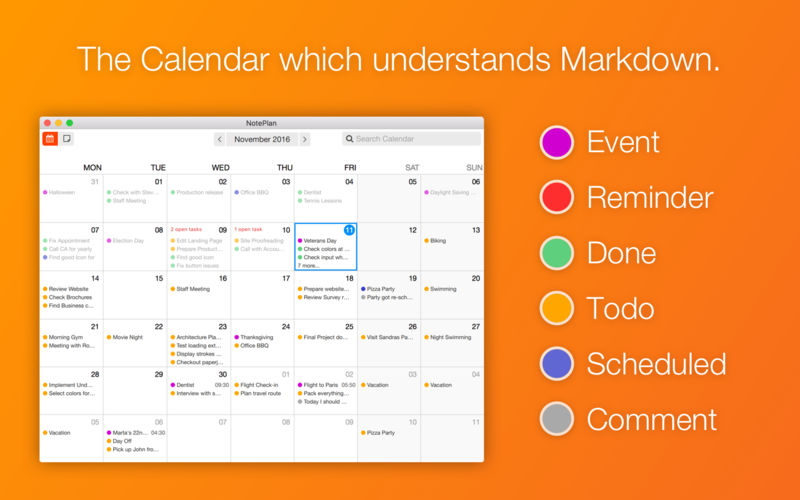
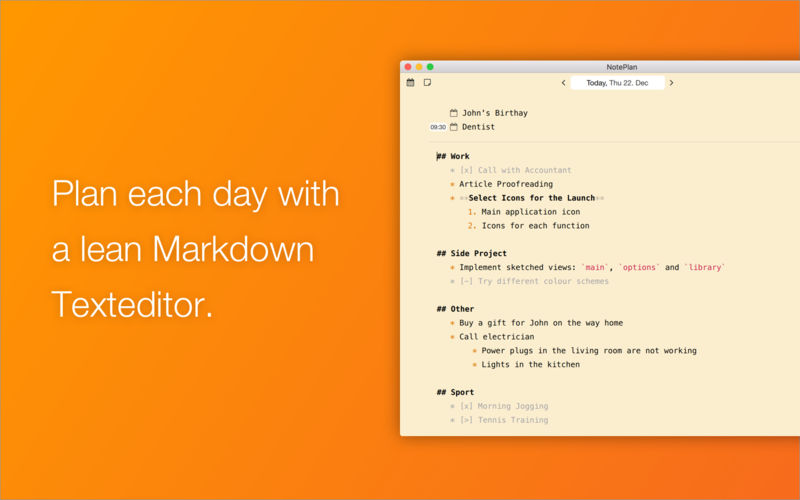
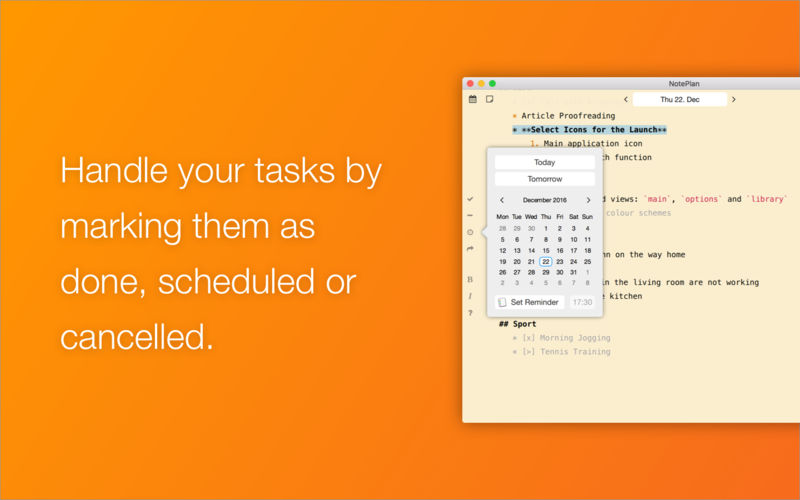
NotePlan is designed to make your task planning more productive. It solves problems like bloated, ever-growing to-do lists.
- Modern Writing - Enjoy a full writing area with Markdown and injected flavour for productivity.
- Calendar Notes - A calendar shows you where the action is. Jump right into a day to manage it by writing notes into each day.
- Backlog Notes - Save away your backlogs and general notes behind the daily planning and apart from the calendar.
- Full, modern writing tool included for every day of a month - NotePlan will give you the convenience of a modern writing editor supporting markdown. Add formatting to your task lists and notes to keep it better organized.
- Monthly calendar overview with color-coded daily note content - See a summary of your notes and color coded lists in a monthly calendar view. Use keyboard shortcuts to navigate and quickly jump into a day to review or edit it. The calendar will also show you, if you missed out on some tasks, so nothing important slips from your mind.
- Schedule tasks to stay organized - If you couldn't finish a task, don't leave it unmanaged on the list. Re-schedule it to another day. Or, if you manage a backlog, schedule a todo directly from there onto your calendar.
- Backlogs, drafts, bug lists or just text notes, apart from the calendar - Some information is not related to a day and should be kept separated from the calendar. Like bug lists or project backlogs. They can be managed in NotePlan and scheduled directly into the calendar, when required. Notes can be organized by tagging them. In the overview you can filter your notes by tags.
- New: Spellchecker!
- New: Title of opened general note is also shown in window title.
- New: Support Control+H as backspace
- New: Add enter full-screen with shortcut Control + Command + F
- Fixed: The text in the conflict view is selectable now, so you can resolve note conflicts easier by copying the text somewhere else.* Fixed: Multi-Day events were not shown inside the note, only inside the calendar.
- Fixed: Support 12 hour format (AM/PM) also in the @done links.
- Fixed: Keep the order when archiving to-dos again through the menu option. Before the fix the order of archived to-dos was reversing each time.
- Fixed: Archiving to-dos was duplicating titles when another language than English was used. Such as German.
- Fixed: Some reminders with late due times were not displayed inside a day's note.
- Fixed: Markdown help screen was showing the wrong shortcut for ordered/unordered list.
- Fixed: Minor corrections of items in the menu-bar.
Frequently asked questions
How do I install the app?
Mount the image, drag the app into the "Applications" folder and launch it. If the system blocks the launch, allow it in "System Settings → Privacy & Security".
The app is damaged or won't launch
Reinstalling from a fresh image usually helps. Make sure your macOS version matches the one listed in the compatibility specs.
How do I update?
Download the new version from the site and install it over the current one — your settings will be preserved.
The download link doesn't work
Try a mirror or a download manager. For large files the browser often drops the connection.
How do I completely remove the app?
Use an uninstaller utility — it cleans up the service files that remain after moving the app to the trash.
VersionNotePlan - Markdown Calendar 1.6.30
DeveloperEduard Metzger
CompatibilityOS X 10.10 or later, 64-bit processor
LanguageEnglish
IncludesK'ed by TNT


Information
Visitors in the group Guests cannot leave comments on this publication.
Choose a download source
NotePlan - Markdown Calendar 1.6.30 · 23.21 MB