
Net Radar 1.3 fix

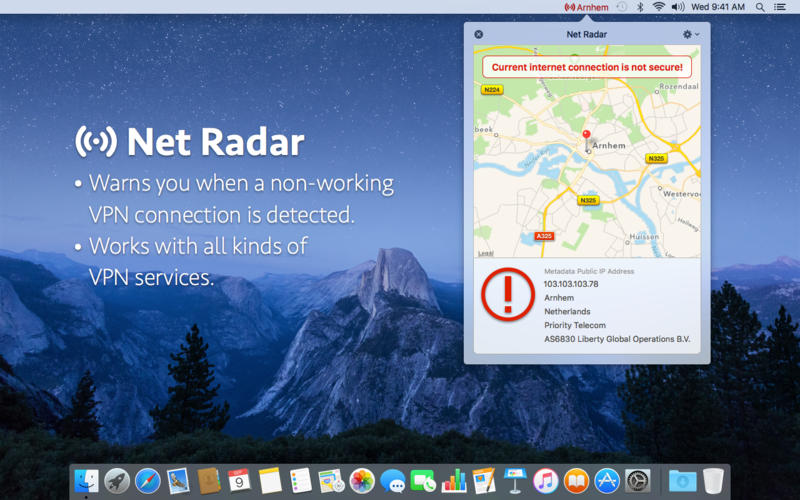
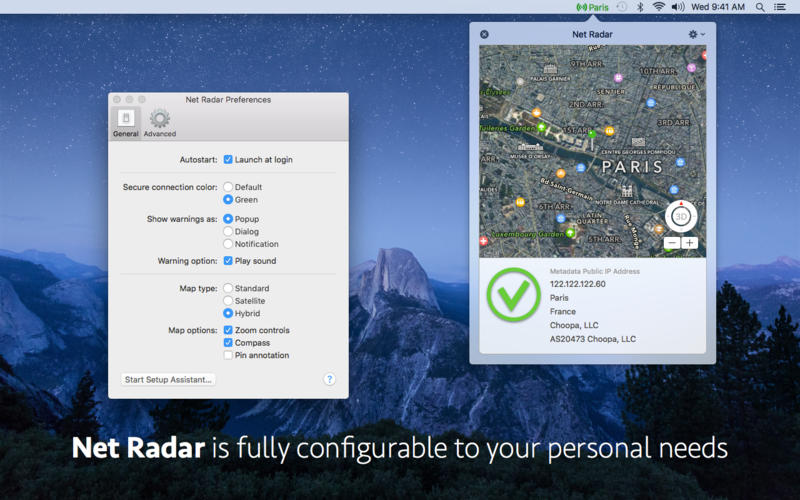
Net Radar monitors the status of your VPN connection and shows the current geographical location of your public IP address in the menu bar. Net Radar will warn you immediately when your connection is no longer private.
Features
- Runs in the menu bar, showing the current geographical location of your Internet connection.
- The color of the displayed location indicates the status of your VPN connection.
- Clicking on the menu bar item will display a popup showing the location on a map and the status of your connection.
- Can be automatically launched at startup of your Mac.
- Works with all types of remote VPN connections.
- The type of warning can be configured to be a simple notification, a modal dialog, or as a popup.
- Does not interfere with your Internet connection or VPN setup.
- Includes a Setup Assistant that leads you through a few simple steps to set up Net Radar.
- Can also be used to just monitor the location of your public IP address, without VPN verifications.
NOTE
Net Radar monitors the operational status of your VPN connection, based on system events and empirical data.
- Tested with OpenVPN, PPTP, L2TP, IPSec, WireGuard and IKEv2.
- Net Radar does not include a VPN service.
- Net Radar is not able to check whether your connection is encrypted or not.
- Net Radar is not able to detect IPv6 and DNS leaks.
Version 1.3
- Optimised for macOS 11 Big Sur, runs natively on Apple Silicon and Intel Macs.
- Improved responsiveness with VPN services based on WireGuard.
Frequently asked questions
How do I install the app?
Mount the image, drag the app into the "Applications" folder and launch it. If the system blocks the launch, allow it in "System Settings → Privacy & Security".
The app is damaged or won't launch
Reinstalling from a fresh image usually helps. Make sure your macOS version matches the one listed in the compatibility specs.
How do I update?
Download the new version from the site and install it over the current one — your settings will be preserved.
The download link doesn't work
Try a mirror or a download manager. For large files the browser often drops the connection.
How do I completely remove the app?
Use an uninstaller utility — it cleans up the service files that remain after moving the app to the trash.



Choose a download source
Net Radar 1.3 fix · 4.58 MB
Previous versions
Net Radar 1.3 fix
Previous versions are available to registered users.