
Net Monitor 4.9.2
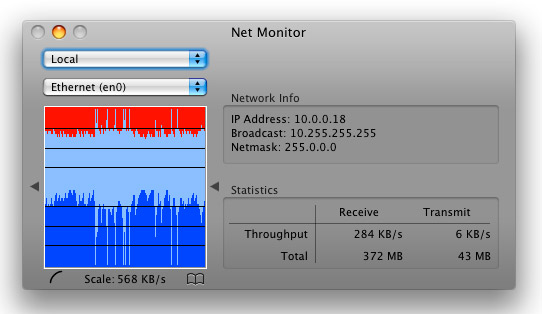
NetMonitor is a network utility for the rest of us. Graphs network activity of local and remote computers; records traffic activity; calculates total traffic between dates; measures traffic speed. Highly customizable.
Features
- Traffic log
- Traffic calculator
- Traffic reports (HTML and XML)
- Stopwatch
- 7 graph types, 5 scaling options, auto scaling mode, 4 scrolling directions, transparency, and grid
- Textual display of throughput, interval data through and total data through
- Updates dynamically in sync with network configuration and location
- Monitors remote computers
PPP Features
- Connection window for the control and display of connection status
- Connection window display includes IP (local and remote), speed of connection and time connected
- Connect/Disconnect from the Dock, the menu bar, or the floating window
- Display status of connection in the Dock and menu bar (including connection details via tool-tip)
- Display of time connected in the menu bar
- Auto connect on startup
- Auto disconnect on quit
- Auto reconnect after sleep; auto reconnect on disconnect by remote peer
- Connect at a minimum speed; configurable audio feedback for PPP events
- Display of PPP log
WHAT’S NEW
Version 4.9.2:
- Compatible with macOS 10.12 Sierra
- Removed menubar view position preference
- On macOS Sierra position can be adjusted by holding the cmd key and dragging
- Download dmg is code signed
SCREENSHOTS
Frequently asked questions
How do I install the app?
Mount the image, drag the app into the "Applications" folder and launch it. If the system blocks the launch, allow it in "System Settings → Privacy & Security".
The app is damaged or won't launch
Reinstalling from a fresh image usually helps. Make sure your macOS version matches the one listed in the compatibility specs.
How do I update?
Download the new version from the site and install it over the current one — your settings will be preserved.
The download link doesn't work
Try a mirror or a download manager. For large files the browser often drops the connection.
How do I completely remove the app?
Use an uninstaller utility — it cleans up the service files that remain after moving the app to the trash.
VersionNet Monitor 4.9.2
DeveloperTGuy Meyer
CompatibilityOS X 10.6 or later, 64-bit processor
LanguageEnglish
IncludesK





Information
Visitors in the group Guests cannot leave comments on this publication.
Choose a download source
Net Monitor 4.9.2 · 1.15 MB