
SynoTool 1.0
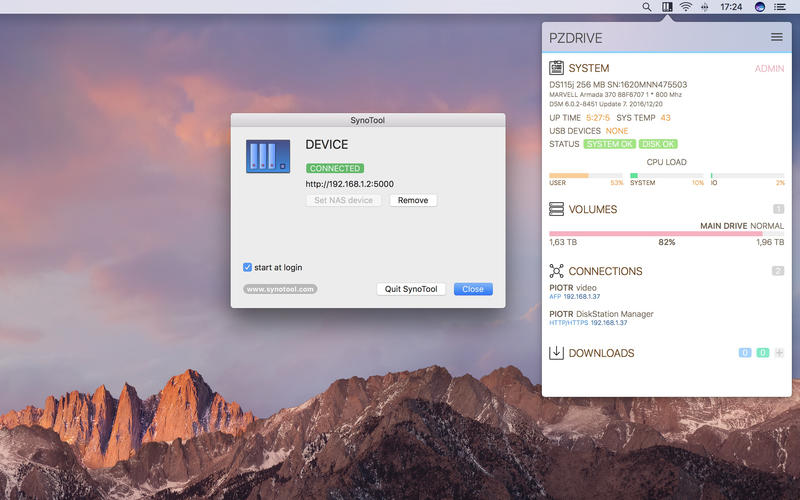
SynoTool shows your Synology device status in your local network every time you click on its icon in Menu Bar. You can also manage Download Station service.
One click and you see:
- device information and status
- storage volumes total size and free space
- connected users
- task items from Download Station
SynoTool also makes it easy to manage Download Station tasks.
SynoTool is 100% native application created with Swift 3
- it has Zero Energy Impact on your MacBook's battery
- sends and receives requests only in your local network
- authentication data is stored in Keychain.
REQUIREMENTS
- Synology device (NAS or Router) with software version DSM 6 connected to your local network
- user account with admin rights (TFA currently not supported)
- Download Station installed if you want to monitor and manage downloads
- macOS version 10.12 or higher
Screenshots
Frequently asked questions
How do I install the app?
Mount the image, drag the app into the "Applications" folder and launch it. If the system blocks the launch, allow it in "System Settings → Privacy & Security".
The app is damaged or won't launch
Reinstalling from a fresh image usually helps. Make sure your macOS version matches the one listed in the compatibility specs.
How do I update?
Download the new version from the site and install it over the current one — your settings will be preserved.
The download link doesn't work
Try a mirror or a download manager. For large files the browser often drops the connection.
How do I completely remove the app?
Use an uninstaller utility — it cleans up the service files that remain after moving the app to the trash.
VersionSynoTool 1.0
DeveloperPiotr Zagawa
CompatibilitymacOS 10.12 or later, 64-bit processor
LanguageEnglish
IncludesPre-K'ed





Information
Visitors in the group Guests cannot leave comments on this publication.
Choose a download source
SynoTool 1.0 · 5.09 MB