
Rubbernet 1.2
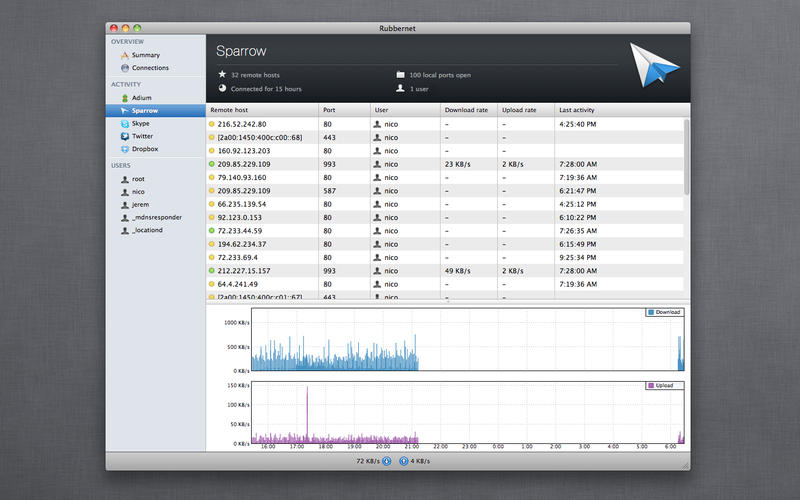
Rubbernet provides a breakdown of per-app network usage, so you can quickly detect apps that phone home, connect to servers without your knowledge, or blame the app that's slowing down your network.
Features:
- Real-time network dashboard:
Rubbernet provides real-time monitoring so you can keep an eye on the exact state of your live network connections. With the Activity sidebar, you'll be able to see which applications are currently communicating over your network. When connections are idle, they will dim to let you know that traffic has stopped. - App bandwidth usage:
Rubbernet provides a breakdown of per-app network usage, so you can quickly detect apps that phone home, connect to certain servers without your knowledge, or blame the app that's slowing down your network. - Live graphs:
Real-time charting displays download and upload transfer rates for all active apps on all monitored Macs. Visualize your network usage and get a bead on network hogs before they get out of control. - Remote monitoring:
Monitor all computers on your network from one Rubbernet instance on your Mac. No need to get up and open Rubbernet on a remote Mac to see its network statistics. Unlike other network monitoring tools, there is no complicated setup. It takes just a second to install or uninstall the necessary tools for Rubbernet to work. After that, they sit quietly in the background and provide the app with live data with minimal resource consumption. - Multi-user support:
Have multiple user accounts on your Macs? Rubbernet automatically assigns every incoming and outgoing connections to the users they belong to. - One-click install/uninstall:
Unlike other network monitoring tools, there is no complicated setup. It takes just a second to install or uninstall the necessary tools for Rubbernet to work. After that, they sit quietly in the background and provide the app with live data with minimal resource consumption.
WHAT’S NEW
Version 1.2:
Rubbernet 1.2 is a free upgrade for all 1.x customers.
- Fullscreen support in OS X 10.7
- Removed activity logs from the system's console
- Fixed "Bandwidth Monitoring Disabled" message in app view
- Fixed transparency issues with the 'New Connection' window's buttons
SCREENSHOTS


Frequently asked questions
How do I install the app?
Mount the image, drag the app into the "Applications" folder and launch it. If the system blocks the launch, allow it in "System Settings → Privacy & Security".
The app is damaged or won't launch
Reinstalling from a fresh image usually helps. Make sure your macOS version matches the one listed in the compatibility specs.
How do I update?
Download the new version from the site and install it over the current one — your settings will be preserved.
The download link doesn't work
Try a mirror or a download manager. For large files the browser often drops the connection.
How do I completely remove the app?
Use an uninstaller utility — it cleans up the service files that remain after moving the app to the trash.
VersionRubbernet 1.2
DeveloperConceited Software
CompatibilityOS X 10.6 or later, 64-bit processor
LanguageEnglish
IncludesPre-K'ed

Information
Visitors in the group Guests cannot leave comments on this publication.
Choose a download source
Rubbernet 1.2 · 8.99 MB