
PeakHour 4.1.14


PeakHour is a beautiful, real-time network-traffic visualizer that lives in your menu bar. It provides an instant view of your Internet or WiFi activity in real-time. PeakHour is great for monitoring your Internet or WiFi connection, and can help you determine how much bandwidth your computers and devices are using at any given time.
Monitor
Monitor network performance of capable devices in real-time: routers, WiFi, Macs, PCs, NAS, servers and more.
Troubleshoot & Diagnose
Help troubleshoot slow downloads, poor voice/video call quality.
Track Usage
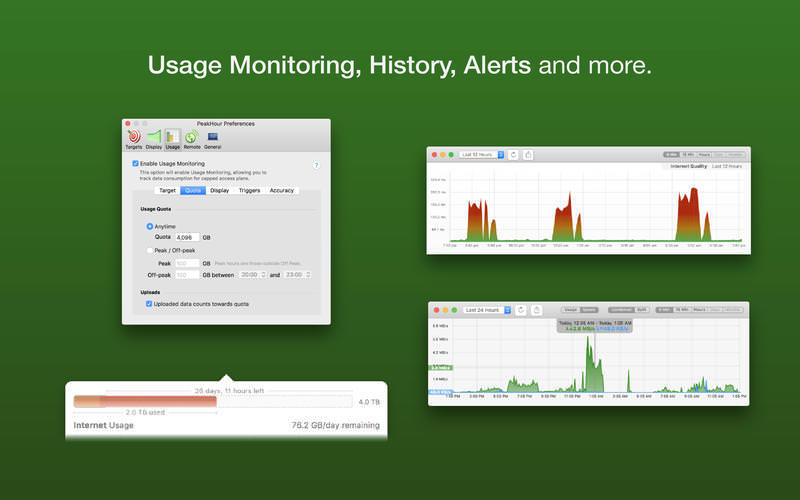
Keep an close eye on your usage; set up alerts to warn if you're exceeding your quota.
Compatibility
Compatible with most SNMP and UPnP-enabled network devices.
History
PeakHour now includes a powerful history engine that stores usage and performance data for as long as you wish.
The History view lets you look back at usage and performance over any time period: hours, days, weeks, months or years.
Enhanced Real-time
PeakHour's real-time view has been enhanced to support zooming and scroll-back. You can now scroll sideways back in time (up to several hours) to see past activity.
You can also zoom the view in or out to see more or less detail.
Usage Triggers
As well as monitoring usage, PeakHour can now raise notifications (via Notification Center), send an email or execute a script/program when a certain usage threshold has been reached.
Configuration made even easier
For PeakHour 3, the Configuration Assistant has been completely re-designed to make it easier than ever to discover compatible devices.
Version 4.1.14:
- Fixed: Fix for some SNMP devices returning 'unknown reponse'
Frequently asked questions
How do I install the app?
Mount the image, drag the app into the "Applications" folder and launch it. If the system blocks the launch, allow it in "System Settings → Privacy & Security".
The app is damaged or won't launch
Reinstalling from a fresh image usually helps. Make sure your macOS version matches the one listed in the compatibility specs.
How do I update?
Download the new version from the site and install it over the current one — your settings will be preserved.
The download link doesn't work
Try a mirror or a download manager. For large files the browser often drops the connection.
How do I completely remove the app?
Use an uninstaller utility — it cleans up the service files that remain after moving the app to the trash.
VersionPeakHour 4.1.14
DeveloperDigitician Inc.
CompatibilityOS X 10.9 or later, 64-bit processor
LanguageEnglish
IncludesK'ed by HCiSO





Choose a download source
PeakHour 4.1.14 · 17.47 MB
Previous versions
PeakHour 4.1.14
Previous versions are available to registered users.
Comments 1