Disk Inspector 2.1.1
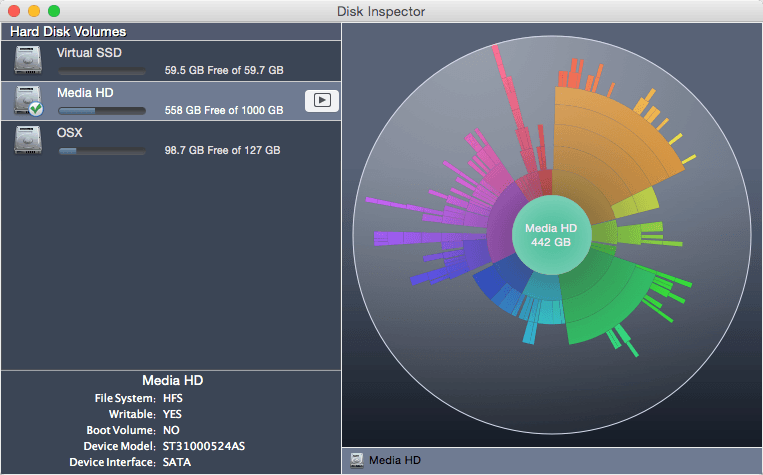
Disk Inspector is a disk scanning utility for Mac OS X. It scans any supported drive and generates a chart representing the file system usage.
Disk Inspector scans the disk file structure, analyzes the remaining space, and represents your files and folders with intuitive sunburst-like visuals. Bigger items are larger in the diagram, making it simple to find large files.
Disk Inspector scans: Hard Disk Volumes, SSDs, CD and DVD disks, Flash drives, External storage disks, mounted DMG volumes, and even folders with FileVault protection!
Disk Inspector has a visual scanning mode, and results of the scan are shown in real time. A small progress bar on the dock icon displays scanning progress.
You can obtain additional information for every disk: whether or not the disk is writable or bootable, what the file system type is, and the disk’s connect protocol. For every disk item, you can use QuickLook Preview, get additional detailed information, and show the item in Finder before deleting or move unused files.
Note: All hidden files are displayed as a single item in the diagram.
If you need to preview even system hidden files & folders use our advanced clean up scanner - Disk Expert (see a link in “More Developer’s Products").
Features:
- Animated scanning process
- Real-time display of inspected files & folders during scan
- Progress bar during scanning process
- Detailed information about disk
- Information about files
- QuickLook for files
- Copy path for the item
- Displaying the folders structure, skipping free space
- And even rotate the resulting diagram!
SCREENSHOTS
Frequently asked questions
How do I install the app?
Mount the image, drag the app into the "Applications" folder and launch it. If the system blocks the launch, allow it in "System Settings → Privacy & Security".
The app is damaged or won't launch
Reinstalling from a fresh image usually helps. Make sure your macOS version matches the one listed in the compatibility specs.
How do I update?
Download the new version from the site and install it over the current one — your settings will be preserved.
The download link doesn't work
Try a mirror or a download manager. For large files the browser often drops the connection.
How do I completely remove the app?
Use an uninstaller utility — it cleans up the service files that remain after moving the app to the trash.
VersionDisk Inspector 2.1.1
DeveloperNektony
CompatibilityOS X 10.8 or later, 64-bit processor
LanguageEnglish
IncludesPre-K'ed

Information
Visitors in the group Guests cannot leave comments on this publication.
Choose a download source
Disk Inspector 2.1.1 · 3.76 MB