Movavi Screen Capture Pro 10.1.0
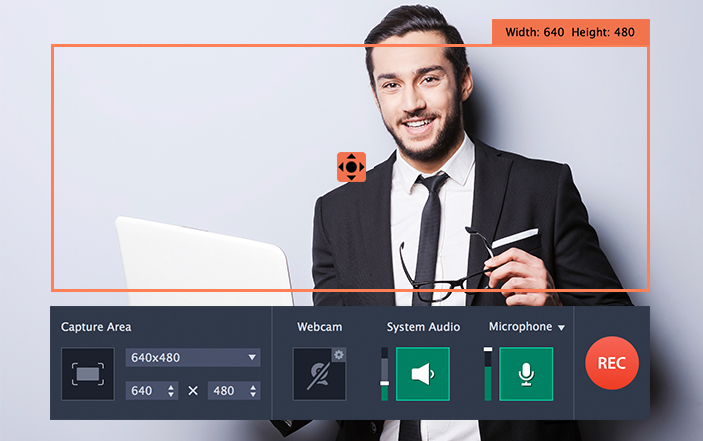
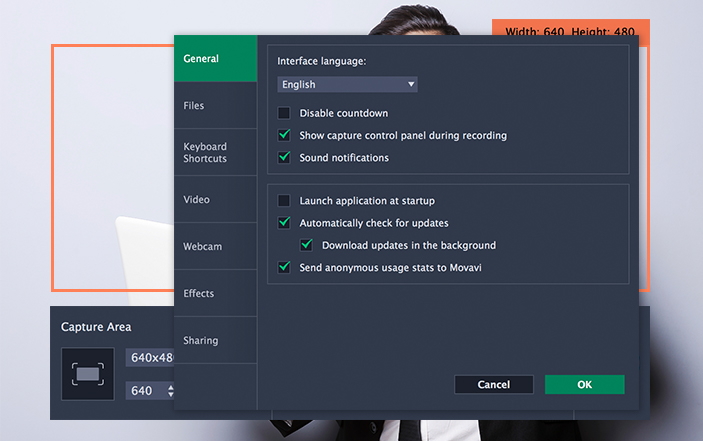
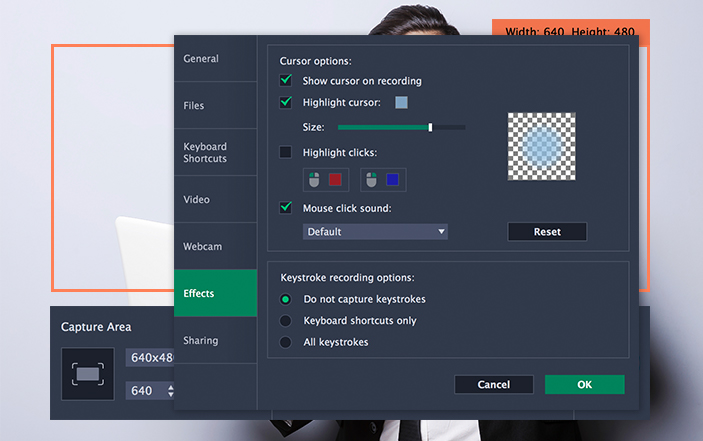
Movavi Screen Capture is perfect for recording any kind of screen video on your Mac. Enjoy unlimited possibilities for screencasting: grab live streams, program activities, the web content, even digital painting.
Experience smooth HD-video recording at up to 60 fps. Record full screen or define a part of the screen as your capture area, and use customizable hotkeys to start, pause, or stop capturing your screen. Capture system sounds and audio from CD players and other devices or through a USB -microphone, including voice commentary - no additional software required. You will need to install the free SoundFlower app to record system sounds. Record MP4 videos and save them for playback on any Apple or Android device using ready-made settings. Saving videos in H.264 MP4 format makes them fully compatible with many other platforms - desktop, laptop, and mobile. This screen capture app also lets you compress videos for playback on your iPad, iPhone, iPod, Apple TV, or Android devices. The intuitive and stylish interface makes capturing screen video from your Mac easy and fun!
Features
Choose frame rate
Capture video at up to 60 fps or set a frame rate as low as 5 fps to reduce the final file size.
Adjust capture area
Move and resize the capture frame to record any part of your display; set an exact resolution if necessary.
Record audio from any source
Capture sound from system audio, headphones, microphones, or MIDI devices; adjust audio device volume.
Record from webcam
Add a simultaneous webcam overlay to your videos.
Capture keyboard and mouse actions
Display pressed keys and mouse movements, highlight the cursor, add mouse click sounds.
Use hotkeys
Control the capture process with customizable hotkeys.
Tweak videos
Trim and cut recordings, remove unwanted content.
Edit screenshots
Crop and resize screenshots, add arrows, frames, and captions.
Version 10
Screen Recording Extras
Movavi Screen Capture Pro is the new extended version of Movavi Screen Recorder, with additional tools that will help your business workflow.
Scheduler Mode
Create your own schedule of recordings and capture your screen even if you are away.
Improved Recording Frame
Now you can change the capturing area by moving special markers.
Ability to Turn the Recording Frame Blinking Off
This should make the recording process more convenient.
Brand New Design
The design is slick and the interface is optimized.
New Screenshots Module
Add arrows and highlight your text during the recording.
Frequently asked questions
How do I install the app?
Mount the image, drag the app into the "Applications" folder and launch it. If the system blocks the launch, allow it in "System Settings → Privacy & Security".
The app is damaged or won't launch
Reinstalling from a fresh image usually helps. Make sure your macOS version matches the one listed in the compatibility specs.
How do I update?
Download the new version from the site and install it over the current one — your settings will be preserved.
The download link doesn't work
Try a mirror or a download manager. For large files the browser often drops the connection.
How do I completely remove the app?
Use an uninstaller utility — it cleans up the service files that remain after moving the app to the trash.



Choose a download source
Movavi Screen Capture Pro 10.1.0 · 91.95 MB
Previous versions
Movavi Screen Capture Pro 10.1.0
Previous versions are available to registered users.