
Screen Capture & Recorder 2.5.2
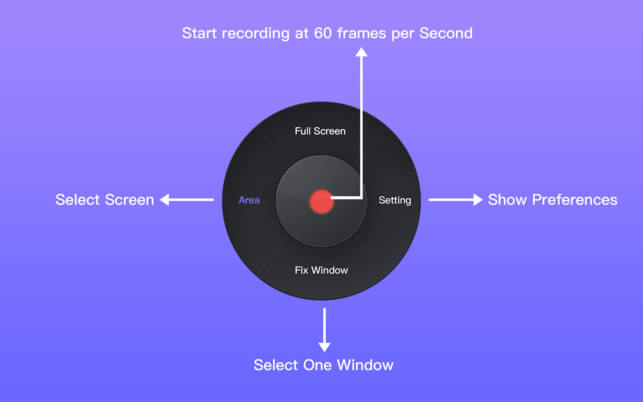
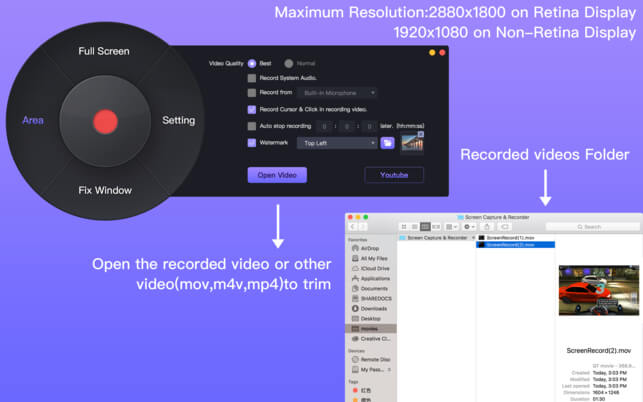

Screen Capture & Recorder is one perfect screen recording software, The core feature is recording exactly what you see with High-Resolution and High-FPS on your Mac, Record audio from Microphone & Computer Sound at the same time. Screen Capture & Recorder also support video editor to trim the recorded video or other video files like (mov, mp4, m4v).
Features:
- High - Resolution: The highest resolution is 2880 x 1800 on Retina Display / 2560 x 1440 on non-Retina Display.
- High - FPS: The highest frame almost 60 fps in recording.
- Record audio from Microphone & Computer Sound at the same time.
- 3 recording mode: Full Screen, Area selection, Fix Window.
- In Area selection mode, we can known exactly where we want to record in the whole recording time.
- Record the mouse tracking and double click for some special tutorial video recording.
- Auto stop recording in the schedule time.
- Load the recorded video to trim and export again.
- Auto check the disk space available when recording.
Version 2.5.2
- Add output formats mov, mp4, m4v when saving video.
- Add cancel function when exporting the edited video.
- Fix the bug that watermark that can not be loaded.
- Improve recording and exporting stability.
Frequently asked questions
How do I install the app?
Mount the image, drag the app into the "Applications" folder and launch it. If the system blocks the launch, allow it in "System Settings → Privacy & Security".
The app is damaged or won't launch
Reinstalling from a fresh image usually helps. Make sure your macOS version matches the one listed in the compatibility specs.
How do I update?
Download the new version from the site and install it over the current one — your settings will be preserved.
The download link doesn't work
Try a mirror or a download manager. For large files the browser often drops the connection.
How do I completely remove the app?
Use an uninstaller utility — it cleans up the service files that remain after moving the app to the trash.
VersionScreen Capture & Recorder 2.5.2
DeveloperXiTian Cai
CompatibilityOS X 10.10 or later, 64-bit processor
LanguageEnglish
IncludesK'ed by TNT




Information
Visitors in the group Guests cannot leave comments on this publication.
Choose a download source
Screen Capture & Recorder 2.5.2 · 5.6 MB