
Capture Gif 1.4.4
With Capture Gif, you can easily record your entire screen or just an area as an animated GIF image. Capture Gif has support for multiple displays, is Retina-ready, and always generates clear GIF images.
Features
- Record any connected display
- Optionally capture the mouse cursor
- Can record OS X menu bar area (or anywhere on the screen!)
- Set a target FPS value
- Set delay time and loop count
- Preview GIFs instantly
- Always produces clear GIFs
- Generates newer version of GIF format (GIF89a)
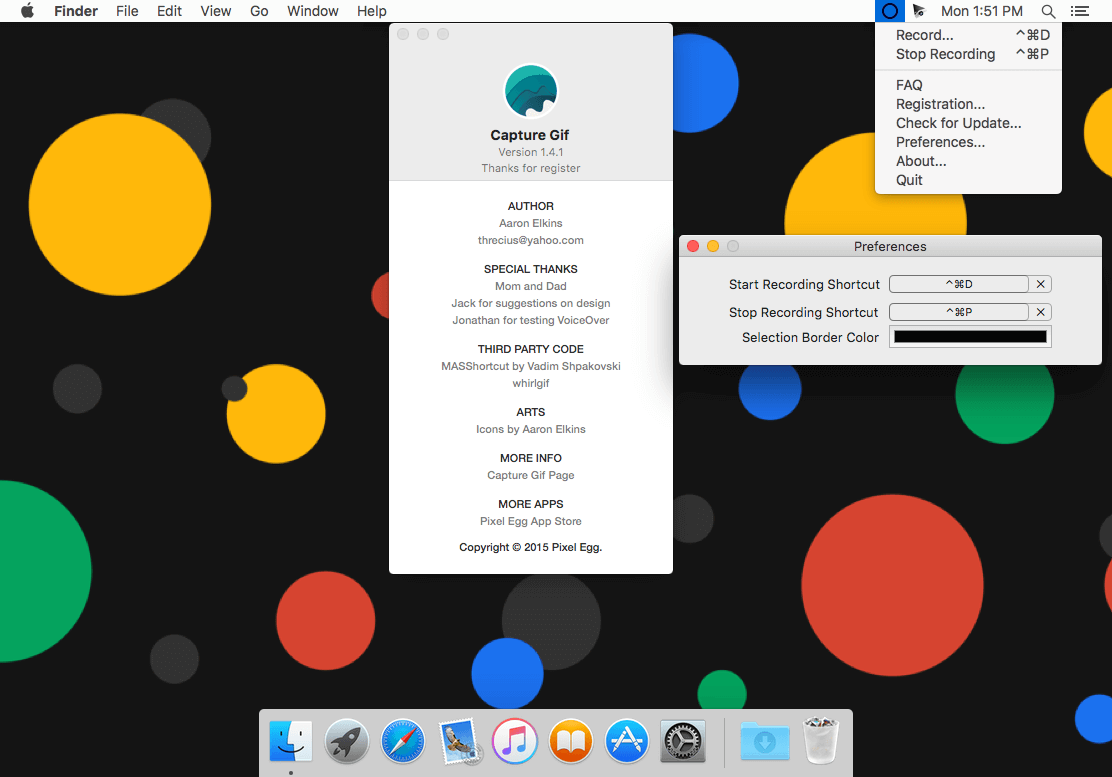
- Customization key shortcuts for recording
- VoiceOver supports for special people
WHAT’S NEW
Version 1.4.4:
- Remove [Stop Recording] butoon, and fix crop frame not works properly on external display on macOS Sierra
- Show setting windows on the main screen
Screenshots
Frequently asked questions
How do I install the app?
Mount the image, drag the app into the "Applications" folder and launch it. If the system blocks the launch, allow it in "System Settings → Privacy & Security".
The app is damaged or won't launch
Reinstalling from a fresh image usually helps. Make sure your macOS version matches the one listed in the compatibility specs.
How do I update?
Download the new version from the site and install it over the current one — your settings will be preserved.
The download link doesn't work
Try a mirror or a download manager. For large files the browser often drops the connection.
How do I completely remove the app?
Use an uninstaller utility — it cleans up the service files that remain after moving the app to the trash.
VersionCapture Gif 1.4.4
DeveloperPixel Egg Studio
CompatibilityOS X 10.7 or later, 64-bit processor
LanguageEnglish
IncludesPre-K'ed


Information
Visitors in the group Guests cannot leave comments on this publication.
Choose a download source
Capture Gif 1.4.4 · 4.24 MB