
CursorSense 1.3.2
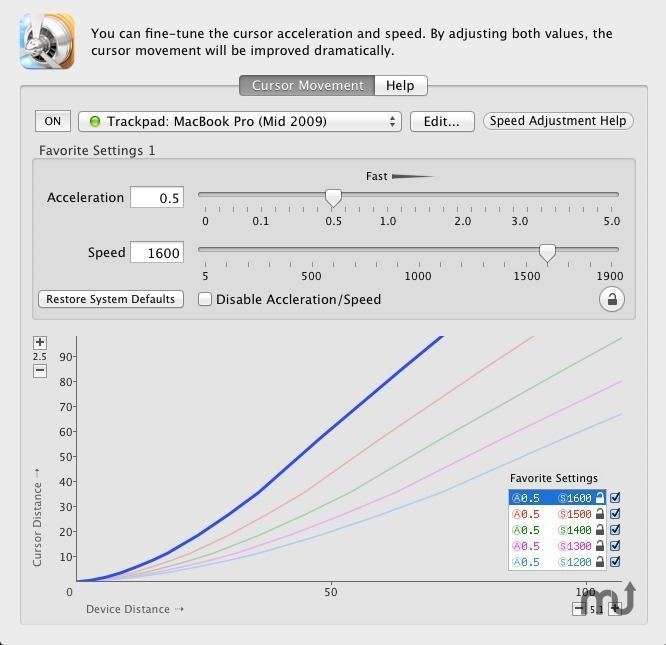
CursorSense is the only application that adjusts the cursor acceleration and sensitivity. By adjusting both values, you can move the cursor just like you move your hand. All mice and trackpads are supported.
- For Designers: Setting acceleration to 0 will make the cursor movement flat. This is good for drawing, but the cursor will move extremely slow. You will need to increase the sensitivity.
- For Windows Users: Many users who have a long experience in using Windows cannot get used to the cursor movement on the Mac. One reason might be that Windows uses sensitivity to adjust the cursor movement, and the Mac uses acceleration. Set acceleration to 0.01 and use sensitivity to adjust the cursor movement to approximate the cursor movement in Windows.
- For Gamers: Gaming mice have a high DPI/CPI and precise cursor control. Some gaming mice move the cursor extremely fast even with acceleration set to 0. You will get the ideal cursor movement by decreasing sensitivity in this case.
You can configure acceleration and sensitivity for each mouse / trackpad individually. No need to change the settings every time when replacing the mouse as you would have to in System Preferences.
WHAT’S NEW
Version 1.3.2:
- Increased the maximum value of the sensitivity to 1950.
- Problem solved where a device would not be recognized properly.
SCREENSHOTS
Frequently asked questions
How do I install the app?
Mount the image, drag the app into the "Applications" folder and launch it. If the system blocks the launch, allow it in "System Settings → Privacy & Security".
The app is damaged or won't launch
Reinstalling from a fresh image usually helps. Make sure your macOS version matches the one listed in the compatibility specs.
How do I update?
Download the new version from the site and install it over the current one — your settings will be preserved.
The download link doesn't work
Try a mirror or a download manager. For large files the browser often drops the connection.
How do I completely remove the app?
Use an uninstaller utility — it cleans up the service files that remain after moving the app to the trash.
VersionCursorSense 1.3.2
DeveloperPlentycom Systems
CompatibilityOS X 10.6 or later, 64-bit processor
LanguageEnglish
IncludesPre-K'ed





Information
Visitors in the group Guests cannot leave comments on this publication.
Choose a download source
CursorSense 1.3.2 · 4.82 MB